Web development, API testing, backend programming and frontend design all rely heavily on properly formatted web addresses and text strings.
Special characters, spaces and unique symbols often break standard URL structures. This causes broken links, failed data requests and runtime errors across projects.
Manually encoding or decoding URL strings takes extra time and raises the risk of typos. Even small mistakes can disrupt entire development workflows.
Choosing and mastering the Best URL encoder decoder for developers fixes these common issues. It delivers fast, error-free string conversion for all web development tasks.
This in-depth guide covers troubles from low-quality conversion tools, core advantages of professional encoders and decoders, key features, real development scenarios and a full step-by-step operation tutorial.
Common Issues Caused by Low-Quality URL Encoder Decoder Tools
Basic or poorly built URL conversion tools create a series of technical headaches for web developers working on personal projects or commercial platforms.
Incomplete character encoding triggers broken web links
Many simple tools fail to convert all special symbols, spaces and reserved characters. Partially encoded URLs will not load correctly on browsers or server systems.
Inaccurate decoding corrupts original text and data content
When decoding encoded strings, unreliable tools may alter letters, symbols or spacing. This ruins original data used for API parameters, query strings and page paths.
Inconsistent performance across different browsers and devices
Generic converters often produce different results on desktop and mobile browsers. This inconsistency makes cross-platform testing far more complicated.
Lack of support for standard web encoding protocols
Professional development follows strict encoding standards. Low-end tools do not follow official rules, leading to compatibility issues with servers and frameworks.
Slow response speed interrupts fast development cycles
Bulky or poorly optimized tools lag during batch conversion work. Every delay adds up and reduces overall productivity for busy development teams.
Core Advantages of Best URL Encoder Decoder for Developers
Switching to a professional Best URL encoder decoder for developers greatly streamlines daily coding, testing and web deployment work for all skill levels.
Full compliance with standard URL encoding rules
Top-tier tools follow universal web standards strictly. Every character conversion matches official requirements for browsers, web servers and programming frameworks.
Dual encode and decode functions in one unified interface
You can switch between encoding and decoding modes instantly. There is no need to use separate tools for different conversion directions during project work.
Complete support for all special and reserved characters
Spaces, punctuation marks, accents and unique symbols all get processed correctly. No character is left unmodified to cause link or data errors later on.
Stable identical output across all modern browsers
The tool maintains consistent conversion results no matter which browser or device you use. This removes uncertainty during cross-browser and cross-device testing.
Fast processing for single strings and batch content
Whether you convert one short URL or a long list of query strings, the tool finishes work in milliseconds. It fits perfectly into rapid development and debugging sessions.
Clean interface focused on developer practicality
Professional encoder decoder tools cut out unnecessary features. The layout keeps focus on input, output and function selection for efficient daily use.
Key Features to Select Best URL Encoder Decoder for Developers
When picking out the Best URL encoder decoder for developers for long-term use, verify these essential professional features one by one.
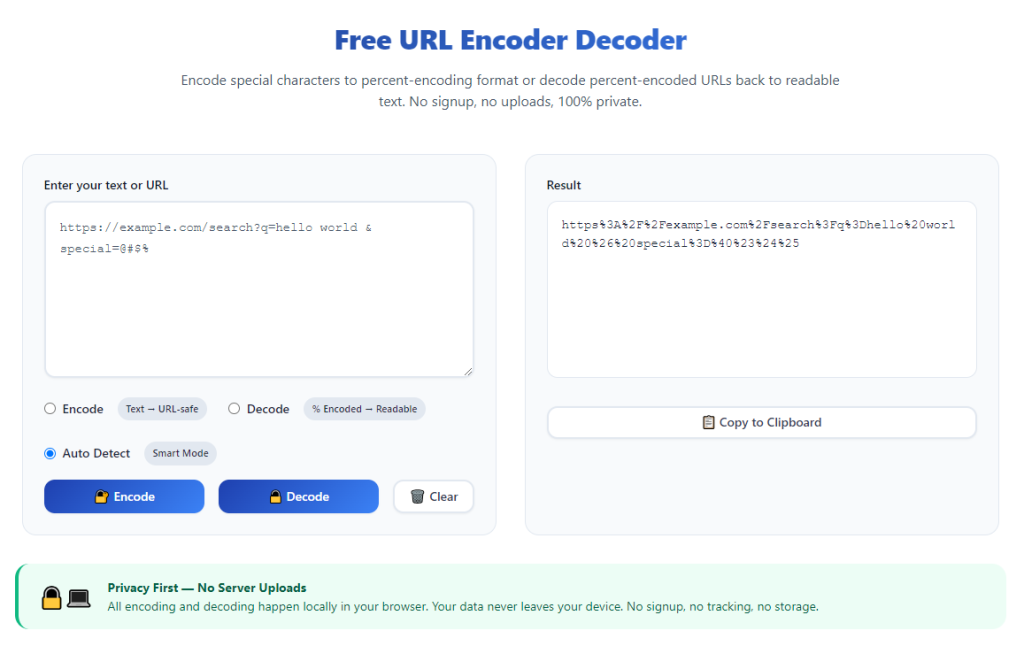
One-click toggle between encode and decode modes
A simple switch lets you change working modes quickly. Developers can move back and forth between converting raw text and restoring encoded strings seamlessly.
Full RFC standard compliance for web encoding
Industry-grade tools adhere to widely accepted web specifications. This ensures full compatibility with Apache, Nginx and all mainstream web server environments.
Large input area for long strings and batch content
Many development tasks require processing long query strings, form data or multiple URLs. A spacious input box supports large volumes of text without limitations.
Instant real-time conversion preview
Results appear right away as you paste or type content. You can check converted data instantly without clicking extra buttons to run calculations.
One-click copy function for converted results
A dedicated copy button lets you move finished strings directly to your clipboard. This speeds up pasting content into code editors, testing panels and configuration files.
Quick reset option for new conversion tasks
Clear all input and output content with a single click. You can start a new round of encoding or decoding without manually deleting old text.
Practical Development Scenarios for Professional URL Encoder Decoder
A fully functional Best URL encoder decoder for developers serves a wide range of common tasks across frontend, backend and full-stack development work.
Website link creation and static page path setup
When building page URLs for websites, special characters in page names need proper encoding. The tool ensures all internal and external links load without errors.
API testing and request parameter formatting
Most application programming interfaces use URL encoded query parameters. Accurate conversion guarantees data transmits correctly between client and server sides.
Form data processing for web applications
User input from web forms often includes spaces and symbols. Encoding this content follows web rules and prevents data loss during form submission.
Debugging broken links and corrupted web strings
When links fail to load or data returns garbled text, developers decode suspicious strings to find root causes. This speeds up troubleshooting and bug fixing.
Configuration file and script content adjustment
Many scripts and config files use encoded URL strings for path settings. Reliable conversion keeps project configurations stable across deployment environments.
Third-party service integration and plugin development
Connecting with external platforms often requires formatted web strings. A professional encoder decoder ensures smooth data exchange between different systems and plugins.
Step-by-Step Guide: Use Best URL Encoder Decoder for Developers
Follow this straightforward professional workflow to operate the Best URL encoder decoder for developers and get standard-compliant results every time.
Step 1: Prepare your original text or URL content
Copy the raw URL, query string or form text that you need to process. Double-check the content to avoid missing characters before conversion.
Separate multiple strings if you prefer to process them one at a time for easier result checking and management.
Step 2: Launch the professional URL conversion tool
Open the tool in your daily used browser. Wait for the full interface to load completely before pasting any content.
Locate the input field, mode toggle switch and result display area to get familiar with the layout quickly.
Step 3: Select your working mode: Encode or Decode
Choose encode mode if you need to convert raw text into standard URL format. Select decode mode to restore encoded strings back to original content.
Always confirm the selected mode first. Using the wrong function will ruin your web strings and create extra debugging work.
Step 4: Paste or type content into the input field
Paste your prepared URL or text directly into the input box. You can also manually type short strings for quick testing tasks.
Do not add extra line breaks or unnecessary symbols unless your development project specifically requires these elements.
Step 5: View real-time converted output
The tool will generate converted content instantly in the output section. Read through the result to confirm all characters are processed correctly.
Check special symbols and spaces closely, as these are the most common areas for conversion errors in low-quality tools.
Step 6: Copy finished results for development use
Click the built-in copy button to move the converted string to your clipboard. This function keeps your content intact without manual selection mistakes.
Paste the copied content into your code editor, testing tool, configuration file or live web project right away.
Step 7: Reset interface for next conversion task
Once you finish one set of conversion work, use the reset button to clear all input and output text.
The tool returns to its default state, ready for new encoding or decoding tasks in your ongoing development work.
Common Operating Mistakes to Avoid
Even with a reliable Best URL encoder decoder for developers, simple operational errors can lead to problematic web content and link failures.
Selecting the wrong encode or decode mode
Running decode on raw text or encode on already converted strings breaks URL structure. Always match the mode to your actual task requirements.
Leaving extra spaces and hidden characters in input content
Invisible symbols or extra spaces change conversion results. Clean up raw content before processing to keep URLs and data strings standard.
Forgetting to verify converted results before deployment
Always do a quick check on output content. Skipping verification may push faulty strings into live projects and cause runtime errors.
Processing overly long unbroken text in one batch
Extremely large blocks of text are hard to troubleshoot when issues appear. Split long content into smaller parts for easier management.
Reusing old converted content for new project tasks
Different projects follow different path and parameter rules. Never reuse old URL strings for unrelated development work.
Practical Tips to Optimize Tool Usage
These professional tips help you maximize efficiency while using theBest URL encoder decoder for developers in daily coding and testing routines.
- Bookmark the tool for one-click access, so you can launch it instantly during debugging, coding and API testing sessions.
- Stick to one main browser for this tool to keep conversion results fully consistent across all your development work.
- Process individual URLs or short query strings first during large project work to locate errors faster.
- Use the one-click copy feature every time to avoid manual text selection and accidental content loss.
- Create a quick test URL with common special characters regularly to confirm the tool runs with standard compliance.
- Clear input and output content after each task to prevent mixing old and new strings during continuous development work.
Final Thoughts
URL encoding and decoding is a fundamental daily task for every web developer, from beginners to experienced senior engineers.
Unreliable conversion tools and manual string editing bring link errors, data corruption and extra debugging work that slow down progress.
A well-selected Best URL encoder decoder for developers eliminates these troubles. It delivers standard, fast and accurate conversion for all web-related strings.
With dual working modes, full character support and cross-browser stability, this tool fits seamlessly into every stage of web development and testing.
By following the step-by-step guide and practical tips above, you can handle all URL conversion tasks confidently and keep your web projects stable and error-free.
After learning the operation method, click the link below to enter the tool page for immediate use.