Animated GIFs dominate modern digital content across social media, business marketing, educational presentations, blog visuals, and personal online communication. Their lightweight file size, universal device compatibility, and seamless loop functionality make them far more flexible than static images and easier to share than full video files. A well-made high-quality GIF adds polish, movement, and engagement to any visual project, helping content stand out in crowded feeds and formal presentations alike. However, most free online GIF makers produce subpar results: pixelated frames, choppy motion, faded colors, heavy compression, and distorted details that turn professional ideas into amateur-looking content.
Casual editing tools prioritize small file sizes over visual fidelity, stripping frame data, lowering resolution, and disrupting smooth playback to speed up processing. For content creators, small business marketers, students, and designers, these low-quality outputs are often unusable for client work, official submissions, branded content, and public posts. This is why investing time to master the best GIF maker for high quality animation is essential for anyone creating custom animated content.
The best GIF maker for high quality animation is engineered specifically to preserve resolution, frame smoothness, color accuracy, and visual detail, delivering studio-grade animations without professional design software. In this comprehensive 1800+ word beginner-to-pro guide, we will cover why regular GIF makers compromise quality, essential premium features, real-world use cases, a step-by-step professional workflow, common quality-killing mistakes, and expert tricks to craft perfect high-definition GIF animations every time.
Why Standard GIF Makers Ruin Animation Quality
To fully grasp the unique value of the best GIF maker for high quality animation, you first need to understand the critical flaws built into generic free GIF creation tools. These platforms are optimized for speed and file compression, not visual accuracy, which leads to consistent quality degradation.
First, generic tools use aggressive lossy compression by default. GIF file formats already have limited color palettes, and basic makers compress frame data further to shrink file sizes. This compression washes out vibrant colors, creates blocky pixelation, and eliminates subtle gradient details that make animations look smooth and professional. Simple reaction GIFs might survive this compression, but branded marketing animations, instructional loops, and detailed design visuals lose all their refinement.
Second, standard tools cap frame rate and resolution limits. Most free platforms lock exports to low standard resolutions and low frame rates, resulting in choppy, stuttering playback. Even if you upload high-definition source videos or crisp image sequences, generic makers downgrade the source material to fit their default low-quality parameters, leaving you with blurry, low-resolution animations.
Third, basic GIF makers lack precise frame timing control. Smooth animation relies on consistent frame duration across every frame. Budget tools apply automatic, uneven timing that creates jerky movement, awkward pauses, and unnatural looping. These subtle inconsistencies make animations feel unpolished and unprofessional to viewers.
Finally, many casual tools distort aspect ratios and crop edges automatically. To fit generic preset dimensions, they stretch, squash, or trim parts of your original media, ruining composition and cutting off critical visual details. Thebest GIF maker for high quality animation eliminates all these issues with professional-grade rendering technology built exclusively for smooth, crisp, true-to-source animation outputs.
Core Features of the Best GIF Maker for High Quality Animation
A premium best GIF maker for high quality animation includes specialized features you will never find in standard free tools. These quality-focused functionalities work together to deliver smooth, sharp, color-accurate animations suitable for professional and public use.
Lossless high-resolution rendering: The flagship feature of this tool is its ability to preserve original source resolution. Unlike basic compress-heavy tools, it renders every frame with full pixel integrity, ensuring sharp edges, clear text, and detailed visuals in every exported GIF.
Precision frame rate control: Users can manually adjust frames per second to fine-tune animation fluidity. Higher frame rates deliver ultra-smooth motion for cinematic loops, while adjusted lower rates create intentional stylized movement without stuttering.
Advanced color preservation technology: Top-tier GIF makers retain rich, accurate color palettes, reducing banding and color fading common in low-quality exports. Branded colors, artistic gradients, and vibrant visual elements stay true to the original source media.
Custom dimension and aspect ratio locking: You can set custom width and height values and lock aspect ratios to prevent stretching or cropping. This ensures every animation maintains perfect composition with zero visual distortion.
Seamless loop optimization: Professional loop matching eliminates jarring jump cuts between the final frame and the first frame. This creates infinite, fluid loops that look continuous and polished for social media and presentation use.
Frame-by-frame editing tools: Creators can trim, delete, duplicate, and adjust individual frames to remove awkward pauses, fix stuttering motion, and refine every detail of the animation for flawless results.
Balanced quality and file size optimization: The tool offers smart compression that reduces file size slightly for easy sharing without sacrificing visual clarity, solving the common conflict between high quality and large file sizes.
Key Use Cases for High-Quality GIF Animations
Using the best GIF maker for high quality animation is essential for any scenario where animation clarity and professionalism impact audience perception or project quality. High-resolution, smooth GIFs elevate every type of digital content across personal, academic, and professional fields.
Brand marketing and social media content: Marketers create branded product demos, service animations, and promotional loops for social posts, email newsletters, and website banners. High-quality animations boost brand credibility, increase viewer engagement, and outperform blurry generic stock GIFs.
Educational and instructional content: Teachers and tutorial creators design step-by-step process animations, scientific diagram loops, and skill guides. Smooth, clear GIFs make complex concepts easier to follow, with no blurry text or distorted visuals to confuse learners.
Professional presentations and reports: Business professionals add custom animated charts, data visualizations, and process flows to slides and reports. Crisp high-quality GIFs make presentations dynamic and memorable without appearing unprofessional or low-budget.
Creative design and portfolio work: Designers and artists craft custom animation loops, artwork previews, and motion graphics for client portfolios. Lossless high-quality rendering ensures their creative work is displayed exactly as intended.
Personal premium content creation: Casual creators make polished reaction GIFs, meme loops, and memory animations for sharing with communities and friends, avoiding the pixelated, low-quality look of basic tool exports.
Why Animation Quality Directly Impacts Content Performance
Many amateur creators overlook how much GIF quality impacts audience trust and content performance. Blurry, choppy animations signal unpolished work, whether you are building a brand, submitting an academic project, or sharing creative content online. Low-quality GIFs often lead to reduced engagement, unprofessional first impressions, and even rejected formal projects.
Smooth, high-resolution animations created with the best GIF maker for high quality animation do the exact opposite. They capture viewer attention, convey professionalism, and ensure every visual detail is communicated clearly. For business owners and creators, this small upgrade in file quality translates to better audience retention, stronger brand perception, and more professional deliverables. Instead of reworking blurry exports or settling for subpar results, using a quality-focused GIF maker ensures every animation you create is ready for public, client, or academic use on the first try.
Step-by-Step Tutorial: Use the Best GIF Maker for High Quality Animation
Follow this professional, beginner-friendly workflow to produce studio-grade smooth, high-resolution animations with the best GIF maker for high quality animation. Every step is optimized for maximum clarity, smoothness, and color accuracy.
Step 1: Open the High-Quality GIF Animation Tool
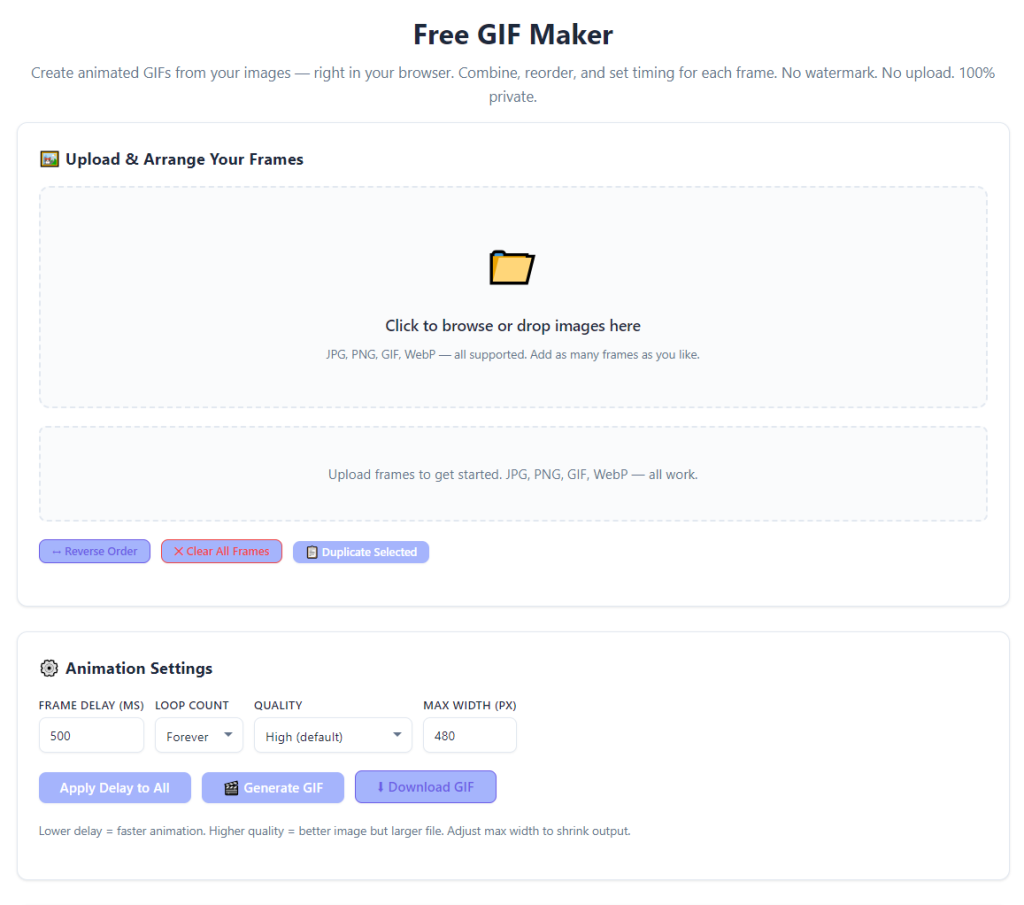
Launch the professional GIF maker designed for high-resolution animation output. Confirm the tool offers custom frame rate, resolution, and color settings—key features that separate premium quality tools from basic free alternatives.
Step 2: Import High-Quality Source Media
Upload your source content, whether it is a sequence of high-resolution images or a clear short video clip. Always use uncompressed, original source files for best results, as pre-compressed media cannot be restored to full quality. The best GIF maker for high quality animation supports all high-definition media inputs without automatic quality downgrades.
Step 3: Trim and Refine Raw Footage
Trim video clips to isolate the exact segment you want to animate, or delete redundant image frames from your sequence. Removing unnecessary frames streamlines the animation, reduces file size, and eliminates awkward, lagging moments in playback.
Step 4: Adjust Resolution and Frame Rate for Smoothness
Set your desired export resolution to match your usage needs, prioritizing high-definition settings for public and professional content. Adjust the frame rate to create smooth motion; higher frame rates deliver fluid animation, while moderate settings balance quality and file size perfectly.
Step 5: Calibrate Loop and Color Settings
Enable seamless loop optimization to eliminate jarring transition gaps between the last and first frame. Double-check color correction settings to ensure saturation, brightness, and contrast match your original source media, preventing faded or oversaturated exports.
Step 6: Preview and Fine-Tune Animation
Use the real-time preview feature to test loop smoothness, frame clarity, and color accuracy. Make small adjustments to frame timing or trim awkward frames to eliminate stuttering, pauses, or visual inconsistencies before export.
Step 7: Export High-Quality GIF File
Select the premium lossless export mode to avoid aggressive compression. Download your finished animation, which will feature crisp details, smooth looping, accurate colors, and zero pixelation—ready for sharing, posting, printing, or embedding in professional projects.
Common Mistakes That Ruin GIF Animation Quality
Even with the best GIF maker for high quality animation, simple user errors can compromise your final output. Avoid these frequent mistakes to consistently produce flawless professional animations.
Using compressed source media: Low-quality, pre-compressed videos and images limit final export quality. Always start with original HD source files for maximum clarity.
Overlooking frame rate consistency: Mixed frame durations create choppy, unprofessional motion. Keep frame timing uniform across the entire animation sequence.
Enabling heavy compression modes: Default fast-compression settings sacrifice detail for smaller file sizes. Always select lossless or high-quality presets for professional animations.
Skipping loop preview checks: Unchecked loop transitions often create visible jump cuts that ruin the polished feel of continuous animations.
Expert Pro Tips for Premium High-Quality GIF Animations
Use these professional tips to maximize the performance of the best GIF maker for high quality animation and create studio-level animations for every project.
- Match resolution to your platform: Use higher resolutions for website and portfolio content, and optimized balanced resolutions for social media to keep quality high while maintaining fast load speeds.
- Keep frame sequences concise: Short, tight animations reduce file bloat and create smoother looping without sacrificing visual detail.
- Fine-tune colors before export: Minor brightness and contrast adjustments can fix washed-out visuals and make high-quality GIFs pop on all screen types.
- Always preview on multiple screens: Check your animation on both mobile and desktop to ensure consistent smoothness and clarity across all devices.
Final Thoughts
Low-quality, choppy, pixelated GIFs hold back creative work, brand content, and academic projects for millions of creators every day. Generic GIF makers prioritize speed and small file sizes over the smooth, crisp detail that makes animations engaging and professional. For anyone serious about creating polished digital content, settling for subpar GIF quality limits audience engagement and undermines overall project quality.
The best GIF maker for high quality animation solves every common quality issue plaguing standard GIF creation tools. With lossless HD rendering, precise frame control, accurate color preservation, seamless looping, and custom resolution settings, it delivers consistent, professional-grade animations for social media, marketing, education, design, and personal use. It eliminates pixelation, stuttering motion, color fading, and distorted composition, letting creators turn ordinary media into extraordinary smooth animations.
If you want your animated content to look polished, professional, and eye-catching, skip basic compression-heavy GIF tools. Use the best GIF maker for high quality animation to unlock full creative control, preserve every visual detail, and produce flawless high-quality animations for every project.
After learning the operation method, click the link below to enter the tool page for immediate use.