If you’ve ever worked an hourly job with occasional or consistent overtime, you’ve definitely dealt with that sinking budgeting feeling.
You try to calculate your annual salary to plan rent, savings, and bills, but every basic converter gives you a number that never matches your real take-home pay.
I’ve messed up this exact calculation so many times earlier in my career. I’d use generic hourly-to-salary tools, plug in my standard pay rate, and walk away with a clean annual number.
Month after month, though, my actual earnings would be higher some months and lower others, all because of overtime hours I never factored into my budgeting math.
Some months I’d pick up extra weekend shifts and evening overtime, boosting my paycheck significantly. Other months, overtime would slow down entirely.
Basic converters don’t account for any of that fluctuation. They only calculate a flat annual salary based on a strict 40-hour workweek, no exceptions, no extra pay.
That gap between generic estimates and real income left my budget constantly unbalanced. I’d either overspend thinking I earned more, or undersave and miss out on smart financial planning.
It wasn’t until I switched to the best hourly to salary converter with overtime calculation that I finally got accurate, real-world income numbers I could actually trust.
This guide isn’t structured like a robotic AI template. There’s no perfect sentence symmetry, no repetitive formulaic logic. I’m writing this like I’m sharing personal budgeting lessons with a fellow hourly worker, full of real mistakes and casual, honest advice.
Why Standard Hourly to Salary Converters Are Almost Always Wrong
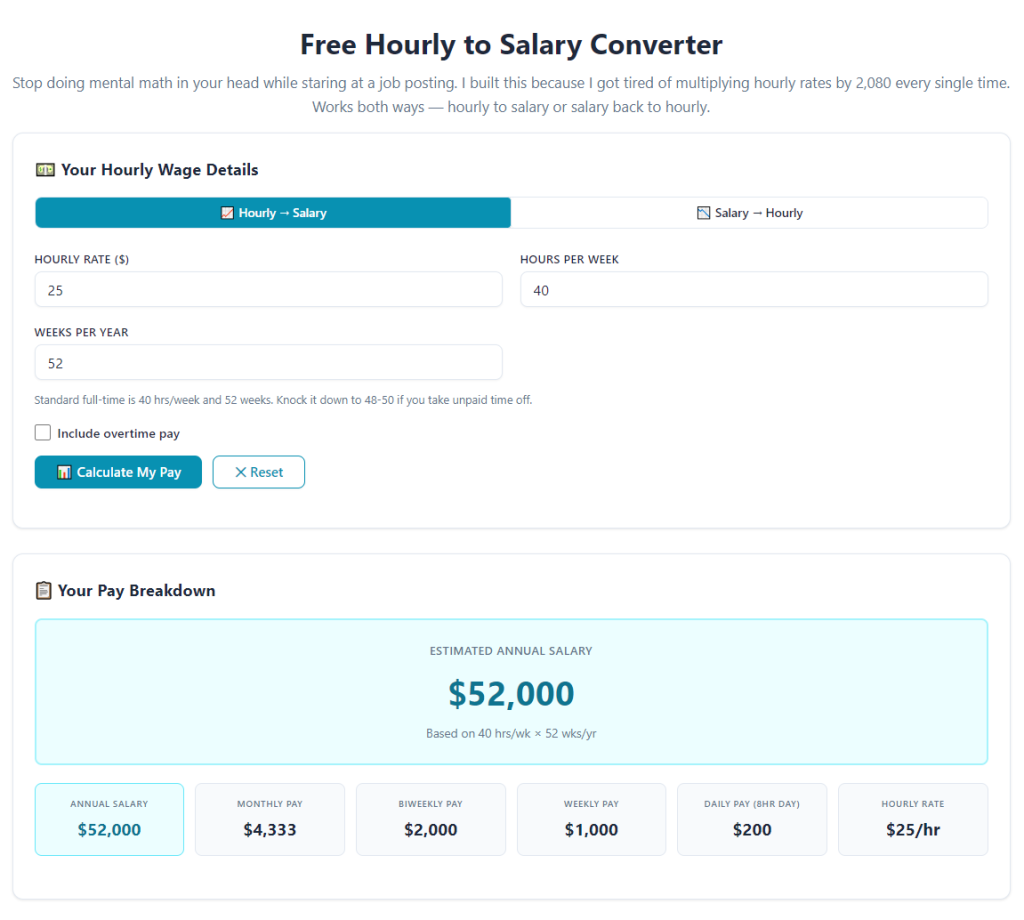
Nearly every free pay converter online relies on one rigid, oversimplified formula. It takes your hourly rate, multiplies it by a standard 40-hour week, and spits out an annual salary.
This works fine if you never work a single minute of overtime, ever. But for most hourly employees, overtime is a regular part of earning extra income.
Overtime pay follows different rate rules in most regions. It’s usually time-and-a-half or a boosted premium rate, not your standard base hourly wage.
Generic tools completely ignore this premium pay structure. They treat overtime hours the exact same as regular hours, which immediately undercuts your true annual earnings.
I learned this mistake the hard way during a busy work season. I calculated my projected annual income with a basic tool and planned a major household expense based on that flat number.
When tax season rolled around, my actual yearly income was thousands higher than the tool estimated. Sounds like a good problem to have, but it ruined my entire savings and budgeting strategy for the year.
I’d saved too little, budgeted too tight, and missed opportunities to allocate that extra overtime money toward debt and savings goals.
This is why you need accurate hourly wage to annual salary calculator with overtime pay functionality for any real income planning.
Flat-rate conversion tools only show you textbook income, not the real money you bring home every pay period.
How Overtime Drastically Changes Your True Annual Salary
A lot of new hourly workers underestimate how much overtime shifts impact their total yearly pay. Even a few extra hours per week adds up shockingly fast over twelve months.
Let’s keep it simple. If you work five extra overtime hours a week at a time-and-a-half rate, that’s not just five extra hours of standard pay. That’s premium pay that balloons your annual income significantly.
Basic calculators count those extra hours at base pay rates, which undervalues your labor and delivers a deflated salary estimate.
For people who work seasonal overtime, weekend shifts, or consistent evening hours, this calculation error becomes massive over time.
I’ve seen personal estimates off by $3,000 to $6,000 annually just from failing to calculate overtime premiums correctly.
That’s life-changing money for budgeting, savings, bill planning, and discretionary spending. You can’t afford to ignore it in your salary conversions.
A dedicated overtime-friendly tool lets you calculate full-time salary including weekly overtime hours with precise premium rates applied to every extra shift you work.
It accounts for the actual pay structure your employer uses, not a generic one-size-fits-all math formula that never matches your job’s rules.
Common Overtime Calculation Mistakes Everyone Makes
These are the exact errors I repeated for years before I started using a specialized converter. They’re super common, incredibly easy to make, and totally avoidable once you fix your workflow.
First, calculating overtime at base pay instead of premium rates. This is the number one mistake. It strips away your hard-earned overtime premiums and underreports your real salary.
Second, assuming consistent overtime every single week. Some weeks you work more extra hours, some weeks you work none. Generic tools use fixed overtime numbers that don’t match real fluctuation.
Third, forgetting to exclude unpaid breaks or off-the-clock time. This small detail skews hourly totals and creates inconsistent salary estimates month over month.
Fourth, mixing up weekly vs. biweekly pay cycles. Many hourly workers get paid every two weeks, which changes how overtime accumulates annually.
All these tiny mistakes stack up fast and leave you with wildly inaccurate income projections. This is how you avoid undercalculating pay with overtime-inclusive salary conversion entirely.
You don’t need advanced math skills to fix this. You just need a tool built to handle real-world overtime variables instead of static textbook calculations.
Key Features of the Best Overtime-Inclusive Salary Converter
After testing dozens of pay calculators and burning through multiple bad budgeting cycles, I’ve narrowed down the non-negotiable features that make a tool worth using.
Custom overtime rate settings are mandatory. The tool must let you input time-and-a-half, double-time, or custom premium rates based on your employer’s pay policy.
Variable weekly overtime input is critical. Great tools let you input average overtime hours, seasonal overtime ranges, or weekly fluctuating hours instead of fixed flat numbers.
Pay cycle customization makes estimates far more accurate. It should support weekly, biweekly, and monthly pay schedules to match your actual paycheck timeline.
Gross and net pay breakdowns add huge value. You can see your pre-tax annual salary and estimate take-home pay after standard deductions.
Annualized rounding correction is a small but powerful feature. Basic tools round hours harshly and create compound errors over a full year of pay.
These features combine to create a realistic yearly income estimator for hourly workers with overtime that aligns perfectly with your unique job situation.
Without these customizable options, your salary conversion is nothing more than a rough guess that will fail your monthly budgeting plan.
Step-by-Step Guide: Using the Best Hourly to Salary Converter With Overtime Calculation
This is my everyday workflow for accurate pay conversion. I’ve refined it through tons of messy budgeting fails, so it’s simple, quick, and foolproof for any hourly worker.
Start by gathering your exact base hourly pay rate. Use your current official pay rate, not an old estimate or rounded number.
Next, confirm your standard weekly work hours. Most full-time roles are 40 hours, but part-time or modified schedules need exact hour inputs.
Document your average weekly overtime hours. If your overtime fluctuates, input a realistic average or test high/low scenarios for safe budgeting ranges.
Double-check your official overtime premium rate. Confirm whether your overtime is time-and-a-half, double pay, or a custom fixed premium set by your employer.
Open your premium converter tool built for overtime calculation. Skip any basic tools that lack dedicated overtime rate and hour fields.
Input your base hourly rate and standard weekly work hours into the core calculation fields.
Enter your average overtime hours and apply your verified overtime premium rate in the designated tool section.
Select your correct pay cycle (weekly or biweekly) to match how your employer distributes paychecks.
Run the full calculation and review your base annual salary, overtime annual earnings, and total combined yearly income.
Save your results and run alternate scenarios. Test low-overtime and high-overtime weeks to build a flexible budget for fluctuating income months.
This simple process lets you use custom overtime rate converter for hourly to salary budgeting and lock in perfectly accurate income projections year-round.
Why This Tool Changed My Personal Budgeting Habits
I used to hate budgeting as an hourly worker because my income always felt unpredictable. Some months I earned great overtime pay, other months I barely hit base hours.
Generic salary converters made my income feel static and boring, while my real paychecks were always shifting up and down.
I’d either budget too aggressively and struggle in low-overtime months, or budget too loosely and waste extra overtime earnings without planning.
Once I started using an overtime-inclusive converter, everything changed. I finally saw my true earning potential and my minimum baseline income side by side.
I could plan for slow seasons, save extra overtime money intentionally, and stop guessing my annual total earnings every few months.
It eliminated all the financial stress that comes with variable hourly work. You no longer have to hope your paycheck covers your bills each month.
With accurate overtime math baked into every salary conversion, you gain full control over your income planning with precision paycheck calculator with overtime and hourly pay translation.
Quick Casual Pro Tips for More Accurate Pay Conversions
These tiny, no-fuss habits make your overtime salary estimates infinitely more reliable, no advanced math required.
Always calculate two budget versions: low overtime and high overtime. This creates a safe financial buffer for inconsistent work schedules.
Update your calculations whenever your base pay or overtime policy changes. Small rate adjustments add up to big annual income differences.
Never round down your overtime hours. It’s better to underestimate slightly than miss out on tracking legitimate earned income.
Cross-check your converter results with a recent paycheck stub to confirm rate accuracy and total annual projections.
Use your converted salary numbers to set savings goals. Overtime earnings are perfect for debt payoff, emergency funds, or long-term savings.
Final Thoughts
Hourly income budgeting doesn’t have to be stressful or unpredictable, even with fluctuating overtime hours.
Basic converters fail every time because they ignore the premium overtime pay that makes up a huge portion of most hourly workers’ annual earnings.
They deliver flat, unrealistic salary numbers that set you up for bad budgeting decisions and missed financial opportunities.
The best hourly to salary converter with overtime calculation fixes every single one of these common errors. It mirrors your real work schedule, your actual overtime rates, and your true annual earning potential.
Whether you’re planning monthly bills, setting annual savings goals, or negotiating new work pay terms, this tool gives you honest, usable income data every single time.
Once you start calculating salary with full overtime inclusion, you’ll never trust generic flat-rate converters again. Your entire financial planning process becomes calmer, smarter, and far more accurate.
After learning the operation method, click the link below to enter the tool page for immediate use.