Creating polished visual content for social feeds, blog posts, product listings, and personal portfolios relies on simple orientation edits. Rotating misaligned shots or flipping mirrored graphics is one of the most frequent photo adjustments every creator needs to make.
Most basic online photo editors ruin this simple workflow in two major ways. They stamp large, unremovable watermarks across every exported file, or they compress raw visuals into blurry, low-resolution copies after rotation and flipping actions.
Many creators waste extra time editing out watermarks manually or reuploading original high-res files multiple times to preserve sharpness. These repetitive tasks cut into content creation hours and create unnecessary frustration for casual hobbyists and professional marketers alike.
A reliable best image rotate & flip tool no watermark high quality eliminates both of these common pain points at once. It delivers full orientation control, zero branded overlays, and lossless high-resolution exports for every single image you process.
This comprehensive user guide breaks down the flaws of generic photo editors, core advantages of watermark-free high-quality rotation tools, must-have functional features, real-world creator use cases, and a beginner-friendly step-by-step workflow to adjust any visual perfectly.
Why Standard Photo Editors Fail Rotate & Flip Tasks
Regular free image adjustment platforms come with built-in limitations that degrade your visuals and slow down your content schedule. Every downside ties back to missing the two critical traits: no watermarks and consistent high-resolution output.
Permanent editor watermarks on all exports
Nearly every free online photo tool locks clean output behind paid subscriptions. Even basic rotate and flip edits add semi-transparent logos, text tags, or brand footers onto every saved image.
These marks look unprofessional on commercial product shots, personal artwork, and branded social media graphics. Cropping the watermark out often cuts off important visual details from the frame.
Severe quality loss after orientation edits
Most lightweight editors apply heavy compression each time you rotate or flip a picture. Original sharp details fade, text becomes fuzzy, and product textures turn grainy after one simple adjustment.
For print-ready graphics, HD social reels, and high-detail portfolio shots, minor quality degradation ruins the entire visual presentation.
Mandatory account sign-ups for high-res downloads
To unlock watermark-free or lossless exports, generic editors force users to register accounts, submit email addresses, or confirm personal information. This adds extra steps for quick, one-off image fixes.
Limited orientation customization options
Basic rotation tools only offer 90-degree left or right turns with no fine-tuning. They lack horizontal flip, vertical flip, and custom angle rotation for slightly tilted candid photos.
Slow processing for large image files
High-resolution raw photos, PNG transparent graphics, and big product banner files lag heavily on standard editors. Batch rotation features are almost always restricted to premium paying users only.
Core Benefits of Best Image Rotate & Flip Tool No Watermark High Quality
Integrating a dedicated best image rotate & flip tool no watermark high quality into your content workflow streamlines editing and preserves full visual integrity for every project type.
Zero watermarks on all exported images
No hidden logos, text overlays, or footer branding appear on any rotated or flipped file. Every output is completely blank and ready to use for personal, commercial, or client-facing content without extra cleanup edits.
100% lossless high-resolution output
The tool retains your original image pixel density, color depth, and sharpness through every rotation and flip operation. No compression artifacts, blurriness, or washed-out tones appear after adjustments.
Full suite of orientation adjustment controls
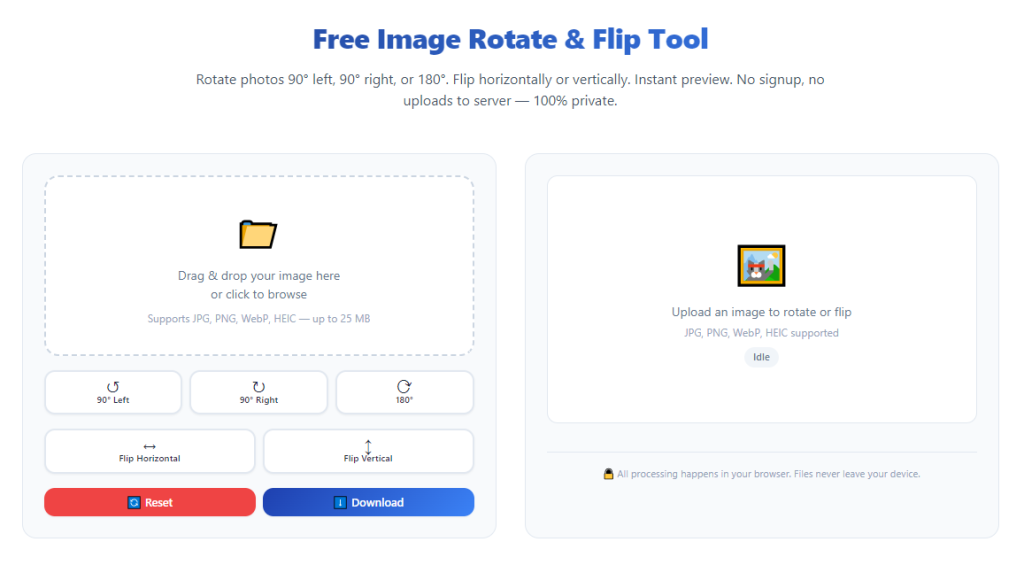
You gain access to every standard orientation function: 90-degree clockwise rotation, 90-degree counterclockwise rotation, 180-degree spin, horizontal flip, vertical flip, and custom fine-angle tilt correction for uneven shots.
No mandatory login or registration barriers
You can upload, edit, adjust, and download images immediately without filling out sign-up forms, verifying emails, or creating permanent user accounts. Quick one-time edits take just seconds to complete.
Support for all mainstream image formats
The tool processes JPG, PNG, WEBP, TIFF, and transparent graphic files equally well. It maintains transparency layers on PNG assets during flip and rotate actions without distortion.
Fast single and batch image processing
Whether you edit one single photo or dozens of product visuals at once, processing speeds stay consistent. Batch rotation cuts down repetitive orientation work for large content libraries drastically.
Lightweight, distraction-free editing interface
The layout focuses solely on orientation tools without bloated extra filters, templates, or ad pop-ups. You avoid visual clutter and complete simple rotate-flip tasks far faster.
Must-Have Features to Identify a Top Best Image Rotate & Flip Tool No Watermark High Quality
Not every watermark-free photo rotation editor delivers consistent high-quality results. When comparing tools, prioritize these creator-focused core features to pick the ideal best image rotate & flip tool no watermark high quality.
Lossless rendering engine
This feature guarantees no pixel compression during orientation edits. Raw high-res product photos, digital art, and print graphics retain every original fine detail after rotation or flipping.
Full flip and rotation toolkit
Look for all six core adjustment modes: clockwise rotate, counterclockwise rotate, 180 full spin, horizontal mirror flip, vertical mirror flip, and custom free-angle sliders for minor tilt fixes.
Unlimited watermark-free downloads
There should be no daily download caps, no hidden paywalls, and no quality tiers. Every single edited image exports without branded overlays regardless of file size or resolution.
Batch image upload and bulk processing
For creators managing large content sets, batch support lets you upload multiple photos, apply identical rotate or flip settings to all files, and export a full folder of clean high-quality visuals in one session.
Format retention and transparent layer support
PNG files with clear backgrounds must keep transparency intact after flipping or rotating. The tool should never fill blank transparent space with solid white blocks automatically.
Custom output resolution controls
You can lock your preferred pixel dimensions, DPI settings, and quality percentage before exporting. This lets you match output specs to social media, print, blog, or marketplace listing requirements.
Quick drag-and-drop upload functionality
Skip slow file browser navigation. Drag any image file directly into the editor workspace to start orientation adjustments instantly without extra clicking.
Mobile and desktop cross-device compatibility
The tool runs smoothly on laptop browsers, tablet screens, and mobile phone displays. You can fix misaligned photos on the go without sacrificing high-res output or triggering watermarks.
Common Real-World Use Cases for a Watermark-Free High-Quality Rotate & Flip Tool
A versatile best image rotate & flip tool no watermark high quality fits every visual content niche, from hobby photography to full-time commercial marketing and graphic design work.
E-commerce product listing photo editing
Online sellers frequently receive product shots taken at uneven angles or mirrored incorrectly. Rotating and flipping product visuals ensures consistent framing across store catalogs, with crisp watermark-free high-res images ready for marketplace uploads.
Blog and website featured image optimization
Bloggers often capture candid vertical or sideways photos during content shoots. Fast orientation fixes create properly framed header graphics and inline post images without blurriness or distracting editor watermarks.
Social media content creation (Reels, feed posts, static carousels)
Content creators adjust mirror selfies, landscape travel shots, and short graphic banners for platform feeds. Lossless rotation preserves visual sharpness for algorithm-friendly high-quality social assets.
Digital art and illustration polishing
Artists design hand-drawn graphics, logos, and printable art that require mirror flips for symmetrical design work. Watermark-free exports let creators share finished high-res artwork on portfolios without brand overlay marks.
Printable graphic and flyer prep
Print projects demand uncompressed high-resolution visuals. Rotating template layouts or flipping design elements with this tool avoids quality loss that would create blurry physical print copies.
Personal photography and memory album curation
Casual photographers fix tilted vacation shots, family portraits, and event snapshots. Clean, unwatermarked exports save polished photos for digital albums, prints, and personal social sharing.
Guest content and collaborative team asset editing
Marketing teams with multiple contributors need uniform image adjustment tools. No sign-up requirements let every team member edit visuals without shared accounts, and all outputs stay watermark-free and high resolution.
Old archived photo refresh and repurposing
Creators rework years-old stored photos for new content campaigns. Rotating and flipping archived shots with lossless rendering revitalizes old visuals without adding permanent editor watermarks.
Step-by-Step Complete Guide: Use Best Image Rotate & Flip Tool No Watermark High Quality
Follow this simple, actionable workflow to adjust any visual perfectly, retain maximum quality, and export fully clean images with zero watermarks.
Step 1: Organize your source image files
Gather all photos, graphics, or product shots you plan to adjust. Separate single one-off edits from bulk batches if you need consistent rotation or flip settings across multiple files.
Double-check your original source files to confirm they are saved in full high resolution before uploading into the editor workspace.
Step 2: Launch the watermark-free high-quality rotate & flip tool
Open the tool inside your device browser. The platform loads instantly with no mandatory login pop-ups, email verification prompts, or subscription upgrade banners blocking the main editing area.
Take a quick scan of the control panel to locate rotation buttons, flip toggles, batch upload zone, and resolution output settings before importing your visuals.
Step 3: Upload images via drag-and-drop or file selection
Drag single or multiple image files directly into the upload zone, or click the file upload button to select assets from your device storage. The tool accepts all standard graphic formats without file size restrictions for high-res shots.
Wait one to two seconds for each visual to render fully in the preview window, confirming all original sharpness and transparency layers load correctly.
Step 4: Select your desired rotation or flip adjustment
Pick the orientation edit matching your content needs:
- Clockwise or counterclockwise 90-degree rotation for sideways vertical/horizontal photos
- 180-degree full spin for upside-down captured shots
- Horizontal flip to mirror selfies, logos, and symmetrical design elements
- Vertical flip for inverted graphic layouts
- Custom angle slider to gently straighten slightly tilted candid images
Preview the adjusted visual in real time to confirm framing aligns with your posting, print, or portfolio goals before locking the edit.
Step 5: Tweak high-quality output resolution settings
Open the export configuration panel to adjust DPI, pixel dimensions, and compression quality sliders. Max out quality percentage values to activate full lossless rendering for professional or print-ready files.
If working on social media content, match resolution presets to platform standard dimensions to skip extra resizing work after rotation and flipping.
Step 6: Process single image or batch export
For individual visuals: Click the single export button to generate your finished photo.
For bulk batches: Apply identical rotate/flip settings to all uploaded files, then trigger batch processing to render a full set of adjusted high-res images at once.
No hidden watermark layers embed into the rendered files during processing, regardless of image count or file resolution size.
Step 7: Download clean watermark-free high-quality visuals
Once processing completes, click the download link for single images or the bulk folder download option for batch edits. Save the finished files directly to your device storage.
Store the original unedited source photos separately so you can rework orientation settings later without reuploading raw high-res assets again.
Step 8: Review exported visuals for quality confirmation
Open your newly downloaded images to double-check sharpness, framing, transparency layers, and lack of watermarks. If minor angle adjustments are still needed, reupload the original source file and repeat the edit process.
Step 9: Organize finished edited assets for publishing
Sort your clean high-res rotated and flipped images into dedicated folders labeled by content type (product shots, social graphics, blog featured images, print art). This speeds up future content publishing workflows.
Common Mistakes to Avoid When Using Image Rotate & Flip Editing Tools
Even when using a top-tier best image rotate & flip tool no watermark high quality, these frequent user errors can reduce visual quality or create unnecessary editing delays.
Uploading compressed low-quality source files first
If your original photo is already blurry or heavily compressed, rotation cannot restore lost pixel detail. Always start editing with uncompressed raw or high-res original files to maintain sharp final output.
Ignoring resolution and DPI export settings
Sticking to default low-quality export sliders defeats the tool’s lossless high-res functionality. Always adjust output quality controls to maximum values for print, commercial, or portfolio visuals.
Over-reliance on low-quality generic free editors
Generic tools that promise rotation often hide watermarks behind post-processing filters. Even if previews look clean, exported files will carry branded overlay marks that require manual cropping.
Processing huge batch files without previewing each asset
Applying identical flip or rotation settings to every photo in a batch can ruin unique framing for individual shots. Preview each visual briefly before confirming bulk processing actions.
Forgetting transparency support for PNG graphics
Some rotation tools automatically fill blank transparent areas with white backgrounds. Always verify the tool supports transparent layers before editing logo or graphic PNG assets.
Saving edited files over the original source copy
Overwriting your unedited original photo removes the option to redo orientation edits later. Always export adjusted visuals as new separate files and preserve raw source images separately.
Expert Pro Tips to Maximize Results From Best Image Rotate & Flip Tool No Watermark High Quality
Use these practical creator strategies to cut editing time, preserve perfect visual quality, and generate consistently clean watermark-free images every session.
- Bookmark the tool page in your browser bookmarks for instant one-click access to rotation and flip controls without repeated search steps.
- Create dedicated batch upload folders sorted by content niche (product photos, blog graphics, social reels) to speed up bulk editing sessions.
- Always apply custom fine-angle straightening before full rotation to avoid uneven framing on travel and candid lifestyle shots.
- Separate transparent PNG logo edits and JPG product photos into different upload batches to prevent accidental format rendering errors.
- Test one sample image export first for new project types to confirm zero watermarks and full high-resolution rendering before processing entire batches.
- Match export DPI values to your end use: higher DPI for print graphics, standard web DPI for social media and blog featured images.
- Rotate landscape banner graphics before adding text overlays to avoid misaligned design elements in your final published visuals.
- Clean up your upload workspace after every batch session to prevent leftover unused images from slowing down tool processing speeds over time.
Final Thoughts
Orientation adjustments like rotating and flipping images are non-negotiable basic steps for every digital creator, marketer, artist, and online seller. Misaligned, mirrored, or tilted visuals immediately drag down the professionalism of your entire content library.
Generic free editing tools force users to choose between clean watermark-free exports or consistent high-resolution sharpness, never both. Account sign-ups, paywalls, and permanent branded overlays create extra work that cuts into creative production time each week.
The best image rotate & flip tool no watermark high quality resolves all of these frustrating limitations in one streamlined platform. It delivers complete rotation and flip functionality, fully lossless high-res rendering, zero embedded watermarks, and registration-free instant access for all users.
Whether you edit single personal photos, hundreds of e-commerce product shots, printable digital art, or social media graphic batches, this tool adapts to every content workflow and niche requirement.
By following the structured step-by-step editing workflow and avoiding common quality-killing mistakes covered above, you can generate unlimited clean, sharp, watermark-free rotated and flipped visuals to elevate every piece of content you publish online or print offline.
After learning the operation method, click the link below to enter the tool page for immediate use.