Business teams handle hundreds of PDF files every single week. Invoices, client contracts, financial reports, internal meeting slides, and official corporate paperwork all arrive as multi-page PDF documents.
Most of these files contain extra pages that serve no business purpose: blank filler sheets, duplicate draft pages, outdated appendix sections, or irrelevant internal notes meant only for your team. Sharing these bloated PDFs with clients, partners, or stakeholders looks unpolished and unprofessional.
Many standard PDF editing tools create two major headaches for business users. First, they stamp large, visible watermarks across every exported file after page deletion. Second, many tools lock clean, watermark-free exports behind paid subscription tiers or mandatory account sign-ups.
A premium best PDF page remover no watermark for business docs eliminates both of these critical pain points. It lets office staff, small business owners, corporate admins, and freelance professionals delete unwanted PDF pages entirely, then download fully clean, unbranded documents ready for client distribution.
This in-depth business-focused guide breaks down the downsides of watermarked PDF editing tools, core advantages of watermark-free page removers, must-have corporate-grade features, common office use cases, and a step-by-step repeatable workflow to edit business PDFs flawlessly every time.
Common Frustrations With Standard PDF Page Deletion Tools for Business
Generic online PDF editors and desktop utilities were not built around corporate document standards. Their built-in limitations damage your brand image and slow down daily office workflows in multiple avoidable ways.
Permanent Visible Watermarks on All Exported Files
Nearly every free tier PDF page remover adds prominent branded watermarks across every page of your final document. These semi-transparent stamps cover text on contracts, obscure financial figures on invoices, and clutter formal business reports.
Clients and business partners interpret watermarked files as unprofessional. It signals you cut corners on document preparation, which can weaken trust during negotiations, invoicing cycles, or formal project handoffs. Removing these watermarks manually requires extra editing steps that eat into valuable work hours.
Full Feature Locked Behind Monthly Subscriptions
Most tools restrict watermark-free page deletion to premium paid plans. Small businesses, solo entrepreneurs, and part-time admins cannot justify recurring monthly fees just for a simple page-cutting function.
Even mid-sized corporate teams find these paywalls inefficient. Multiple staff members need quick PDF edits daily, and bulk team subscriptions add unnecessary overhead to administrative budgets.
Slow Workflow Barriers Like Mandatory Account Creation
Many editors force users to register accounts, submit business emails, and verify contact information before accessing core page removal tools. For rushed last-minute document edits before client calls, these signup steps create disruptive delays.
Shared office devices compound this issue. Multiple team members logging into separate accounts creates messy login cycles and slows group document processing throughout the workday.
Risk of Damaging Sensitive Business File Formatting
Low-quality PDF page removers often break internal formatting when deleting pages. Corporate documents rely on fixed layout alignment: signature blocks, table data, header branding, and legal clause formatting can shift, warp, or disappear entirely after edits.
Broken formatting means extra rework. Staff must reupload, re-edit, and recheck every file to restore proper layout before sending documents externally.
No Support for Large Multi-Page Corporate Files
Financial year-end reports, full project bid packets, and comprehensive legal contracts often run dozens or hundreds of pages long. Basic lightweight PDF tools crash or impose strict page limits when processing these large business files.
Users are forced to split documents into smaller chunks, delete pages piecemeal, then re-combine PDFs manually—a lengthy process that multiplies administrative workload.
Core Business Benefits of Best PDF Page Remover No Watermark for Business Docs
Integrating the <strong>best PDF page remover no watermark for business docs</strong> into your regular office workflow delivers tangible time savings, brand consistency, and document professionalism that generic tools cannot match.
Zero Branded Overlays on All Exported Corporate PDFs
The defining feature of top-tier business-focused tools is complete watermark-free output for every edited file, with no hidden catches or tiered restrictions. Every contract, invoice, report, and proposal you edit will export fully clean, with no tool logos, text stamps, or semi-transparent branding anywhere on the page canvas.
This uniform clean presentation strengthens your professional brand identity across all client-facing communications. Recipients receive polished, official-looking documents with only your company’s own logos and branding intact.
Streamlines Daily Administrative PDF Workflows
Page deletion tasks that previously took ten or more minutes with watermarked tools now wrap up in under one minute. Staff skip account registration steps, skip watermark removal edits, and skip formatting repair work after page cuts.
Consistent fast processing frees administrative teams to focus on high-value business tasks like client communication, financial reconciliation, and project coordination instead of repetitive PDF cleanup.
Fully Compliant With Corporate Confidentiality Standards
Reputable watermark-free PDF page removers designed for business avoid unnecessary data storage of sensitive company documents. Unlike tools that save uploaded PDFs to remote servers indefinitely, quality business-focused utilities process files locally without long-term data retention.
This critical feature protects confidential financial data, client personal information, proprietary project plans, and internal legal paperwork from unauthorized third-party access—a major priority for regulated industries like finance, healthcare, real estate, and legal services.
Handles All Standard Business PDF Document Types
Whether you work with short one-page invoices or multi-hundred-page audit reports, the tool processes every corporate file variant without layout corruption. It preserves locked signature fields, formatted data tables, custom letterhead headers, embedded charts, and legal fine print throughout page deletion operations.
There are no arbitrary page caps or file size limits to interrupt bulk document processing for quarterly reviews, annual business filings, or large client bid packages.
Accessible for Every Team Member With No Training Barriers
The interface is built for non-technical office staff: admins, sales representatives, accountants, project managers, and business owners can navigate page deletion without advanced tech knowledge or lengthy training sessions.
No specialized IT support is required to onboard new team members. The simple drag-and-drop upload and visual page selection system cuts down on internal training time for seasonal or temporary office staff.
Eliminates Recurring Software Subscription Costs
Unlike editors that gate watermark-free exports behind monthly payment plans, this dedicated business tool offers permanent access to core page removal functionality with no ongoing financial commitment. Small startups and large corporate departments alike eliminate unnecessary recurring administrative software expenses.
Must-Have Professional Features of Best PDF Page Remover No Watermark for Business Docs
Not all watermark-free PDF page deletion tools meet corporate operational standards. When evaluating the <strong>best PDF page remover no watermark for business docs</strong>, prioritize tools that include these business-critical specialized functions.
100% Unrestricted Watermark-Free Export for All File Sizes
The tool must guarantee zero overlay branding on every downloaded PDF, regardless of page count, file size, or document type. Avoid tools that hide partial watermarks or add subtle footer text after editing operations. Clean output must remain consistent for internal drafts and external client documents alike.
Visual Thumbnail Page Preview Panel
A grid-based thumbnail preview lets users scan every page of their uploaded business PDF at a glance. Staff can quickly identify blank pages, duplicate sections, outdated appendices, or irrelevant internal notes for targeted removal without opening each page individually.
This visual system drastically reduces human error. Team members avoid accidentally deleting critical contract clauses, financial data pages, or required signature blocks common in formal business paperwork.
Multi-Page Bulk Selection & Deletion Controls
Corporate document editing rarely requires removing just one single page at a time. The tool must support bulk multi-page selection: users can click and mark dozens of non-consecutive pages for simultaneous deletion in a single workflow step.
Bulk selection cuts processing time for long annual reports, multi-part client proposals, and segmented financial filings that contain dozens of disposable filler pages.
Full Formatting Preservation Engine
High-quality business PDF removers retain every original layout element after page deletion: fixed table alignment, embedded image resolution, locked form fields, custom corporate letterhead, footnote numbering, and cross-page legal reference links.
Cheap basic editors frequently break these formatting elements, forcing staff to rework entire documents post-editing before distribution to stakeholders.
Local File Processing for Confidential Business Data
Enterprise-grade tools process uploaded PDF files within the user’s local browser environment rather than uploading full documents to external cloud servers for permanent storage. After export, all uploaded file data is automatically cleared with no residual copies saved remotely.
This local processing design satisfies internal corporate data privacy policies and external regulatory data protection rules for industries handling sensitive customer and financial records.
Cross-Device Compatibility for Office Workflows
The tool operates seamlessly on desktop workstations, office laptops, tablet devices used for on-site client meetings, and shared front-office workstations. There are no operating system exclusions that limit team access across mixed office hardware setups.
Staff can upload, edit, and export business PDFs whether working in the physical office, remotely from home workspaces, or on location during client site visits.
Quick Download & Local Save Functionality
After page edits complete, users can instantly download the revised watermark-free PDF directly to local device storage, network shared drives, or corporate cloud storage folders used for official document filing. There are no forced intermediate steps, share links, or preview-only restrictions blocking immediate file saving.
Lightweight Interface Free of Distracting Advertisements
Cluttered ad-heavy interfaces slow down focused office work and create unprofessional distractions during time-sensitive document edits before client calls. The top business-focused PDF page remover maintains a clean, minimal workspace with no pop-up promotions or sidebar marketing banners.
Real-World Business Use Cases for Watermark-Free PDF Page Remover
The <strong>best PDF page remover no watermark for business docs</strong> integrates into nearly every daily administrative, sales, finance, and legal workflow across all industry verticals. Below are the most common office applications for this editing tool.
Client Invoice & Statement Cleanup
Accounting teams regularly receive multi-page generated invoices that include system-generated blank test pages, internal audit footnotes, or duplicate draft copies attached at the end of files. Staff delete these disposable pages to send concise, single or two-page clean invoices to paying clients.
Watermark-free output ensures financial documents look polished and authoritative during payment cycles, eliminating amateur branded overlays that distract from pricing tables and payment terms.
Contract & Legal Document Trimming
Draft legal contracts, service agreements, and vendor partnership files often carry outdated revision pages, internal legal team comment sheets, or obsolete clause appendices. Business admins remove these internal-only pages before sending finalized signed versions to clients and third-party vendors.
Unwatermarked edited contracts maintain formal legal professionalism and avoid visual clutter that could obscure signature blocks, liability terms, or compliance fine print.
Sales Proposal & Bid Packet Refinement
Sales teams compile comprehensive multi-page bid proposals full of internal planning notes, draft pricing worksheets, and obsolete preliminary design pages. Before sending formal bids to prospective customers, staff delete all internal reference pages to deliver streamlined, client-focused proposal PDFs.
Clean watermark-free files elevate brand perception during competitive bidding cycles, separating your business from competitors sending watermarked, unpolished document drafts.
Quarterly & Annual Financial Report Editing
Finance departments generate lengthy quarterly performance reports, tax summary packets, and year-end audit files loaded with blank separator sheets, raw data backup pages, and internal reconciliation worksheets. These extra pages clutter formal versions shared with company leadership, investors, or external auditors.
Bulk page deletion lets accountants strip non-essential content rapidly while preserving critical formatted financial tables and official disclosures with zero tool watermarks disrupting data readability.
Internal Meeting Slide & Presentation PDF Cleanup
Corporate teams convert slide decks to PDF format for distributed meeting pre-read materials. Exported slide files frequently include blank template slides, duplicate backup slides, or draft working pages meant only for the presentation creator.
Admins remove redundant slides to create compact, easy-to-share meeting packets for all attendees, producing unbranded professional PDF files for internal and cross-departmental distribution.
Real Estate & Property Listing Document Preparation
Real estate professionals compile multi-page property disclosure packets, inspection reports, and listing brochures filled with internal agent notes, blank template pages, and obsolete comparable property data. Agents trim these files to create concise client-facing disclosure documents with clean, unwatermarked layouts.
HR Employee Onboarding File Editing
Human resources teams manage multi-page onboarding packets with internal HR administrative worksheets, blank test forms, and draft policy revision pages. Staff delete internal reference pages before distributing finalized employment paperwork to new hires, maintaining clean, professional official company documents.
Step-by-Step Workflow: Use Best PDF Page Remover No Watermark for Business Docs
Follow this standardized, repeatable editing process to delete unwanted pages from corporate PDFs and export fully clean, watermark-free files optimized for client and stakeholder distribution.
Step 1: Organize and Review Your Source Business PDF
Locate the target PDF file stored on your office device or corporate shared drive. Open the file briefly in your standard PDF viewer to scan for pages marked for removal: blank separators, duplicate drafts, outdated appendices, internal team notes, or irrelevant worksheet sections.
Make a mental note of page numbers requiring deletion, or jot them down for reference during the editing stage to avoid accidental removal of critical legal, financial, or client-facing content.
Step 2: Launch the Business PDF Page Remover Tool
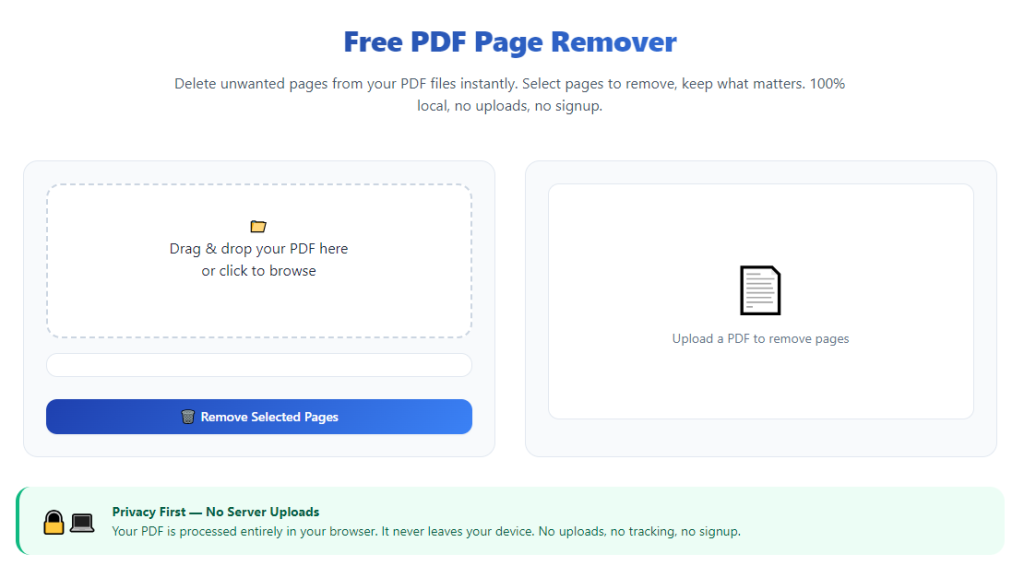
Open the tool in your standard web browser on any office workstation, laptop, or tablet device. The main landing workspace loads instantly with no mandatory signup windows, login prompts, or email verification pop-ups to delay your workflow.
Locate the dedicated upload zone labeled for business PDF files; most top tools feature a clear drag-and-drop box positioned at the top of the main interface for fast file import.
Step 3: Upload Your Corporate PDF Document
Two simple upload methods are available for business users:
- Click the upload box to open your device’s file browser and select the target PDF from local storage or network drives.
- Drag and drop the PDF file directly from your desktop or corporate folder into the upload panel for one-click import.
Wait one to three seconds for the file to process fully. Once uploaded, the tool generates a full grid of small thumbnail previews representing every individual page inside your business document.
Step 4: Select All Pages You Want to Permanently Remove
Use the visual thumbnail panel to mark every disposable page for deletion:
- Single page removal: Click the individual thumbnail to place a visible checkmark marker on the page preview.
- Bulk multi-page removal: Hold the selection modifier key while clicking multiple non-consecutive page thumbnails to mark dozens of pages simultaneously for batch deletion.
Double-check all marked thumbnails to confirm no critical contract clauses, financial tables, signature blocks, or formal disclosure pages have been accidentally selected for removal. Deselect any mistakenly marked pages with a single click on the checked thumbnail.
Step 5: Run the Page Deletion Processing Operation
Locate the prominent “Delete Selected Pages” action button below the thumbnail preview grid and click to initialize processing. The tool executes page removal without altering formatting, embedded charts, letterhead branding, or locked form fields within the remaining document pages.
Processing completes in seconds, even for large multi-hundred-page financial or legal business files. The updated thumbnail grid refreshes automatically to display only the pages you chose to retain in the final export file.
Step 6: Preview the Revised Clean PDF Before Export
Scroll through the updated thumbnail panel one final time to verify the document flow remains logical and all required business content stays intact. Confirm no blank gaps, misaligned tables, or broken header/footer branding appear after page removal operations.
If you notice any missing critical content or accidental page deletion, reupload your original source PDF and repeat the selection workflow—no permanent changes are saved until you complete the final download step.
Step 7: Export Fully Watermark-Free Business PDF File
Locate the download button labeled for clean, unbranded business document export and click to begin saving the revised PDF file to your local office device. There are no hidden upgrade prompts, paywall pop-ups, or forced account creation steps blocking the download process.
The exported file contains zero tool watermarks, footer branding, or semi-transparent overlay text anywhere on the document pages. All original corporate formatting, fonts, tables, and embedded media remain fully preserved in the final saved file.
Step 8: File the Clean PDF to Your Corporate Storage System
Save the finished watermark-free PDF into your designated business folder structure: shared network drives, client project folders, financial filing directories, or HR onboarding storage folders used for official company records.
Rename the edited file following your office’s standardized document naming conventions for easy future retrieval by team members, auditors, or leadership staff.
Step 9: Distribute the Polished PDF to Stakeholders or Clients
Your unwatermarked, streamlined corporate PDF is now ready for external sharing: attach to client emails, upload to secure corporate document portals, share during virtual client meetings, or print physical hard copies for in-person business consultations.
The clean, uncluttered layout improves readability and reinforces a professional brand impression with every external recipient.
Common Costly Mistakes to Avoid When Editing Business PDFs With Page Remover Tools
Even when using a high-quality <strong>best PDF page remover no watermark for business docs</strong>, these frequent user errors can damage corporate document integrity or create unprofessional final files for client distribution.
Accidentally Selecting Critical Contract or Financial Pages for Deletion
Rushing through the thumbnail selection stage without cross-referencing original page numbers often results in deleting signature blocks, payment tables, legal liability clauses, or official disclosure pages. Always double-check all marked thumbnails before running the delete processing step.
Failing to Preview Revised Layout Prior to Export
Formatting shifts rarely occur with premium business tools, but complex multi-column financial tables and embedded legal cross-references require a quick final scan after page removal. Skipping the preview step risks distributing misaligned, broken documents to clients or auditors.
Using Low-Quality Generic PDF Editors Instead of Business-Focused Removers
Generic consumer-grade PDF page tools frequently add hidden watermarks on free exports, cap maximum file page limits, or corrupt corporate document formatting. These cheap alternatives create extra rework and unprofessional branded overlays on client-facing files.
Overlooking Confidential Data Risks With Cloud-First PDF Tools
Tools that upload full unprocessed business PDFs to remote external servers create data privacy risks for financial records, client personal data, and proprietary corporate project information. Always prioritize local-processing watermark-free removers for sensitive internal paperwork.
Bulk Deleting Entire Document Sections Without Review
Mass-selecting large page ranges without scanning individual thumbnails can remove critical middle sections of multi-part proposals, audit reports, or service contracts. Process page deletions in smaller segmented batches for long complex business files.
Saving Edited Files Over the Original Master Source PDF
Directly overwriting your original unedited corporate document erases the full master file containing all draft pages and internal reference content. Always export the revised clean PDF as a separate new file to preserve the original source for future revisions.
Pro Expert Tips to Maximize Efficiency With Best PDF Page Remover No Watermark for Business Docs
Implement these office-focused productivity strategies to cut down daily PDF editing time and maintain consistent high-quality watermark-free corporate document output for all team workflows.
- Bookmark the tool in every shared office browser workstation for instant one-click access during time-sensitive last-minute document edits before client calls or audit submissions.
- Process batches of similar business PDFs in single editing sessions: group all monthly invoices together, or batch process quarterly financial reports to minimize repeated upload and tool navigation steps.
- Standardize a consistent page review checklist for all team members before page deletion: verify signature pages, pricing tables, legal disclosures, and corporate letterhead remain marked for retention.
- For extremely large multi-hundred-page audit or bid documents, split page selection into smaller segmented batches to reduce visual fatigue and lower the risk of accidental critical page deletion.
- After exporting every clean watermark-free PDF, create a dedicated archived folder for edited finalized documents separate from raw draft source files to organize corporate filing systems cleanly.
- Train all seasonal, temporary, and new administrative staff on this standardized step-by-step workflow to maintain uniform polished document quality across every department of your business.
- Pair watermark-free page removal with simple internal PDF naming standards to create a fully searchable, organized corporate document library accessible to all authorized team members.
Final Closing Section
PDF page trimming is a core daily administrative task for every modern business, yet most generic editing tools undermine your brand image with mandatory watermarks and frustrating paywall restrictions.
The <strong>best PDF page remover no watermark for business docs</strong> eliminates every major pain point of traditional PDF editing software for corporate use. It delivers unlimited clean, unbranded page deletion exports, preserves sensitive business document formatting, processes large financial and legal files seamlessly, and operates with zero subscription fees or mandatory account creation barriers.
When integrated into your regular office workflow following the structured step-by-step guide above, this tool drastically cuts down time spent on repetitive PDF cleanup work while ensuring every client, auditor, partner, and stakeholder receives polished, professional unwatermarked corporate documents.
By avoiding the common editing mistakes outlined and adopting the expert productivity tips for batch processing and file organization, your entire team can maintain consistent high document standards across invoices, contracts, financial reports, sales proposals, and all other critical business PDF files long-term.
After learning the operation method, click the link below to enter the tool page for immediate use.