Email marketing remains one of the most reliable ways to connect with audiences, nurture leads and retain existing customers. The success of every campaign hinges entirely on the quality of your contact list.
Even a small number of improperly formatted email addresses can derail your entire outreach plan. Invalid entries trigger delivery failures and create unnecessary troubles for marketers and business owners.
High bounce rates are more than just wasted messages. They hurt your sender reputation across email platforms and make it harder for your legitimate emails to land in inboxes later on.
Many professionals still rely on manual reviews to sort through contacts. This old method works for just a handful of emails, but it falls apart completely when you manage large bulk lists.
Basic single-entry verification tools also have clear limits. They are not built to process dozens or hundreds of addresses in one go, slowing down your daily list maintenance work.
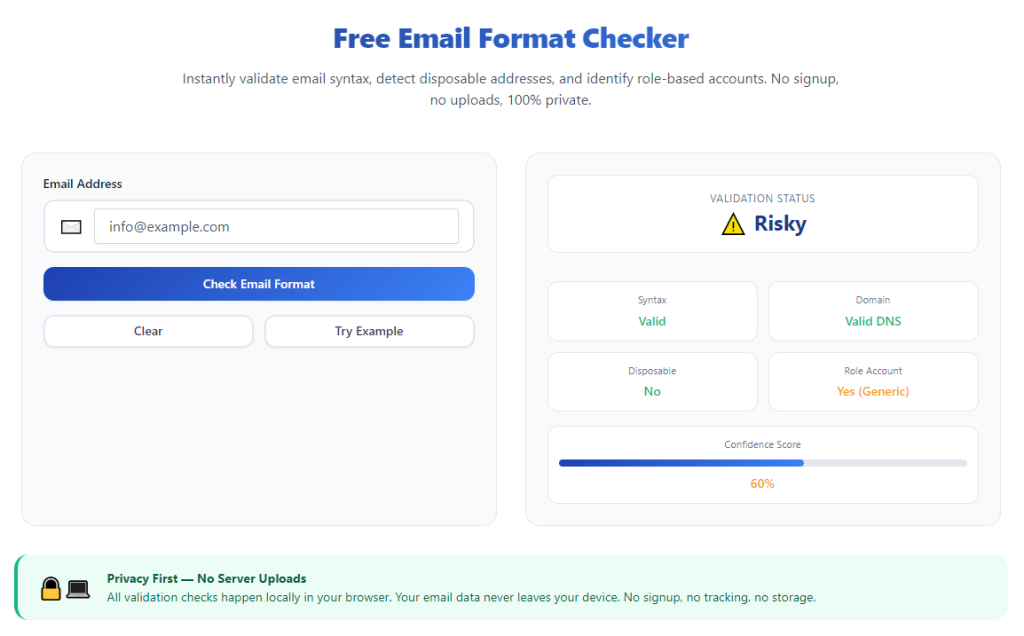
The best email format checker for bulk list is designed to fix these common pain points. It automates full list scans, flags formatting errors clearly and keeps your contact database clean and fully compliant.
This detailed tutorial walks through the downsides of manual work, core tool advantages, essential features, real business use cases, and a complete step-by-step workflow for seamless bulk email validation.
Problems With Manual Email Format Checks for Bulk Lists
Manual email checking was acceptable for small contact groups in the past. Today, growing bulk lists make this approach inefficient and risky for all types of email outreach.
Excessive time consumption
When your list holds hundreds of contacts, checking each email one at a time takes multiple hours. This tedious work pulls you away from campaign design, content creation and customer engagement.
Easy human error and oversight
Repetitive tasks lead to mental fatigue. After reviewing dozens of entries, you will likely miss small typos, missing symbols or extra spaces inside email addresses.
Inconsistent validation standards
If multiple team members handle list checks, everyone may follow different formatting rules. Over time, this creates uneven quality across your full email database.
No detailed error breakdown
A quick manual glance only tells you an address looks wrong. It cannot point out the exact issue, such as a missing @ symbol or an invalid domain segment.
Hidden duplicate contacts
Duplicate emails are easy to overlook during manual scans. Repeated entries fill up your list and cause your audience to receive duplicate marketing messages.
Hard to maintain growing lists
Most businesses add new contacts every week. A manually managed list will keep accumulating errors, and the workload for regular checks will only get heavier.
Key Benefits of the Best Email Format Checker for Bulk List
Integrating the best email format checker for bulk list into your regular workflow will completely change how you manage large contact collections for email marketing and internal communication.
Rapid bulk scanning capability
A dedicated bulk tool processes massive groups of email addresses in mere seconds. Work that once took hours of manual labor is finished in moments, freeing up your schedule for core business tasks.
Uniform format validation rules
This tool follows global standard email formatting rules for every entry. Every address gets the same strict check, so no minor mistake slips through your verification process.
Clear classification of all errors
Instead of just marking an address as invalid, the tool labels each specific problem. You will see missing characters, broken domains, extra spaces and other issues at a glance.
Noticeably lower email bounce rates
When every address follows proper formatting rules, more of your messages reach real inboxes. Lower bounce rates directly improve the overall performance of your email campaigns.
Strong protection for sender reputation
Email service providers closely track failed deliveries. A consistently clean bulk list prevents delivery restrictions and keeps your sending account in good standing long term.
Simple ongoing list maintenance
You can schedule regular full-list scans with ease. Routine checks stop formatting errors from building up as you keep adding new leads, customers and subscribers.
Streamlined team collaboration
Every member of your team uses the same tool and the same set of rules. There is no need for extra training, and your entire team maintains consistent list quality across all projects.
Must-Have Features of the Best Email Format Checker for Bulk List
Not all bulk email verification tools deliver reliable results for professional use. The truly useful best email format checker for bulk list includes these business-focused core features.
Support for large-volume entries
Top tools are built to handle high numbers of contacts at once. They accept full bulk imports without lagging, truncating entries or crashing mid-scan.
Full format rule verification
It checks every required component of a standard email: the local username, mandatory @ symbol, valid domain structure and acceptable special characters.
Smart result sorting and filtering
The tool automatically separates valid emails from problematic ones. Built-in filters let you view only faulty entries, so you can focus on quick edits and list cleanup.
Built-in duplicate detection
Repeated contacts waste sending resources and annoy your audience. The duplicate scanner finds and marks repeats to keep your bulk list lean and organized.
Flexible result export options
Once verification finishes, you can export the cleaned list directly. This feature lets you move verified data smoothly between different email platforms and work tools.
Intuitive and simple dashboard
A clean, uncomplicated interface means any team member can run bulk checks right away. Confusing menus and complex settings will only slow down daily list management.
Batch recheck functionality
After you fix all marked formatting errors, you can run a second bulk scan. This final check confirms all edits work and restores full validity to your entire contact list.
Common Use Cases for Bulk Email Format Checkers
A reliable best email format checker for bulk list serves a wide range of business scenarios where large contact groups are part of daily operations.
Marketing newsletter list cleaning
Newsletter campaigns depend on steady delivery to subscribers. Regular bulk format checks remove bad addresses and lift overall campaign engagement and results.
Lead generation database validation
Leads collected from online forms, landing pages and offline events often contain typos. A quick bulk check fixes these errors before your sales team starts outreach.
Long-term customer contact maintenance
Businesses store hundreds of client emails for updates, support and follow-ups. Keeping these addresses properly formatted ensures stable and reliable customer communication.
Event attendee contact processing
Live events and webinars always generate long sign-up lists. Attendees often make typing mistakes when entering their emails, and bulk scans correct these issues quickly.
Internal company contact directories
Large teams and organizations maintain internal email lists for staff communication. Format checks keep internal directories accurate and prevent internal delivery failures.
Merging multiple separate contact lists
When you combine lists from different campaigns or departments, formatting styles tend to vary. One full bulk scan standardizes all entries in a single process.
Pre-campaign final validation
Right before launching a major email campaign, run a complete bulk check. This final step stops unexpected bounce problems from appearing while your campaign is live.
Step-by-Step Guide: Use the Best Email Format Checker for Bulk List
Follow this simple, actionable workflow to verify, clean and optimize your contact data with a professional best email format checker for bulk list.
Step 1: Gather and organize your bulk email list
First, compile all your email addresses into one unified group. Take time to remove extra notes, phone numbers, labels or symbols that do not belong to actual email addresses.
Arrange all entries into a plain list format. This simple structure ensures the tool can read and scan every contact quickly and accurately.
Step 2: Adjust tool settings for bulk analysis
Launch the email format checker and locate the main bulk input area. Make sure the tool is switched to bulk list mode, instead of the default single-address checking mode.
Turn on useful features such as duplicate detection and detailed error logging. Match these settings to your current list cleaning and management goals.
Step 3: Import or paste your full contact list
You can either upload your prepared file or paste the full list directly into the tool’s input box. Go through the content briefly to confirm every entry loads completely.
Avoid splitting your list into multiple small parts unless the tool has strict volume limits. A single full scan delivers the most consistent verification results.
Step 4: Start the bulk format scan
Once your list is fully loaded, click the scan or verify button to start the process. The tool will run through every address and apply standard formatting rules automatically.
For extra large lists, wait just a few seconds for the process to finish. The tool will not slow down or skip entries during standard bulk operations.
Step 5: Review full scan results and error reports
When the scan completes, review the overall summary first. You will see the total number of valid emails, invalid entries and detected duplicates at a glance.
Use the built-in filters to isolate all invalid addresses. Read the detailed error notes to understand exactly what needs to be fixed on each problematic entry.
Step 6: Correct formatting errors manually
Work through the list of invalid emails one by one. Fix missing @ symbols, misspelled domains, extra spaces and other basic formatting mistakes.
If you cannot confirm the correct address for a repeated typo, remove the entry entirely. Keeping unconfirmed emails will only cause future delivery issues.
Step 7: Remove duplicate contacts
Move to the duplicate section of the results. Keep one original entry and delete all repeated copies to streamline your bulk list.
This step cuts down on unnecessary sending volume and prevents your audience from receiving multiple identical messages from your brand.
Step 8: Run a second batch recheck
After finishing all edits and deletions, copy or re-import the updated list back into the tool. Launch a second full bulk scan to verify all fixes.
Double-check that no formatting errors or duplicates remain. This second scan acts as a final quality gate for your contact data.
Step 9: Export the fully cleaned bulk list
Once your list passes the second scan, use the export function to save the finalized contact data. Choose a file format compatible with your main email marketing platform.
Store the cleaned file in your regular workflow folder for easy access before your next email send or campaign launch.
Step 10: Schedule regular recurring scans
Make bulk format checks a regular part of your routine. Set a weekly or monthly schedule to scan your growing contact list and catch new errors early.
Consistent maintenance keeps your database clean all year round and maintains strong delivery performance for every email you send.
Common Mistakes to Avoid When Using Bulk Email Format Checkers
Even with a powerful best email format checker for bulk list, simple operational mistakes can reduce the quality of your contact list and campaign results.
Uploading mixed content alongside emails
Pasting phone numbers, names or random notes into the input area will disrupt scanning results. Always separate pure email addresses first before running bulk checks.
Ignoring detailed error explanations
Do not just delete every invalid entry right away. Read the error labels carefully, as many issues are simple typos that take only a moment to correct.
Skipping the second recheck step
After manual edits, some small mistakes may still remain. A quick second bulk scan ensures your fixes work as intended.
Forgetting to remove duplicates
Duplicate contacts do not break formatting rules, but they hurt user experience. Always clear repeats to keep your list efficient and professional.
Only checking lists once per campaign
One-time checks are not enough for growing databases. New contacts bring new errors, so regular scans are required for long-term list health.
Overlooking platform format compatibility
Some email platforms have minor formatting preferences. Always preview a small sample after export to make sure the list works with your sending tool.
Pro Tips to Maximize Results From Your Bulk Checker
Use these practical professional tips to get the most value from the best email format checker for bulk list and elevate your email marketing performance.
- Organize raw contact data right after collection. Clean up formatting before saving new entries to reduce future bulk scan work.
- Create separate lists for different audience groups. This makes targeted bulk checks and campaign management much simpler.
- Review error trends from each scan. If the same typos appear often, adjust your sign-up forms to cut down on user mistakes.
- Share standardized list rules with your whole team. Everyone will follow the same process for preparing contacts for bulk verification.
- Archive old cleaned lists for reference. This helps you track how your contact database grows and changes over time.
- Combine format checks with basic list segmentation. Clean data paired with targeted groups creates stronger email campaigns.
- Test a small batch of emails first when using the tool for the first time. This helps you get familiar with all features before large-scale scans.
Final Thoughts
Clean, well-formatted email contacts are the foundation of successful email marketing and business communication. Poor list quality undermines even the most creative content and carefully planned campaigns.
Manual verification and single-entry tools cannot keep pace with modern bulk list management needs. They waste time, create errors and leave your sender reputation at risk.
The best email format checker for bulk list solves all these challenges efficiently. It delivers fast, accurate, standardized scans for large contact groups and simplifies ongoing list maintenance.
Whether you run marketing newsletters, sales outreach, internal team communication or event follow-ups, this tool adapts to all your bulk email verification needs.
By following the step-by-step workflow and avoiding common mistakes, you will maintain a consistently clean contact database, lower bounce rates and protect your sender reputation long term. Your email campaigns will reach more real users and deliver better business results every single time.
After learning the operation method, click the link below to enter the tool page for immediate use.