PDF files remain the most common format for storing and sharing confidential business records, client contracts, internal research data, and private organizational paperwork. Their fixed layout preserves formatting across every device, but this convenience creates major data security risks during internal and external file transfers.
Many teams share unmarked confidential PDFs without clear visual warnings. Recipients may accidentally forward sensitive content to unauthorized parties, screenshot private pages, or print documents for public use with zero accountability. Without clear labeling, tracking leaked files back to their source becomes nearly impossible.
Manual text overlays or basic editing software fail to deliver reliable protection for confidential material. Generic editors produce faint, easily erased marks, lack bulk processing support, and offer no traceable identification for internal audit trails.
A professional, specialized best tool to add watermark to PDF confidential docs eliminates all these security gaps. It builds permanent, customizable warning layers onto sensitive files, adds unique traceable identifiers, and streamlines mass document labeling for teams handling high volumes of private PDF records every week.
This in-depth guide breaks down critical security risks of unwatermarked confidential PDFs, core advantages of dedicated watermark software, non-negotiable safety features, common professional use cases, and a fully compliant step-by-step workflow for secure PDF watermark creation.
Common Security Risks of Unmarked Confidential PDF Files
Every unlabeled sensitive PDF creates avoidable liability for businesses, legal teams, healthcare offices, research labs, and administrative staff. These frequent hazards impact small startups and large corporate departments equally.
Accidental unauthorized distribution
Without clear confidential labeling, employees often forward internal PDF drafts to external vendors, contractors, or personal contacts without recognizing restricted status. A single misplaced file can expose proprietary pricing, client personal data, or unreleased product research to competitors or third-party actors.
Untraceable data leaks
If a confidential PDF circulates publicly online or appears on external storage drives, there is no built-in marker to identify which department, staff member, or distribution batch the file originated from. Internal investigations into data breaches stretch on for weeks with no actionable evidence.
Unregulated printing and screenshot sharing
Recipients can print full confidential PDF pages or capture digital screenshots with no visible disclaimers. Physical printed copies and image captures spread sensitive information far beyond the original intended audience with zero visual deterrent.
Compliance violations for regulated industries
Fields handling protected personal information face strict data privacy rules. Auditors flag organizations that distribute confidential PDF documents without clear classification markings, resulting in fines, mandatory process overhauls, or damaged client trust.
Weak generic editing workarounds
Basic image editors or simple PDF viewers only add temporary text overlays. These shallow marks disappear during compression, printing, or format conversion, leaving confidential content fully unprotected after minor file adjustments.
Key Benefits of the Best Tool to Add Watermark to PDF Confidential Docs
Integrating the best tool to add watermark to PDF confidential docs into your regular document workflow transforms your internal data protection strategy, reducing leak risks and simplifying audit compliance for every team member.
Permanent, tamper-resistant confidential marking
Top-tier tools embed watermarks directly into the core PDF layer, not as removable floating text. Marks stay visible through compression, printing, screenshot capture, format exports, and long-term file storage, eliminating easy removal by unauthorized users.
Fully customizable confidential classification text
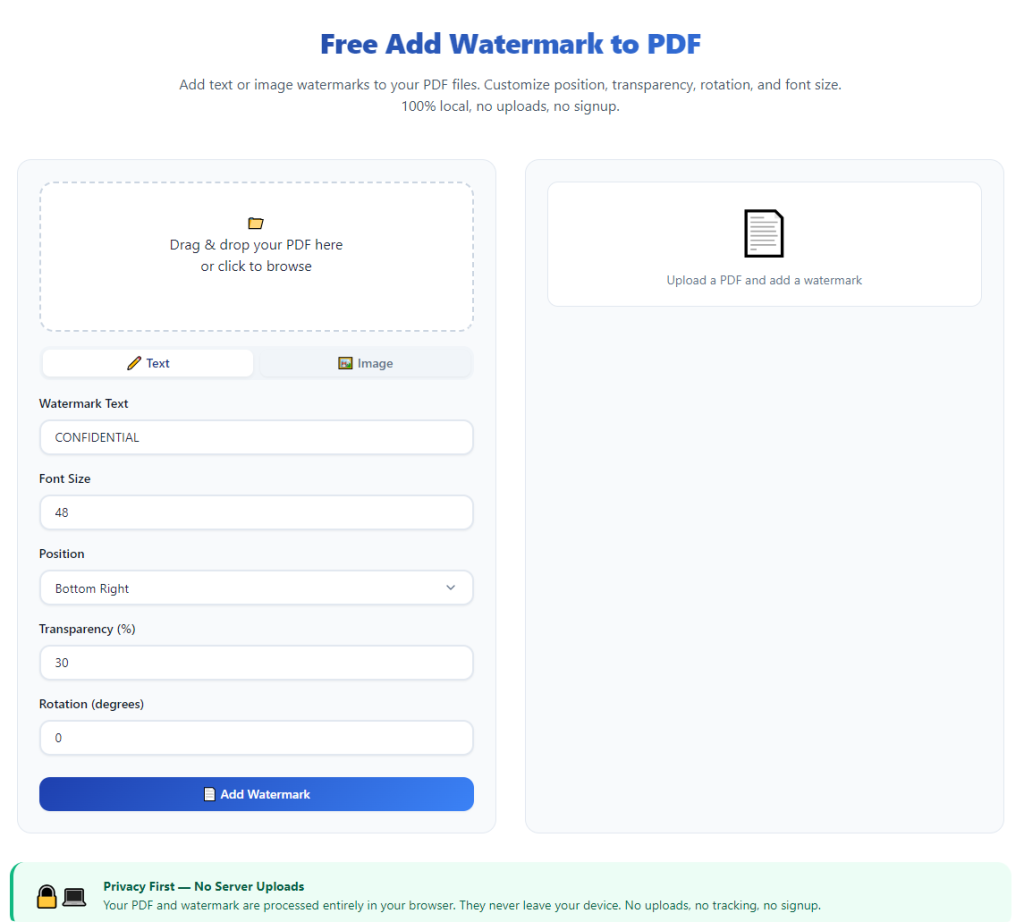
Users can upload preset warning labels such as CONFIDENTIAL, INTERNAL ONLY, RESTRICTED ACCESS, or FOR AUTHORIZED STAFF ONLY. You can adjust font weight, transparency, diagonal tilt, color, and opacity to balance readability of the original document with clear security warnings.
Unique traceable identifier embedding
The most secure versions of this tool add dynamic variable data to each PDF watermark, including staff names, department codes, distribution dates, and file serial numbers. If a confidential document leaks, investigators instantly match the unique marker to its original recipient for full accountability.
Bulk PDF batch processing support
Teams handling dozens or hundreds of confidential reports, contracts, and research PDFs each week save massive amounts of labor time. The tool processes entire folders of sensitive files in one session instead of requiring one-by-one manual editing.
Cross-device, cross-format consistent output
Watermarks render uniformly on desktop monitors, mobile screens, printed hard copies, and cloud previews. No matter where the confidential PDF opens, the security label remains fully visible to deter misuse.
Industry compliance alignment
Pre-built watermark templates match privacy regulation requirements for finance, legal, healthcare, and corporate research teams. Auditors easily verify that all distributed confidential PDF files carry mandatory classification markings during compliance reviews.
Dual visible and invisible watermark layers
Premium tool versions support two layers of protection: a semi-transparent visible confidential warning for instant visual deterrence, plus hidden invisible digital watermarks embedded into file metadata for deep forensic tracing during breach investigations.
Must-Have Features in a Trusted Best Tool to Add Watermark to PDF Confidential Docs
Not all PDF watermark software is built to handle sensitive, regulated confidential documents. The true best tool to add watermark to PDF confidential docs includes these security-focused, business-critical features that generic free editors lack entirely.
Permanent embedded watermark encoding
Avoid tools that rely on editable overlay text. Secure software merges warning text or logos into every page’s base content layer, so compression, cropping, or PDF editing cannot strip the confidential marking away completely.
Dynamic variable data watermarking
Customize unique identifiers per file batch: employee ID, division name, distribution timestamp, client reference numbers, or project codes. This traceable data creates an unbroken audit trail for every circulated confidential PDF.
Full bulk folder upload and batch processing
Support for uploading entire directories of confidential PDF files, with uniform or individualized watermark rules applied to the whole batch. This eliminates repetitive single-file editing for administrative teams managing large document libraries.
Full opacity, rotation, and layout customization
Adjust diagonal tile patterns, horizontal single-line stamps, centered page labels, or corner footer marks. Users balance visibility of confidential warnings without obscuring critical data tables, signatures, or contract clauses inside the PDF.
Image logo watermark compatibility
Upload company seals, classification stamps, or official confidential branding to pair with text labels. Combined text-image watermarks boost professionalism while reinforcing data security protocols for external shared PDFs.
Password-protected output PDF generation
After adding confidential watermarks, the tool can lock finished files with user access passwords. Dual layers of protection—visual marking plus access encryption—create robust safeguards for highly restricted internal records.
No file quality degradation
High-end processing preserves original PDF resolution, text sharpness, image clarity, and formatting. Confidential reports, financial spreadsheets, and legal contracts remain crisp without blurring from watermark rendering.
Offline local processing option
Enterprise-grade variants process all confidential PDF files locally on your device instead of uploading unmarked sensitive content to external cloud servers. This eliminates third-party data storage risks for extremely private organizational material.
Real-World Use Cases for Confidential PDF Watermark Tools
The best tool to add watermark to PDF confidential docs adapts seamlessly to nearly every professional workflow that involves creating, sharing, or archiving restricted digital PDF records across all industry verticals.
Corporate internal business reports
Finance departments, marketing teams, and executive leadership circulate unreleased quarterly forecasts, strategic plans, and budget analysis PDFs. Watermarks mark these documents INTERNAL ONLY to prevent accidental leaks to competitors or entry-level staff without clearance.
Legal firm client contracts and case files
Law offices manage confidential settlement drafts, litigation evidence, client personal data, and proprietary legal research. Traceable watermarks identify which paralegal or attorney distributed each PDF, mitigating liability if case materials spread externally.
Healthcare patient records and clinical research
Medical facilities and clinical trial teams handle protected health information in PDF format. Clear confidential watermarks satisfy privacy standards and remind staff to limit printing or sharing patient documentation with unauthorized parties.
Product development and engineering research
Tech and manufacturing teams circulate prototype blueprints, cost analysis sheets, and unreleased product specifications. Permanent confidential watermarks deter screenshotting and distribution to outside manufacturers or rival brands.
Human resources employee confidential files
HR departments store salary data, performance reviews, background check documents, and termination paperwork as PDF files. Watermark labeling restricts access awareness and creates traceability if personnel records leave internal systems.
Government and non-profit restricted records
Public sector teams handle grant applications, sensitive constituent data, and internal policy drafts. Standardized confidential watermarking aligns with public records security protocols and audit requirements.
Client-facing draft proposals and quotes
Consultants, agencies, and sales teams share preliminary pricing PDFs with prospective clients. Confidential watermarks prevent prospects from forwarding exclusive rate sheets to competing service providers without permission.
Step-by-Step Complete Guide: Use the Best Tool to Add Watermark to PDF Confidential Docs
Follow this structured, security-first workflow to apply permanent, traceable confidential watermarks to sensitive PDF files with zero compromise to data privacy or document formatting.
Step 1: Organize and segregate your confidential PDF files
Group all restricted documents into a dedicated folder separate from public or general-use files. Separate high-sensitivity material (client personal data, unreleased research) from moderately confidential internal drafts to apply matching watermark severity levels.
Label each batch based on intended distribution group (executive only, department staff, external approved vendors) to assign unique traceable watermark identifiers later.
Step 2: Launch the specialized confidential PDF watermark tool
Open the dedicated secure watermark software built for restricted documents. Avoid generic online PDF editors that require uploading unprotected confidential files to external cloud servers. Navigate directly to the confidential watermark module designed for sensitive records labeling.
Review core customization panels: text editor, variable data settings, opacity controls, layout rotation, and bulk batch processing tabs before uploading any PDF content.
Step 3: Upload single or bulk confidential PDF documents
For individual sensitive files: Select the upload single PDF function and import your confidential record from your secure local storage folder.
For mass processing: Choose bulk folder upload, select your pre-organized confidential document directory, and confirm all PDFs load fully without missing pages or corrupted formatting.
Do not upload confidential files to unencrypted third-party web tools to avoid temporary unmarked data exposure during processing.
Step 4: Build your confidential watermark template
Create a security label tailored to your document’s restriction level:
- Input core classification text: CONFIDENTIAL, RESTRICTED ACCESS, FOR AUTHORIZED PERSONNEL ONLY, or similar organizational standard wording.
- Adjust font style, weight, and color to stand out without covering critical PDF content.
- Set transparency and diagonal tile rotation for repeated background watermarks, or select single corner/footer stamp layout for minimal visual disruption.
- Add optional variable traceable data: department name, distribution date, staff ID, or project serial number to embed unique identification per document batch.
- Upload official company confidential stamp logos if required for formal compliance documentation.
Save your finished template for one-click reuse on future confidential PDF batches to maintain consistent security labeling standards across all teams.
Step 5: Preview watermark placement across all PDF pages
Run a full page preview to scan every sheet of your confidential PDF. Verify the watermark does not obscure signatures, data tables, legal clauses, patient identifiers, or critical visual diagrams embedded in the document.
Adjust tile spacing, opacity, or layout position if key confidential information becomes unreadable beneath the security marking. Confirm the watermark appears uniformly on odd and even pages for multi-page reports.
Step 6: Apply optional secondary security layers
Add supplementary protection aligned with your internal data rules:
- Set user open passwords to lock finished confidential PDFs after watermarking
- Enable invisible forensic hidden watermark metadata for advanced breach tracing
- Restrict printing, copying, or text extraction permissions on the final output file
These extra safeguards pair with visible confidential watermarks to create multi-layered data defense for highly sensitive records.
Step 7: Initiate secure watermark processing
Start the encoding workflow. The tool embeds the permanent confidential marking directly into each PDF page’s core content layer. Local processing tools complete this work entirely on your device without transmitting unmarked confidential data to external servers.
Wait for the batch processing progress bar to finish fully before closing the program or moving the original source PDF files. Interrupting mid-processing can create corrupted, unprotected output documents.
Step 8: Save the newly watermarked confidential PDF files
Export finished protected PDFs to a separate secure storage folder labeled WATERMARKED CONFIDENTIAL DOCUMENTS. Never overwrite your original unmarked source files—retain clean master copies in encrypted internal storage for future edits or reprocessing.
Name each output file with clear classification tags in the filename for easy internal sorting and identification during file sharing sessions.
Step 9: Conduct a full post-processing security check
Open several finished watermarked PDFs on desktop and mobile devices to confirm markings remain visible across all screen sizes. Print a sample page to verify the confidential label appears clearly on physical hard copies as well.
Attempt basic editing tools to test tamper resistance: confirm cropping, compression, or text overlay edits cannot fully remove the embedded confidential watermark from any page.
Step 10: Distribute or archive protected confidential PDF records
Share the fully watermarked, optionally password-locked PDF files only with pre-approved authorized recipients per your internal data security policies. Retain all original unmarked source documents in encrypted, access-restricted cloud or local storage archives for official record keeping.
Repeat this workflow for every new batch of confidential PDF documents generated by your team to maintain consistent compliance and data protection standards year-round.
Common Costly Mistakes to Avoid When Using Confidential PDF Watermark Tools
Even when utilizing the best tool to add watermark to PDF confidential docs, these frequent user errors weaken document security, create compliance gaps, or reduce traceability during potential data leak investigations.
Using temporary floating text overlays instead of embedded permanent marks
Generic editable text stamps disappear during file compression, screenshotting, or PDF conversion. Always select the embedded layer encoding function built for confidential records instead of lightweight temporary overlays.
Skipping unique variable traceable identifiers for bulk batches
Generating identical static watermarks for every distributed confidential PDF eliminates source tracing capability. Adding unique staff, department, or date markers enables fast breach origin identification if files leak externally.
Uploading highly sensitive PDFs to unencrypted online web tools
Free browser-based PDF editors store unmarked confidential content on third-party cloud servers temporarily. For regulated or high-risk private records, only use offline local-processing desktop versions of the secure watermark tool.
Over-obscuring critical confidential data with heavy opaque watermarks
Dark, fully solid watermark blocks can hide signatures, financial figures, or protected personal identifiers. Balance visibility of security warnings with moderate transparency to preserve document readability for authorized users.
Overwriting original unmarked source PDF files after watermarking
Saving the watermarked output over your clean master file erases the unmodified original record. Separate source and protected output folders to retain editable base documents for future revisions.
Failing to preview multi-page documents before batch export
Long confidential reports, legal filings, and research papers often have inconsistent margin spacing on opening pages, appendices, or chart sections. A quick full preview prevents partial watermark coverage on select pages of the finished PDF.
Forgetting supplementary password and permission locks for top-secret material
Visible watermarks act as a visual deterrent, not a full access barrier. Pair confidential marking with PDF open passwords and copy/print restrictions for extremely restricted internal documents.
Pro Expert Tips to Maximize Security With Your Confidential PDF Watermark Tool
Use these optimized strategies to get full value from the best tool to add watermark to PDF confidential docs, streamline team workflows, and strengthen organizational data protection long-term.
- Create standardized pre-saved watermark templates for each classification tier (Internal Only, Confidential, Top Secret) to enforce uniform labeling across every department without manual reconfiguration.
- Schedule weekly bulk watermark processing sessions for accumulated confidential PDF drafts to avoid last-minute unmarked file sharing before distribution deadlines.
- Train all team members to only share the finished watermarked output files, never the original unprotected source PDFs stored in secure archives.
- Mix visible diagonal confidential warning tiles with invisible forensic metadata watermarks to combine instant visual deterrence with deep traceability for breach response.
- Match watermark font color to subtle light gray or semi-transparent black to avoid harsh visual clutter while keeping classification labels clearly legible on all backgrounds.
- Run quarterly compliance audits of circulated confidential PDFs to verify consistent watermark application across all shared client, financial, and internal research records.
- Save batch processing presets for recurring document types such as client contracts, quarterly reports, and HR employee files to cut down repetitive setup work during regular document production.
- Restrict access to the confidential PDF watermark tool only to authorized administrative and compliance staff to prevent untrained team members from misapplying weak, easily removed markings to sensitive files.
Final Thoughts
Confidential PDF documents carry immense organizational risk when distributed without clear, permanent security labeling. Unmarked sensitive records enable accidental leaks, untraceable data breaches, costly regulatory compliance penalties, and compromised client or internal proprietary information.
Manual editing tools and basic PDF viewers lack the embedded encoding, traceability, and bulk processing functionality required to properly protect restricted digital files. These lightweight alternatives create false security that leaves businesses exposed to avoidable data incidents.
The specialized best tool to add watermark to PDF confidential docs solves every core vulnerability associated with sharing private PDF records. It delivers tamper-resistant embedded security markings, customizable traceable identification, batch workflow efficiency, and multi-layered supplementary protection aligned with global data privacy compliance standards.
Suitable for legal, healthcare, corporate, research, human resources, and public sector teams, this dedicated software streamlines secure document management without sacrificing PDF formatting quality or workflow speed.
By following the complete step-by-step secure processing workflow, avoiding common security mistakes, and implementing the expert optimization tips outlined above, every organization can consistently produce fully protected, traceable confidential PDF files that reduce leak risks, simplify internal audits, and safeguard sensitive digital information across all channels of internal and external distribution.
After learning the operation method, click the link below to enter the tool page for immediate use.