Dining out with friends, family, or coworkers is one of life’s most enjoyable social activities. Group restaurant meals create fun memories, but they almost always lead to one frustrating hassle: splitting the final check.
Every group faces the same messy math problems. Someone orders an expensive steak, another only gets a small salad, and everyone struggles to split tax, service charges, and tips evenly without arguments.
Mental math, handwritten notes, and basic phone calculators rarely produce fair results. Guests either overpay to avoid conflict or spend ten minutes arguing over small dollar amounts before leaving the restaurant.
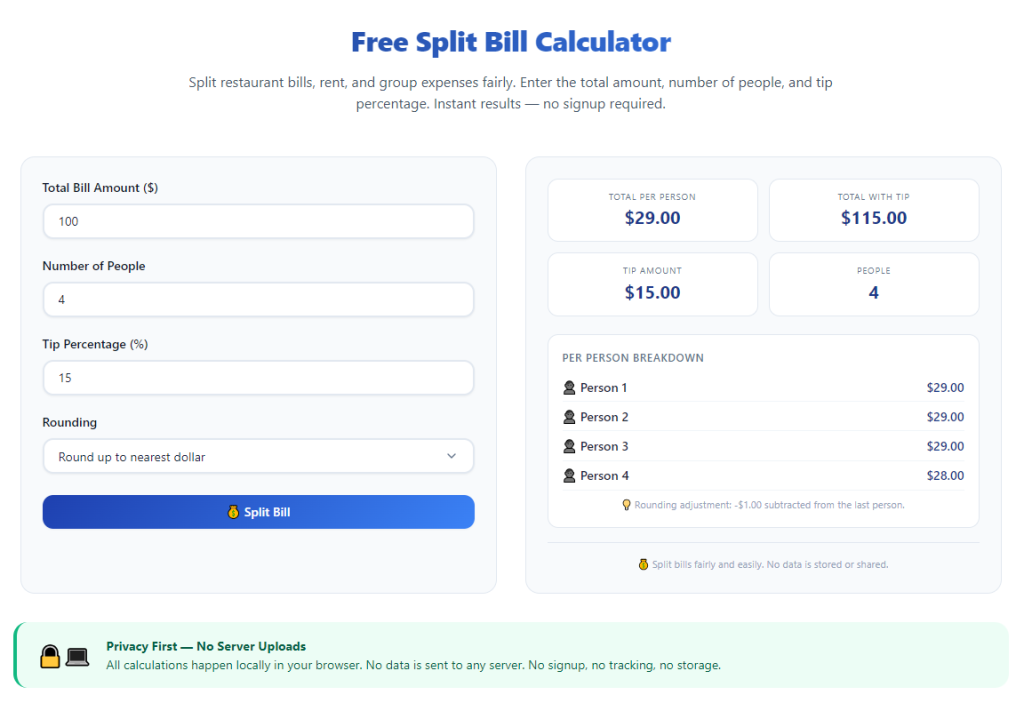
A premium best split bill calculator for group restaurant meals eliminates all of these awkward, time-consuming issues. This specialized tool is built exclusively to separate individual food costs, automatically calculate proportional tax and tips, and generate clear, fair balances for every person in your dining party.
This complete tutorial breaks down the flaws of manual bill splitting, core advantages of dedicated dining split tools, non-negotiable must-have features, common real-life group dining scenarios, and a detailed step-by-step workflow to use the calculator perfectly every time you eat out with a group.
Common Frustrations of Splitting Restaurant Bills Manually
Handling group restaurant tabs without a dedicated split calculator creates consistent stress, unfair payments, and wasted time for every member of your dining party.
Unfair flat-split math
Most groups default to dividing the entire bill equally. This method penalizes guests who ordered cheap drinks or light appetizers while letting people with pricey meals pay far less than their actual share.
Confusing tax and tip allocation
Sales tax and restaurant tips are calculated on the full pre-payment subtotal. It is extremely hard to manually divide these extra fees proportionally based on each person’s individual food cost.
Slow, error-prone mental arithmetic
Adding up every person’s dishes, then calculating proportional surcharges requires complex multi-step math. Even careful people make counting mistakes that lead to uneven balances and awkward disputes.
Forgotten add-on charges
Many restaurant bills include extra fees: delivery surcharges, corkage fees, shared appetizer platters, and split plate charges. Manual tallying often overlooks these hidden costs, leaving one person stuck covering unaccounted expenses.
No clear breakdown for everyone
Handwritten lists or rough phone notes only show raw numbers. There is no transparent line-by-line breakdown each guest can review to confirm their own food, tax, and tip amounts.
Last-minute rush before paying
Restaurants expect quick payment once the server brings the check. Trying to sort complicated split math while staff waits creates pressure and rushed, inaccurate calculations.
Key Benefits of the Best Split Bill Calculator for Group Restaurant Meals
Integrating a high-quality best split bill calculator for group restaurant meals into every group dining routine removes every pain point of manual tab splitting and delivers consistent, fair results for all guests.
Individual item cost tracking
The tool lets you log every dish, drink, and side item next to the name of the person who ordered it. No more guessing who owes what for separate menu selections.
Automatic proportional tax and tip math
Instead of splitting surcharges evenly across the group, the calculator distributes tax and tips based on each diner’s personal subtotal. This creates 100% fair payment balances with zero extra math from you.
Instant full party balance summaries
Within seconds of inputting all meal items, the tool generates a clear summary showing exactly how much each person owes, including their proportional share of fees and gratuity.
Support for shared group platters
Large restaurant meals often feature shared appetizers, family-style sides, and group desserts. The calculator evenly divides shared food costs across all selected diners with one simple click.
Saves critical time at the restaurant table
What used to take 10 to 15 minutes of scribbling and counting finishes in under one minute. Your group can wrap up payment quickly and avoid keeping restaurant staff waiting.
Eliminates awkward money arguments
Transparent line-item breakdowns remove room for debate. Every guest can see exactly how their final balance was calculated, ending disputes over unfair splitting once and for all.
Flexible tip percentage customization
Different restaurants, locations, and group sizes call for different tip rates. The tool lets you adjust tip percentages to match local dining standards or group agreements instantly.
Must-Have Features of a Top Split Bill Calculator for Group Restaurant Meals
Not all expense split tools work well for restaurant dining. The true best split bill calculator for group restaurant meals includes these dining-specific features tailored to group restaurant tabs.
Individual diner profile creation
Add custom names for every person in your party to assign each menu item directly to its buyer. This core feature separates restaurant-specific calculators from generic expense split tools.
Separate entry for single and shared menu items
Two dedicated input modes: one for individual meals and drinks, and another for shared platters, pitchers, and family dishes that multiple guests split evenly.
Automated proportional tax distribution
Built-in tax input field that automatically splits sales tax based on each person’s food subtotal, instead of dividing tax equally across the whole group.
Adjustable tip calculator engine
Custom tip percentage slider or manual input to set 10%, 15%, 18%, 20%, or custom gratuity rates. The tool instantly spreads tip costs proportionally to each diner’s balance.
Line-by-line printable/shareable breakdown
Generate a readable summary listing each person’s ordered items, personal subtotal, allocated tax, allocated tip, and final total owed. You can share this breakdown with the whole dining group easily.
Support for extra restaurant surcharges
Dedicated fields for corkage fees, split plate fees, service charges, and takeout surcharges common on restaurant checks. These fees get split fairly alongside food costs.
No complicated account setup
The best dining split calculators open instantly with no mandatory sign-ups, long forms, or paid memberships required to access full tab-splitting functionality.
Editable item entries
You can edit, delete, or reassign menu items after initial input. If someone swaps food or corrects their order, you can adjust the list without restarting the entire calculation from scratch.
Real-World Use Cases for Restaurant Group Bill Split Calculators
A versatile best split bill calculator for group restaurant meals fits every common group dining scenario, from small casual dinners to large corporate restaurant gatherings.
Small friend dinner parties
Groups of 3 to 6 friends dining at casual cafes, burger joints, or local bistros. Each person orders unique meals and drinks, requiring precise individual cost separation.
Family holiday restaurant meals
Extended family gatherings with kids, separate adult entrees, shared family platters, and multiple drink orders. The calculator balances child-sized meals and expensive adult dishes fairly.
Office team lunch and corporate dinners
Work groups dining out for team events, client meals, or office celebrations. Employers can log company-covered items separately from personal employee orders.
Date night group double dates
Two couples dining together with separate appetizers, entrees, and alcoholic beverages. The tool splits costs per individual instead of forcing couples to split a single joint balance.
Large birthday restaurant parties
Big groups of 8 or more guests celebrating birthdays with shared cake platters, pitchers of drinks, and mixed-price entrees. Massive tab math becomes streamlined and stress-free.
Brunch weekend group outings
Weekend brunch groups with coffee mimosas, separate breakfast plates, and shared pastry baskets. The calculator handles mixed beverage and food costs seamlessly.
Post-event group restaurant meals
Concert, sports game, or workshop groups stopping for dinner afterward with uneven menu spending and mixed shared dishes. Fast input lets the group split the bill before the venue rush.
Step-by-Step Complete Guide: How to Use the Best Split Bill Calculator for Group Restaurant Meals
Follow this simple, restaurant-friendly workflow to split any group dining tab fairly and quickly using your specialized split bill calculator.
Step 1: Gather the full physical restaurant check
Grab the complete printed bill from your server before opening the calculator tool. Lay the paper flat so you can read every line item clearly, including entrees, drinks, sides, tax, tip lines, and extra surcharges.
Separate all individual ordered items from shared platters, family sides, and group beverages to make data entry faster. Note the total sales tax amount printed at the bottom of the receipt.
Step 2: Open the restaurant split bill calculator tool
Launch the calculator on your mobile browser or device. The dining-focused interface will load immediately, with no login, registration, or payment prompts blocking access.
Take 10 seconds to locate the core input panels: diner name list, individual item entry box, shared food entry tab, tax input field, and tip percentage adjustment slider.
Step 3: Add every person in your dining group
Input each guest’s first name into the diner profile section. Label names clearly to avoid mix-ups when assigning food items later. You can add or remove names at any point if someone joins or leaves the party last minute.
For corporate groups, you can also tag entries as “company covered” to separate business expenses from personal meal costs.
Step 4: Log all individual menu items and assign owners
Work line by line through the restaurant receipt. Type each entree, drink, side, or dessert price into the individual item box, then select the name of the person who ordered that food or beverage.
Double-check prices against the printed receipt to avoid typing errors. Skip shared platters for now—these get entered in a separate dedicated section later.
Step 5: Input all shared group food and drink platters
Switch to the shared items tab on the calculator. Enter the total cost of every group platter, pitcher, family dessert, or shared appetizer listed on your restaurant bill.
Select all diners who split that shared dish, and the tool will automatically divide the cost evenly across every selected guest’s balance. Repeat for every shared item on the receipt.
Step 6: Enter restaurant tax and adjust tip percentage
Locate the sales tax dollar amount on your printed check and type the full tax value into the tax input field. The calculator will automatically distribute this tax proportionally based on each person’s total food subtotal.
Next, adjust the tip percentage slider to match your group’s agreed gratuity rate. The tool will calculate each person’s proportional tip amount without extra manual math.
If you already added a pre-calculated automatic service charge on the restaurant bill, input that flat fee into the surcharge field instead of adjusting the tip slider.
Step 7: Add any extra restaurant surcharges
Input additional fees from the receipt: corkage fees, split plate charges, facility service fees, or takeout add-ons. Assign whether these charges apply to all group members or only specific diners.
The calculator will fold these extra costs into each person’s final owed balance automatically.
Step 8: Generate full group split breakdown
Once all items, tax, tips, and surcharges are entered, click the calculate button to run the full tab split analysis. The tool will generate a complete, organized breakdown within one second.
Scroll through the results to view each diner’s personal ordered items, individual food subtotal, allocated tax, allocated tip, and final total payment balance.
Step 9: Review and fix any entry errors
Scan the full breakdown to catch misassigned menu items, mistyped prices, or mislabeled shared platters. If you spot an error, return to the item entry tabs to edit or delete incorrect lines.
After making corrections, re-run the calculation to refresh all guest balances with the updated accurate data.
Step 10: Share the split summary with your dining group
Show the generated breakdown to every member of your party so each guest can verify their own assigned food costs and final owed amount. The transparent line-by-line layout eliminates confusion or disagreement.
Guests can quickly send their individual portion to the person covering the full restaurant payment using any standard money transfer method.
Step 11: Complete restaurant payment and close the calculator
Once all group members confirm their balances and send their share, the person paying the restaurant bill can settle the full check with the server.
You may close the calculator tool after payment. No saved data or personal group information is stored if the tool requires no registration to operate.
Common Mistakes to Avoid When Using a Restaurant Split Bill Calculator
Even with a powerful best split bill calculator for group restaurant meals, these frequent user errors create unfair balances and messy split results for your dining group.
Entering flat equal splits for all shared and individual items
Never skip assigning individual meals to specific diners. If you lump every cost into a single equal split, guests who ordered cheap food will overpay significantly.
Forgetting to input sales tax and gratuity separately
Many new users only log food prices and ignore tax and tip fields. This creates incomplete balance totals that leave the person paying the bill short on funds.
Assigning shared platters to only one diner
If you input a group appetizer but fail to select all participating guests, the full cost of the platter will load onto a single person’s final balance unfairly.
Typing incorrect dollar amounts from the restaurant receipt
Small typos on entree, drink, or tax prices skew every proportional calculation. Always cross-reference every typed number against the physical printed check twice.
Using generic expense split tools instead of dining-specific calculators
Generic budget split apps split all costs evenly by default. They lack proportional tax and tip distribution built exclusively for restaurant tabs, leading to inaccurate guest balances.
Ignoring extra surcharges listed on the restaurant bill
Corkage, split plate, and facility fees add meaningful cost to the total tab. Leaving these fees unaccounted for creates an unbalanced final payment burden.
Rushing data entry before reviewing the full receipt
Entering items quickly while rushing to pay the server increases misassignment and typo errors. Take an extra 30 seconds to log every line item completely before calculating splits.
Pro Tips to Maximize Results From the Best Split Bill Calculator for Group Restaurant Meals
Use these practical dining-focused strategies to streamline your tab-splitting process and guarantee perfectly fair payments for every group restaurant meal.
- Bookmark the calculator tool on your mobile device for instant access as soon as the restaurant server brings over the printed check.
- Log menu items one by one as the group eats, instead of waiting until the end of the meal. This cuts down rushed data entry during payment time.
- Separate alcoholic beverage orders from food entries for corporate dining groups, so business and personal expenses stay clearly divided.
- Always set the tip percentage before calculating final balances, instead of adding a flat tip amount after the initial split calculation.
- Save a blank template of common group sizes for recurring dinner crews, so you do not retype the same guest names for weekly restaurant outings.
- If multiple people will split the full restaurant payment, use the calculator’s multi-payer feature to divide the total tab across two or three primary payers evenly.
- Share the digital breakdown summary via text message to every guest after calculating balances, so everyone has a permanent record of their individual meal costs.
- Rotate who inputs the receipt data for large parties to avoid one person handling all the tab-splitting work for every group restaurant dinner.
Final Thoughts
Group restaurant meals are meant to be relaxed, enjoyable social experiences. Manual bill splitting with mental math and handwritten notes turns a fun evening into a stressful, argument-prone chore for everyone at the table.
Generic split tools and basic phone calculators lack the specialized logic needed to fairly separate individual food costs, proportional tax, and proportional restaurant tips. They cannot account for shared platters, dining surcharges, and mixed-price menu items common on group restaurant checks.
A dedicated best split bill calculator for group restaurant meals solves every single tab-splitting pain point with dining-specific functionality built exclusively for restaurant receipts and large dining parties. It delivers transparent, mathematically fair balances in seconds, eliminates awkward money disputes, and speeds up checkout time with restaurant staff.
Whether you dine out with small friend groups, large family gatherings, corporate office teams, or birthday celebration parties, this calculator adapts to every restaurant tab format and group size.
By following the step-by-step workflow, avoiding common splitting mistakes, and applying the pro dining tips outlined above, you can handle every group restaurant bill effortlessly, ensure every guest pays only their exact fair share, and keep your group meals fun and stress-free from start to finish.
After learning the operation method, click the link below to enter the tool page for immediate use.