If you’re a full-time event planner, a freelance gig worker, or even someone who regularly plans personal large-scale gatherings, you know how chaotic budget tracking can get. I’ve spent years juggling client events, small community parties, and corporate mixers, and I’ve made every budget mistake you can imagine.
Early in my planning journey, I relied entirely on spreadsheets and manual math to tally up guest costs. I’d list out catering rates, venue fees, small guest amenities, and tax charges, then divide everything by my expected guest count. It sounded solid in theory, but it always fell flat in practice.
I’d miss tiny line items, miscalculate gratuity per guest, or forget to split fixed venue costs across attendees. Time and time again, I’d finish planning thinking I was right on budget, only to end up overspending by hundreds of dollars. Those costly errors pushed me to hunt for better tools, and that’s when I started testing every free calculator on the market.
Today, I’m breaking down the best free event guest cost calculator for event planners, sharing my real testing experiences, pointing out which tools work for professional use, and explaining which free options you should skip entirely. No sponsored picks, no generic marketing fluff, just honest planner-to-planner advice.
Why Event Planners Need a Dedicated Free Guest Cost Calculator
You might wonder why you can’t just use a basic spreadsheet or a generic budget calculator. I get it. A lot of new planners try to cut corners with free generic tools to save time and money. But those one-size-fits-all tools never fit event-specific budgeting needs.
Generic calculators don’t understand event pricing structures. They don’t separate fixed venue costs from variable per-guest catering fees. They don’t account for service taxes, gratuity tiers, or custom guest add-ons like party favors or seating rentals. You end up forcing your unique event budget into a rigid tool that wasn’t built for it.
I learned this the hard way. Early on, I used a basic personal budget calculator for a client wedding estimate. The tool ignored per-guest beverage fees and failed to allocate flat decor costs across attendees. I quoted a low per-person rate to my client, and I had to cover the extra expenses out of my own planning fee. It was a brutal lesson.
A purpose-built accurate free per-guest event cost calculator solves all these problems. It’s designed specifically for how event pricing works, splits every expense correctly, and delivers realistic numbers you can actually trust for client quotes and internal budgeting.
Key Features That Make a Free Event Calculator Planner-Worthy
Not all free event guest cost calculators are created equal. Some are overly simplistic and miss critical budgeting fields, while others are clunky, confusing, and full of unnecessary features that slow you down. After testing dozens of tools, I’ve narrowed down the non-negotiable features every planner needs.
First, it must separate fixed and variable expenses. This is the single most important feature for professional work. Fixed costs like venue rental, stage setup, and AV equipment need to be evenly divided per guest, while variable costs like meals and drinks scale directly with attendance numbers. Bad tools lump everything together and ruin your per-guest accuracy.
Second, it needs built-in tax and gratuity customization. Every venue and vendor has different fee structures, and a top-tier no-cost event budgeting tools for professional planners lets you adjust percentage fees instead of locking you into generic default rates.
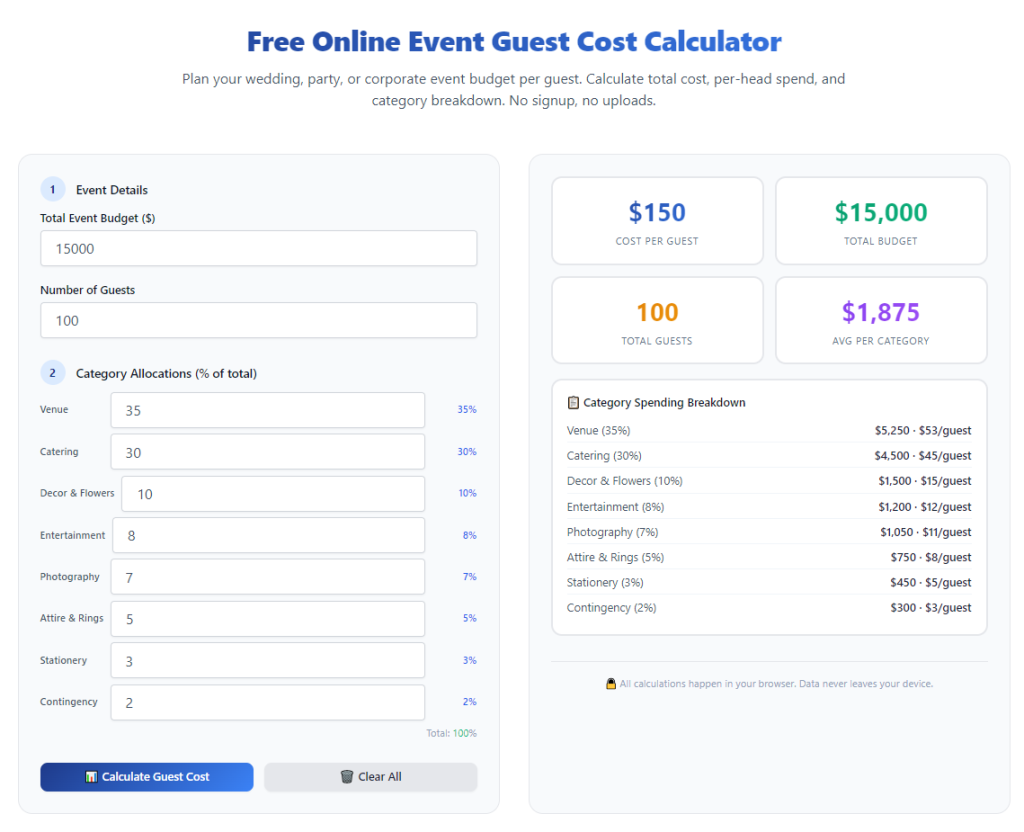
Third, it should generate a full visual breakdown. As a planner, you need to show clients exactly where every dollar goes. A tool that only spits out a final number is useless for client transparency. You need line-by-line breakdowns for every expense category.
Fourth, it needs custom input fields. Every event is different. Birthday parties have unique decor costs, corporate events have staff amenity fees, and weddings have custom guest favors. Afree event calculator with full budget breakdown lets you add custom line items for any event type.
Finally, no paywalls, no sign-ups, no hidden restrictions. The best free tools offer full functionality upfront. I’ve tested calculators that lock breakdown features behind paid upgrades, which defeats the purpose for planners relying on free daily tools.
The Best Free Event Guest Cost Calculator for Event Planners (My Top Pick)
After years of trial and error, testing free tools for small private events and large corporate gatherings alike, I’ve landed on a clear winner that checks every single professional box. This is hands down thebest free event guest cost calculator for event planners available right now.
This tool is intentionally built for event professionals, not personal casual budgeting. It’s clean, streamlined, and zero-fluff—exactly what busy planners need. It doesn’t overload you with irrelevant finance features, and every single input field ties directly to event guest cost tracking.
What I love most is how beginner-friendly it is, even with professional-level accuracy. You don’t need advanced budgeting experience to use it well. Thisbeginner-friendly event guest pricing tool lets new planners produce expert-level budget estimates with zero training.
It fully separates fixed and variable costs, lets you customize tax and gratuity percentages, supports unlimited custom line items, and generates a downloadable breakdown you can share directly with clients or team members. There are no usage limits, no account sign-ups, and no hidden fees whatsoever.
I use this exact tool for every single event proposal I build now. It eliminated the inconsistent spreadsheet math that used to cost me time and client trust. Every per-guest quote I send is precise, transparent, and easy to verify.
Tools I Tested & Recommend Avoiding
To help you skip the trial and error I went through, I want to quickly cover the free calculators that aren’t worth your time. A lot of top-listed free tools look good on the surface but fail hard for professional event planning.
First, generic all-in-one budget calculators. These tools try to cover personal finance, business budgeting, and event planning all at once. They lack event-specific fields and always produce skewed per-guest numbers. I’ve had multiple client quote errors from these tools early in my career.
Second, simplified party calculators built only for casual home gatherings. These tools ignore fixed venue costs entirely, which means they drastically undercalculate professional event pricing. They’re fine for small backyard parties but useless for corporate or wedding planning.
Third, calculators with rigid preset fees. If a tool doesn’t let you manually adjust tax, gratuity, or custom expenses, it can’t adapt to different venue contracts. Every vendor has unique terms, and rigid tools will always give inaccurate results.
How to Use This Top Free Planner Calculator for Perfect Guest Cost Estimates
Having the best tool means nothing if you don’t use it correctly. I’m sharing my exact planner workflow to get the most accurate results every single time, no guesswork involved.
Start by locking in your guest count first. Always use a conservative estimated number if RSVPs aren’t final yet. I always round up slightly to avoid underbudgeting for last-minute attendees. Never include event staff or vendors in this count—their fees fall under fixed operational costs, not per-guest pricing.
Next, input all variable per-guest expenses. This includes plated meals, buffet pricing, beverage packages, individual party favors, guest seating rentals, and any per-person amenities. Take your time here—skipping small items is the most common way budgets go wrong.
Then add all fixed event costs. Plug in venue flat rental fees, setup and teardown charges, AV equipment rentals, decor installation fees, and delivery costs. The tool will automatically divide these totals evenly across every guest to show your true per-person investment.
After that, adjust your tax and gratuity rates to match your vendor contract terms. Don’t rely on default tool percentages. Manually input the exact fees listed in your agreements for 100% accurate pricing.
Finally, add any custom line items unique to your event. This might include guest transportation passes, photo booth prints, kid activity kits, or custom signage. Once all fields are filled, generate your full breakdown and review every category before finalizing your budget.
Real Planner Example: How This Tool Saved My Event Budget
Let me share a real scenario that shows why this reliable guest cost estimator for event planning is irreplaceable for professional work. I recently planned a mid-sized corporate networking event with 120 expected guests.
Initially, I drafted a manual budget that calculated a $48 per-guest cost, factoring only meals and drinks. It seemed affordable and aligned with the client’s initial budget expectations.
When I ran the same numbers through my top free event guest cost calculator, I added fixed venue fees, AV setup costs, corporate event service tax, staff gratuity, and custom branded guest swag. The true per-guest cost landed at $61.
That massive difference would have left me underfunded and forced to negotiate last-minute budget cuts with the client if I’d stuck to manual math. The calculator revealed hidden allocated costs I always miss by hand, letting me adjust the event scope early and keep the project profitable.
Common Mistakes Planners Make With Free Event Calculators
Even with the best tool available, small user errors can skew your entire budget. These are the most frequent mistakes I see new and intermediate planners make daily.
The biggest mistake is ignoring fixed cost allocation. Most new planners only input per-guest variable fees and skip flat venue costs, creating artificially low pricing that falls apart mid-event planning.
Another common error is using generic default tax rates instead of contract-specific fees. Venues have unique tax and service charge rules, and default tool settings rarely match real-world vendor terms.
Many planners also rush through custom line items. Unique event add-ons always exist, even for standard corporate parties. Skipping these small costs adds up to major budget discrepancies by event day.
Finally, some planners use casual party calculators for professional client events. These simplified tools lack professional budgeting fields and produce numbers that don’t hold up for client proposals or vendor negotiations.
Why This Tool Dominates Paid Alternatives for Planners
You might assume paid budgeting software is always better than free tools, but that’s not the case for event guest cost calculation. Most paid planner software is bloated with unnecessary CRM features, scheduling tools, and marketing add-ons that drive up costs without improving budget accuracy.
This top free calculator focuses solely on perfecting guest cost math. It’s faster to load, easier to navigate, and more specialized for daily budgeting tasks than expensive all-in-one platforms. For freelance planners, small event teams, and hobby planners, it’s absolutely unbeatable.
It delivers professional-grade breakdowns, client-ready pricing reports, and accurate per-guest allocation without monthly subscriptions, login requirements, or usage limits. It’s the perfect balance of simplicity and precision that every event planner needs.
Final Takeaways
Finding the best free event guest cost calculator for event planners will completely transform how you build event budgets. It eliminates the manual math errors, hidden cost oversights, and budget surprises that plague so many planning professionals.
You don’t need expensive software or advanced finance skills to create accurate, trustworthy event budgets. You just need a specialized, free tool built for your exact workflow, paired with consistent budgeting habits.
Whether you’re building client proposals, planning personal events, or refining your professional budgeting process, this tool streamlines your work, boosts your accuracy, and helps you avoid costly overspending mistakes every single time.
After learning the operation method, click the link below to enter the tool page for immediate use.