Regular Base64 encoding produces special symbols like plus signs, forward slashes and equal padding marks. These characters cause parsing failures when embedded inside website URLs, query parameters and browser request strings.
Most generic online Base64 converters only support standard encoding rules without modified URL compatible modes. Developers have to manually replace problematic symbols one by one after conversion, wasting precious coding time.
Many desktop-based Base64 software lock URL-safe conversion features behind premium subscription tiers. Casual developers and hobby coders cannot pay recurring fees just for occasional link-friendly text transformation tasks.
A trusted Best Base64 encoder decoder with URL safe option solves these common encoding pitfalls completely. Users switch between standard and URL-compliant Base64 modes instantly inside regular web browsers without extra cost or cumbersome setup.
This comprehensive user manual covers core flaws of regular Base64 conversion tools, practical advantages of Best Base64 encoder decoder with URL safe option, essential built-in functional modules, real-world development use cases and step-by-step operation guidance for beginners and professional developers alike.
Common Issues Brought by Standard Base64 Without URL Safe Adjustment
Unmodified default Base64 strings regularly trigger runtime errors during web development, data transmission and backend parameter delivery workflows.
Broken URL parameters from forbidden special symbols
Plus and slash characters inside encoded content get misinterpreted as URL separators by web servers, splitting complete parameter data into fragmented invalid values automatically.
Extra manual character replacement after every conversion
Developers must open separate text editors to swap problematic symbols with allowed alternatives, adding redundant steps to every single Base64 encode or decode round.
Paid-only URL-safe conversion on mainstream offline tools
Commercial encoding applications hide URL compliant Base64 logic in upgrade packages, limiting free users to basic standard conversion only.
Data corruption during API request payload delivery
Unsanitized Base64 strings passed via API endpoints lead to payload truncation, causing backend services to receive incomplete dataset and return wrong response results.
Confusing padding equal signs disrupting cookie and token storage
Trailing equal padding symbols often get stripped or misread when saved inside browser cookies or access tokens, breaking user authentication and session validation rules.
Core Benefits of Best Base64 Encoder Decoder With URL Safe Option
After switching to a reliable Best Base64 encoder decoder with URL safe option, users cut redundant manual editing work and eliminate web parsing faults entirely during Base64 conversion.
One-click toggle between standard and URL-safe Base64 standards
Users switch conversion modes with a single selector click, letting the tool auto replace problematic +, /, = characters with URL-compliant alternatives without manual edits.
Full free unlimited encode and decode operations daily
No daily conversion quotas, trial expiration limits or hidden upgrade costs exist for personal and small commercial encoding projects of all sizes.
Entirely browser-native operation with zero software download
Open the converter page on mobile or desktop browsers directly, skipping bulky installer packages that occupy local device storage space unnecessarily.
All conversion calculated locally inside user’s browser
Input plain text and encoded strings never get uploaded to remote servers, protecting sensitive passwords, private tokens and confidential project data from unwanted exposure.
Cross-device uniform conversion rules across all mainstream browsers
The same URL-safe encoding logic stays consistent whether operating from office desktops or portable mobile devices during field debugging and remote coding work.
No mandatory registration or personal information collection
Visitors start conversion immediately after page load, no email submission or account verification required to unlock URL-safe Base64 core functionality.
Must-Have Functional Features on Best Base64 Encoder Decoder With URL Safe Option
While selecting qualified Best Base64 encoder decoder with URL safe option, confirm these core functional modules come fully equipped on the conversion tool.
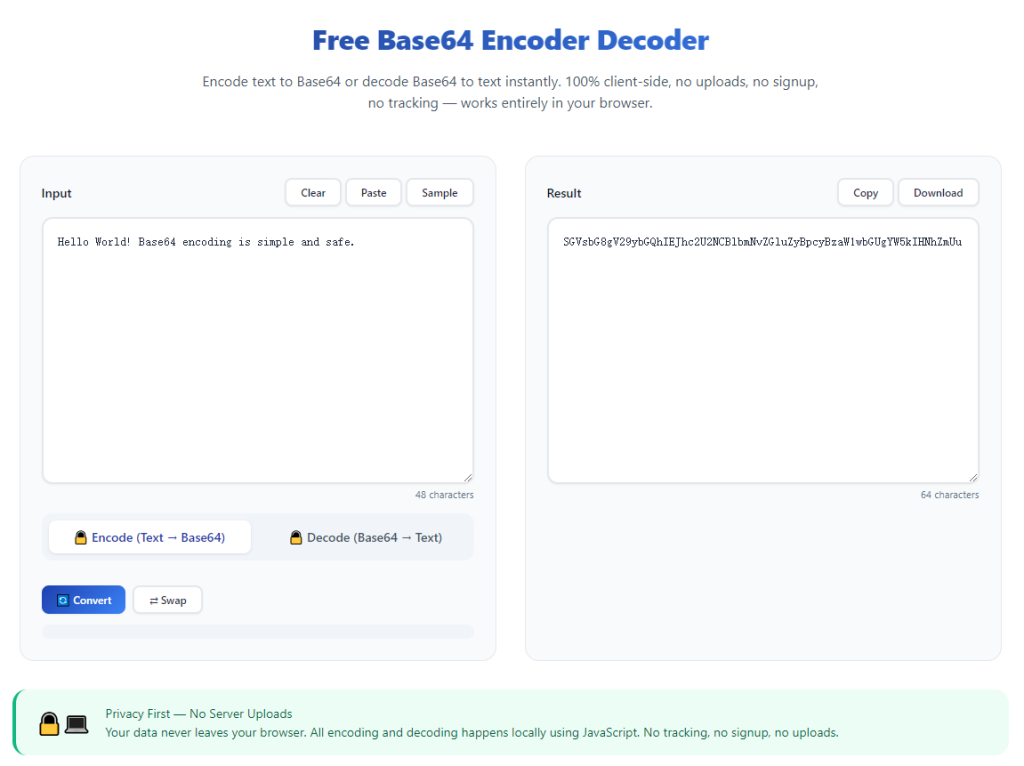
Dedicated input box for plain text or pre-encoded Base64 content
Large clean text area supports bulk pasting of raw strings, access tokens, JSON payloads and encrypted content ready for subsequent encode or decode processing.
Clear toggle switch for URL-safe conversion activation
A visible checkbox or dropdown selector turns URL-friendly character substitution on or off to match different web transmission requirements flexibly.
Separate output field to display finalized conversion results
Encoded or decoded content shows in an independent panel away from source text for quick side-by-side comparison and result inspection.
Instant one-tap copy function for finished output strings
Built-in copy shortcut sits next to conversion outcomes to save formatted Base64 data directly into system clipboard for immediate code embedding.
Error prompt for malformed invalid Base64 input content
The tool sends readable warning messages when users paste broken non-standard Base64, helping correct typos before running formal URL-safe conversion.
Quick reset button to clear input and output in one tap
Reset control wipes all existing content quickly to prepare the workspace for another round of independent Base64 encoding or decoding tasks.
Wide Practical Application Scenarios for URL Safe Base64 Conversion Tool
A fully featured Best Base64 encoder decoder with URL safe option serves web developers, backend engineers, security testers and content creators across multiple digital industry segments.
Website URL query parameter data encoding
Web developers convert dynamic parameter content into URL-safe Base64 before appending values to webpage links to avoid server parsing errors and broken page jumps.
Backend API token and payload transmission formatting
Backend engineers encode sensitive request payloads into compliant Base64 to pass complete data via REST API endpoints without accidental content truncation during network transfer.
Browser cookie and session token storage optimization
Security developers turn confidential access tokens into URL-friendly Base64 for stable storage inside browser cookies without invalid symbol-triggered data loss issues.
Mobile app deep link parameter packaging
Mobile developers wrap app jump parameters with URL-safe Base64 to ensure deep links open corresponding in-app pages normally across different operating system environments.
Programming student coding practice and homework tasks
Coding learners experiment with standard and modified Base64 formats for class assignments without purchasing paid standalone encoding software packages.
Short link backend hidden data encryption
Short URL service operators use URL-safe Base64 to store original webpage addresses inside compact links while keeping all link syntax compliant with global web standards.
Full Step-by-Step User Guide: Best Base64 Encoder Decoder With URL Safe Option
Follow this beginner-friendly sequential workflow to master URL compliant Base64 conversion with minimal learning cost and zero unnecessary mistakes.
Step 1: Prepare your source content for conversion
Copy your target plain text or existing Base64 string from source files, API logs, token documents or webpage parameter drafts in advance.
Trim accidental extra blank spaces at text edges to prevent irrelevant conversion deviations caused by invisible stray characters.
Step 2: Open Best Base64 Encoder Decoder With URL Safe Option in web browser
Launch your commonly used desktop or mobile web browser and access the free online Base64 conversion tool directly.
Verify no signup popups, paid upgrade alerts or obstructive floating advertisements appear once the page finishes full loading.
Step 3: Toggle URL safe option according to your usage goal
Switch on the URL-safe mode checkbox if your final string will embed inside website links or API parameters; leave it off for regular standard Base64 conversion needs.
Double-check mode selection to avoid rework caused by wrong conversion standard selection after finishing text transformation.
Step 4: Paste prepared source content into input field
Insert pre-copied plain text or encoded Base64 data into the designated source input box on the main tool interface.
Confirm full content is completely pasted with no missing character segments resulting from incomplete clipboard copy operations.
Step 5: Select encode or decode function to start conversion
Tap encode for plain text into Base64 transformation or choose decode to revert valid Base64 back into readable original content.
Wait less than one second for fully converted URL-compliant or standard Base64 results to populate inside the separated output panel.
Step 6: Copy finished conversion result for practical use
Click the dedicated copy icon next to generated output to save converted Base64 or plain text directly into your device’s clipboard instantly.
Re-adjust URL-safe toggle setting and repeat conversion if output formatting still fails to match your web embedding specifications.
Step 7: Reset workspace and bookmark for future conversions
Hit available reset option to erase leftover source and output data, clearing the conversion panel ready for next round of Base64 encode or decode tasks.
Bookmark the converter page inside your browser folder to access fast URL-safe Base64 processing amid unexpected urgent development debugging needs.
Common Conversion Mistakes to Avoid With Best Base64 Encoder Decoder With URL Safe Option
Even with full access to flexible URL-compliant conversion controls, careless operating errors create invalid Base64 strings and delay daily development progress.
Keep using standard Base64 for URL embedded content unnecessarily
Unmodified Base64 breaks web parameter parsing; rely on Best Base64 encoder decoder with URL safe option for all link-related encoding assignments.
Forget enabling URL-safe toggle before starting encode conversion
Missing mode activation generates default Base64 with forbidden symbols, forcing users to redo full conversion and waste spare working minutes.
Paste corrupted incomplete Base64 during decode operation
Truncated encoded content triggers parsing errors and garbled plain text output, requiring users to retrieve complete original Base64 and restart decoding again.
Close browser tab before copying finalized converted output strings
Unexpected page refresh clears all finished conversion data fully, pushing users to repeat copy-paste and Base64 transformation workflow from scratch.
Mix up encode and decode function buttons randomly
Wrong function selection turns valid Base64 into unreadable garbled characters, needing fresh source content and repeated correct conversion steps.
Expert Optimization Tips to Maximize Best Base64 Encoder Decoder With URL Safe Option Efficiency
These actionable developer-focused suggestions help streamline daily Base64 conversion every time opening Best Base64 encoder decoder with URL safe option for coding and data formatting tasks.
- Depend on Best Base64 encoder decoder with URL safe option to drop costly paid encoding software subscriptions and cut long-term development tool expenditure.
- Save the conversion tool page into browser bookmarks to launch instant URL-safe Base64 processing for sudden API debugging or link parameter edits.
- Stick to URL-safe mode consistently when preparing strings for URL, cookie or deep-link placement to skip post-conversion manual symbol replacement entirely.
- Split oversized bulk text into smaller chunks for conversion to avoid browser lag and maintain stable accurate URL-safe Base64 formatting results.
- Always verify output content by embedding a short test URL after conversion to confirm no hidden parsing issues appear on live web environments.
- Build a quick personal checklist for common use cases to toggle URL-safe mode in one second without repeated rule checking during busy coding sessions.
Final Thoughts
Base64 remains an indispensable text encoding standard for modern web data transmission, token storage and cross-platform content delivery across software industries.
Regular fixed-standard Base64 creates unavoidable link syntax errors, whileBest Base64 encoder decoder with URL safe option eliminates such flaws by offering switchable URL-friendly conversion free of charge.
Whether you are a professional backend developer building API services, a mobile engineer designing deep links or a coding beginner learning encoding basics, flexible URL-safe Base64 conversion optimizes your daily content formatting work significantly.
Following the detailed step-by-step operation tutorial above lets you produce flawless link-compliant Base64 quickly, remove manual symbol replacement overhead and stabilize your web project’s parameter transmission performance permanently.
After learning the operation method, click the link below to enter the tool page for immediate use.