Raw JSON pulled from API responses or database dumps often arrives as a single uninterrupted string with zero line breaks or consistent spacing. Scanning this condensed format manually slows down debugging and code revision drastically for developers and data specialists.
Most mainstream online JSON beautifiers flood users with floating banner ads, interstitial popups and redirect prompts the moment users open the webpage. These distractions break workflow focus during quick formatting tasks.
Countless alternative formatting platforms lock core beautify functions behind registration walls, requiring valid email addresses and account verification before users can tidy even small snippets of JSON data.
A top-rated Best JSON Formatter No Registration No Ads resolves these two prominent pain points at once. Users refine messy JSON code directly inside regular web browsers without disruptive ads or tedious signup formalities.
This practical user manual breaks down common downsides of ad-ridden or registration-locked JSON tools, core perks of Best JSON Formatter No Registration No Ads, essential built-in tool features, common real-world usage scenarios and detailed beginner-focused operation instructions.
Common Drawbacks of Ad-Filled or Registration-Required JSON Formatting Tools
Conventional JSON formatting services packed with advertisements and mandatory account creation create avoidable obstacles during daily coding and data cleanup work.
Continuous pop-up and banner advertisements interrupt operations
Many free JSON tools insert flashing banner ads alongside input and output panels. Random full-screen popups often appear mid-format, forcing users to close windows repeatedly and lose focused work rhythm.
Mandatory registration to unlock core formatting functionality
Popular mid-tier formatting websites block full beautify access behind signup pages. Casual developers needing one-off JSON fixes must submit personal contact details just to complete basic code arrangement.
Unwanted spam emails after submitting registration information
Platforms collecting user emails regularly share contact data with third-party marketing groups, leading to constant irrelevant promotional mail filling developer inboxes long after initial signup.
Hidden paywalls hiding advanced formatting options
Even after finishing account creation, practical extras like custom indent adjustment and bulk JSON parsing stay restricted behind monthly premium upgrade costs.
Slow page loading caused by heavy ad scripts and tracking plugins
Ad-heavy JSON formatters load dozens of advertising scripts in the background. Slow page speeds create lag when processing large multi-thousand-line JSON datasets during urgent troubleshooting.
Core Practical Advantages of Best JSON Formatter No Registration No Ads
After switching over to a reliable Best JSON Formatter No Registration No Ads, developers eliminate advertisement clutter and signup barriers that plague regular JSON formatting alternatives.
Entirely ad-free clean interface with zero popups or banner inserts
Every section of the tool’s page stays focused on input and output panels only. No sudden ad redirects or floating promotional banners distract users while sorting JSON content.
Zero registration or personal data submission rules
Visitors open the tool page and start formatting instantly. No email forms, phone verification or profile setup steps get in the way of quick on-demand JSON cleanup.
Lightweight page architecture for ultra-fast loading speeds
Without bulky ad tracking codes embedded in page source, the formatter loads instantly even on slow mobile cellular connections or low-end desktop browsers.
Unlimited free formatting runs with no hidden usage caps
Users process small JSON snippets or massive bulk datasets countless times each day. There exist no daily formatting quotas or hidden upgrade fees to restrict repeated usage.
Local browser-side processing protects user data privacy
All JSON parsing and formatting calculations run locally within the visiting browser. Raw code content never gets uploaded or stored on remote third-party backend servers.
Cross-device consistent operating experience across all gadgets
The clean no-ad no-signup layout works uniformly on desktop PCs, smartphones and tablets regardless of which mainstream web browser users choose to operate.
Must-Have Core Functional Features on Best JSON Formatter No Registration No Ads
While picking out a qualified Best JSON Formatter No Registration No Ads, confirm the tool carries these industry-standard core functions to satisfy diverse JSON editing requirements.
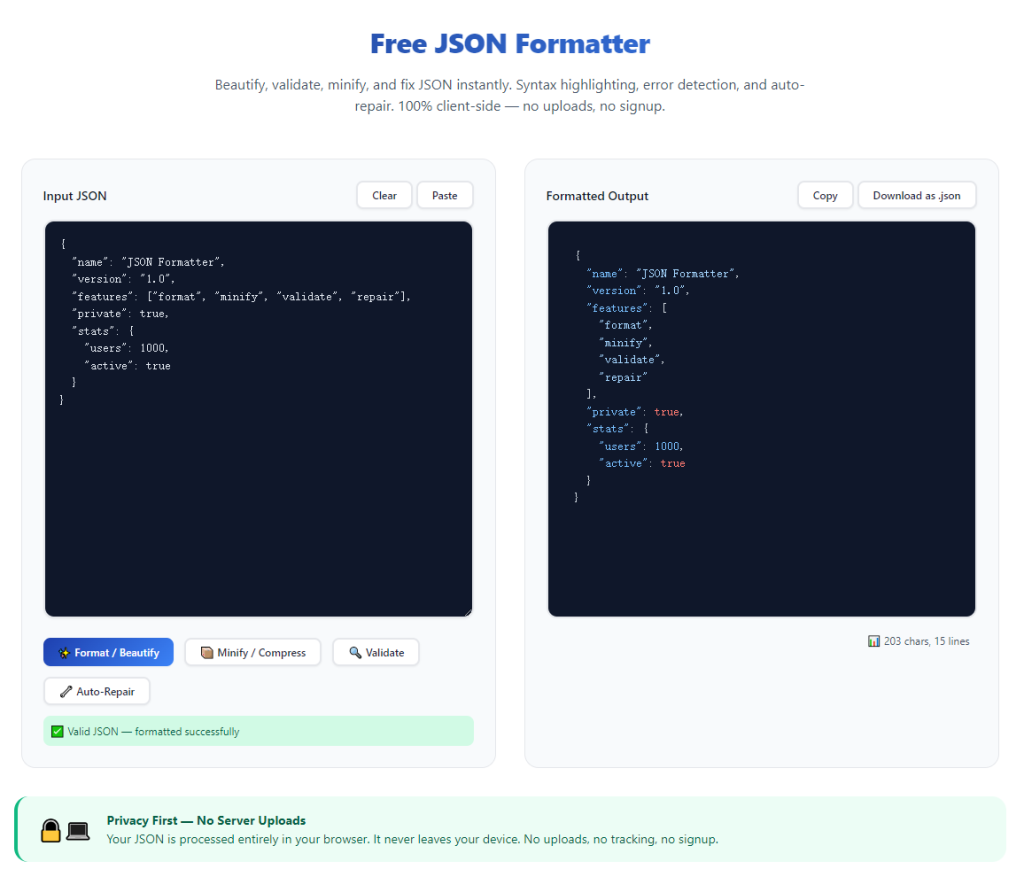
Spacious dedicated raw JSON input text area
Wide uncluttered input box supports direct bulk pasting of compressed single-line JSON copied from API returns, database exports and application configuration logs.
Customizable indent spacing adjustment controls
Users freely switch between 2-space, 4-space or tab-based indent styling to match internal coding standards required by their development teams and ongoing projects.
Independent separated output viewing panel
Formatted clean JSON displays in a distinct split section away from original source code, making direct side-by-side content comparison quick and effortless.
One-click copy shortcut for finalized formatted JSON
Convenient copy buttons sit beside processed output data, letting users instantly save beautified code to clipboard for pasting into code editors and project files.
Built-in lightweight JSON syntax error detection engine
The tool automatically scans submitted JSON content and highlights misplaced commas, missing brackets or other syntax faults before final formatting executes.
Quick reset button to clear all existing panel content
Single tap reset option wipes input and output data in seconds, clearing workspace for another round of independent JSON formatting tasks without page refresh.
Diverse Real-World Application Scenarios for No-Ad No-Signup JSON Formatter
A fully polished Best JSON Formatter No Registration No Ads fits daily operational needs for developers, data analysts, coding learners and small-scale IT maintenance personnel across multiple industries.
Backend developer API response inspection and debugging
Backend engineers copy compact single-line API response JSON, format code quickly without ad interruptions to spot parameter errors and fix faulty interface logic efficiently.
Data analyst bulk exported dataset standardization
Data specialists tidy database-extracted JSON blocks to unify document formatting before importing organized information into spreadsheet and statistical analysis software.
Frontend site configuration file modification
Frontend coders arrange messy plugin and website setting JSON to align styling with existing project code rules during regular site maintenance cycles.
Coding student homework and lab assignment preparation
New programming learners format assignment JSON content to satisfy teacher specified layout requirements without paying for premium editor subscriptions or enduring disruptive advertisements.
Freelance developer cross-client project content sorting
Independent IT contractors rapidly adjust JSON indent styles when switching between separate client projects with differing internal formatting specifications.
IoT hardware equipment configuration review
Device technicians parse condensed IoT setup JSON to examine stored parameter values and tweak equipment settings for stable connected device performance.
Full Step-by-Step User Guide: Best JSON Formatter No Registration No Ads
Follow this beginner-friendly sequential workflow to master smooth JSON formatting with Best JSON Formatter No Registration No Ads in minimal time.
Step 1: Collect and prepare your original unformatted JSON content
Navigate to your source API page, database file or configuration document then copy all target raw JSON text from its original storage location.
Scan copied content briefly to remove stray extra spaces and stray invalid symbols that may trigger unexpected parsing faults later on.
Step 2: Open Best JSON Formatter No Registration No Ads inside your preferred browser
Launch any installed desktop or mobile web browser and pull up the clean ad-free JSON formatting tool page directly.
Double-check no signup prompts, floating ads or paid upgrade notifications appear anywhere across the tool’s visible screen space.
Step 3: Set your preferred indent formatting preferences first
Locate indent configuration options on the tool’s top setting bar, pick your desired space count or toggle tab indent mode matching your project’s coding guidelines.
Use available preview snippets when present to confirm selected indent layout matches your planned final code appearance ahead of content pasting.
Step 4: Paste pre-copied raw JSON into the designated input field
Insert prepared unstructured JSON text into the large empty input box reserved for original source code on the tool interface.
Avoid adding random blank lines or unnecessary characters which can corrupt the overall structure of your imported JSON dataset.
Step 5: Initiate automated JSON formatting process
Click the dedicated format button to trigger backend parsing, letting the tool automatically restructure your JSON following your preselected indentation rules.
Wait only a split second for neatly organized beautified JSON to populate fully within the separated output panel on screen.
Step 6: Copy finished formatted JSON for your intended usage
Tap the built-in copy icon next to finalized output content to save clean JSON directly into your device’s system clipboard instantly.
Reconfigure indent settings and re-run formatting if generated code layout still fails to match your team’s required styling standards.
Step 7: Reset workspace for subsequent JSON formatting jobs
Select the reset control to erase leftover source code and formatted results, clearing the tool’s panels ready for another independent JSON cleanup task.
Bookmark the ad-free formatter webpage inside your browser’s saved folder to access instant clean formatting anytime unexpected debugging needs arise.
Common JSON Formatting Errors to Avoid With Best JSON Formatter No Registration No Ads
Even with a clutter-free Best JSON Formatter No Registration No Ads available, careless operating mistakes lead to broken formatted JSON and wasted working minutes.
Continue using ad-heavy signup-locked formatting platforms unnecessarily
Constant ad interruptions and mandatory registration drag down formatting efficiency; shift to Best JSON Formatter No Registration No Ads for all regular daily JSON cleanup work.
Paste incomplete or corrupted raw JSON before executing formatting
Truncated source code carries missing syntax markers and causes parsing failure, requiring users to re-fetch complete original JSON data and restart formatting.
Adjust indent options after running initial formatting command
Late setting changes force full reprocessing of entire JSON content; lock all preferred indent rules fully before pasting source code into input fields.
Close browser tab before copying finished formatted JSON output
Accidental page closure wipes all processed code data completely, pushing users to repeat full copy-paste and formatting workflow again from scratch.
Input non-numeric characters inside indent value setting boxes
Letters and special symbols break indent configuration logic, needing users to reset settings and input valid numeric spacing values all over again.
Expert Productivity Tips to Optimize Best JSON Formatter No Registration No Ads Usage
These actionable developer-focused tips help users boost daily formatting speed each time they open Best JSON Formatter No Registration No Ads for coding and data management tasks.
- Depend on Best JSON Formatter No Registration No Ads to skip costly editor subscriptions and eliminate time wasted closing irrelevant popup advertisements.
- Store the ad-free tool link inside browser bookmarks to access distraction-free JSON formatting with a single click amid sudden urgent debugging scenarios.
- Note down frequently used project indent specifications to input preferred spacing settings rapidly without repeatedly referencing lengthy coding rule documents.
- Always confirm JSON source integrity with the tool’s built-in syntax checker before formatting to avoid wasting time processing structurally invalid code snippets.
- Split oversized multi-megabyte JSON datasets into smaller chunks during formatting to prevent browser lag and preserve consistent clean indent layout outcomes.
- Finish all indent customization work before source code pasting to cut down redundant duplicate formatting cycles for identical batches of JSON data.
Final Thoughts
Clean properly indented JSON serves as a core foundation for smooth debugging, project maintenance and organized data analysis across modern software development sectors.
Ad-cluttered, registration-bound formatting tools introduce unnecessary workflow delays and privacy concerns, while Best JSON Formatter No Registration No Ads eliminates these two major pain points entirely at zero ongoing cost.
Whether you work as a full-time backend developer, part-time data analyst or new student learning programming fundamentals, ad-free no-signup JSON formatting delivers steady reliable code beautification whenever required.
Following the complete step-by-step operational guide above lets you organize messy JSON quickly without annoying distractions, streamline regular development workflows and keep all your code uniformly formatted long term.
After learning the operation method, click the link below to enter the tool page for immediate use.