Converting JPG images to PDF is one of the most frequent daily document tasks for students, office workers, and casual users. JPG files are ideal for saving scanned forms, screenshots, photos and visual notes. However, standalone image files are messy to share, print, or archive in bulk.
PDFs solve this problem perfectly by merging multiple JPGs into one unified, structured file. They preserve fixed layouts and work on any device. Unfortunately, most free conversion tools spoil finished files with visible watermarks. These branded overlays cover key content and make documents unfit for formal use.
Many users are forced to pay for premium upgrades just to remove unnecessary watermarks from simple conversions. This creates an annoying and unfair barrier for basic document processing. If you want clean, professional results without spending money, finding the best free JPG to PDF converter no watermark is essential.
This in-depth tutorial explains why watermarks hurt your documents, what features to look for in top-tier tools, real-world use cases, and a complete step-by-step workflow. By the end, you will confidently use the best free JPG to PDF converter no watermark for flawless, clean PDF outputs every time.
Why Watermarks Make Free JPG to PDF Tools Unusable
Before choosing the best free JPG to PDF converter no watermark, it is important to understand exactly how watermarks compromise your converted files and daily workflow.
Covers critical document content
Most generic tools place large text or logo watermarks across the center of PDF pages. These overlays block text, data points, chart details and handwritten notes. The final document becomes unreadable and useless for official purposes.
Destroys professional and academic credibility
Watermarked PDFs look unpolished and unprofessional. Schools and businesses rarely accept files with third-party branding. Even high-quality image content loses value when covered in distracting watermark layers.
Forces unnecessary premium upgrades
Many platforms intentionally add watermarks to free conversions to push paid subscriptions. Users must upgrade their plans just to unlock basic clean outputs, even for simple one-time tasks.
Wastes time on rework
Watermarked files require re-conversion, manual editing or tool switching. This repetitive work slows down productivity and creates unnecessary stress during tight deadlines.
Clutters long-term archives
If you save converted PDFs for future reference, permanent watermarks make your entire file library look disorganized and unprofessional. Clean, unmarked files are far better for long-term digital storage.
Common Flaws of Regular Free JPG to PDF Converters
Most free conversion tools come with restrictive flaws that ruin user experience. These issues set the best free JPG to PDF converter no watermark apart from generic, low-quality alternatives.
Mandatory watermark injection on all free outputs
Standard free converters apply watermarks to every exported PDF by default. There is no built-in option to disable branding for free users, leaving no way to get clean results without paying.
Compromised image quality
To save server space, basic tools compress JPG files heavily during conversion. This results in blurry text, faded colors and pixelated graphics inside the finished PDF document.
Limited batch conversion capabilities
Many free tools restrict the number of images you can merge at once. Users working with multi-page scans or bulk photos must process files in tedious, small batches.
Intrusive ads and pop-ups
Ad-supported converters flood screens with pop-ups and upgrade prompts. These distractions slow down processing and create a frustrating workflow experience.
Unreliable layout formatting
Cheap tools often stretch images, create uneven margins or misalign pages. The final PDF looks messy and requires extra editing to fix basic layout issues.
Key Features of the Best Free JPG to PDF Converter No Watermark
A true top-rated best free JPG to PDF converter no watermark includes specific user-centric features that eliminate all common conversion frustrations.
100% watermark-free guaranteed outputs
The core feature is clean, unmarked PDFs on every free conversion. No logos, text overlays or brand stamps appear on any page, regardless of file size or batch count.
Preserves original JPG quality and resolution
Premium free tools avoid over-compression. They retain sharp text, accurate colors and clear details from your original JPG images, delivering high-fidelity PDF results.
Full free batch conversion support
You can merge dozens of JPG images into one single PDF file with no limits. Batch processing saves massive time for scanned documents and multi-image projects.
Customizable layout settings
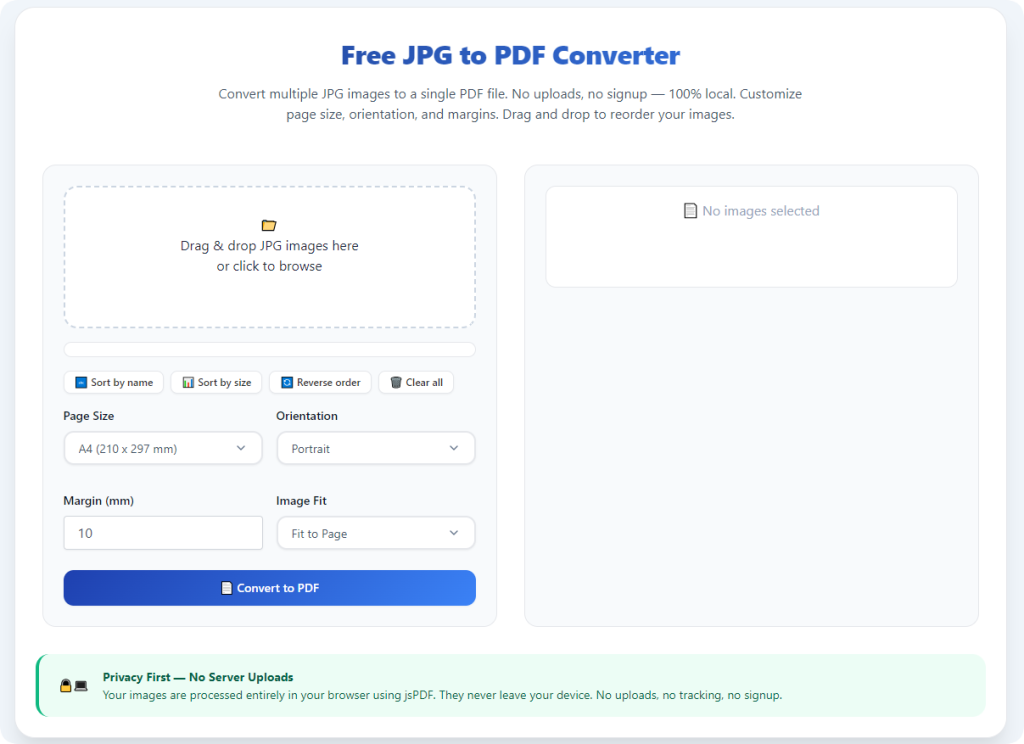
Users can adjust page size, margins, image alignment and orientation. These controls help create polished, print-ready PDFs tailored to personal or professional standards.
No account or registration required
Top watermark-free converters let users process files instantly. No email sign-ups, password creation or personal data input is needed for full access.
Ad-free clean interface
Reliable tools avoid intrusive advertisements and pop-ups. The distraction-free design ensures fast, smooth conversion every single time.
Cross-device compatibility
Browser-based functionality works on all devices. You can convert JPGs to PDFs on desktops, laptops, tablets and mobile phones with no software downloads.
Top Use Cases for Watermark-Free JPG to PDF Conversion
Using the best free JPG to PDF converter no watermark fits a wide range of academic, professional and personal scenarios where clean documents are mandatory.
School assignments and exam submissions
Students merge scanned notes, textbook screenshots and homework photos into neat PDFs. Watermark-free files meet strict academic standards for online class submissions and grading.
Official forms and scanned paperwork
Scanned applications, receipts, contracts and government forms often save as separate JPGs. Merging them into a single clean PDF simplifies filing, printing and official submission.
Business reports and client presentations
Professionals compile chart screenshots, data visuals and meeting notes into organized PDFs. Clean, unmarked documents maintain brand professionalism during client sharing and team meetings.
Creative portfolios and design projects
Designers and content creators merge artwork screenshots and visual drafts into polished PDF portfolios. Watermark-free conversion protects creative work and delivers clean presentation files.
Personal file archiving
Users organize personal photos, travel documents and scanned records into compact PDFs. Clean outputs keep personal archives neat, readable and free of distracting branding.
Step-by-Step Guide: Use the Best Free JPG to PDF Converter No Watermark
Follow this simple, foolproof workflow to use the best free JPG to PDF converter no watermark and generate perfect clean PDFs every time.
Step 1: Sort and Prepare Your JPG Files
Gather all your JPG images and arrange them in your desired PDF page order. Delete blurry, duplicate or unnecessary files to avoid messy final documents.
Create a backup folder for your original images to prevent accidental data loss during conversion.
Step 2: Launch a Trusted Watermark-Free Converter
Open a tool recognized as thebest free JPG to PDF converter no watermark. Confirm the tool offers free, unmarked outputs with no hidden upgrade requirements.
Step 3: Upload Your JPG Images
Upload files via drag-and-drop or standard file selection. You can add single images or bulk batches for multi-page PDF merging.
The tool will process uploads instantly with no waiting time or mandatory account verification.
Step 4: Customize PDF Layout and Quality
Adjust page size, margins and image alignment to fit your needs. Enable high-quality output settings to preserve original JPG resolution and color accuracy.
Choose to merge all images into one single PDF for unified document storage and sharing.
Step 5: Preview for Clean, Watermark-Free Results
Use the live preview panel to scan every page carefully. Confirm there are no watermarks, logos or text overlays on any section of the document.
Check image order and alignment to fix small layout errors before final processing.
Step 6: Convert and Download Your Final PDF
Once you confirm a clean layout, start the final conversion process. The tool will compile your JPGs into a high-quality, watermark-free PDF instantly.
Download the finished file directly to your device for immediate use, sharing or archiving.
Common Conversion Issues & Quick Fixes
Even with the best free JPG to PDF converter no watermark, minor issues may occur. Use these simple fixes to maintain perfect results.
Images appear out of sequence
Reorder files manually in the preview panel before conversion. Pre-sorting images ensures your PDF follows a logical, readable page order.
Slight image blurriness after conversion
Enable maximum quality and disable aggressive compression in tool settings. This preserves sharp details and prevents pixelated pages.
Uneven margins and alignment
Use auto-align and standard page size features to uniform all pages. This creates a clean, professional layout across the entire PDF.
Slow bulk uploads
Process large image batches in smaller groups. This speeds up processing and avoids incomplete file generation.
Expert Tips for Perfect Watermark-Free Conversion
Use these professional tips whenever you utilize the best free JPG to PDF converter no watermark to optimize quality, speed and consistency.
- Always preview the full document before downloading to guarantee zero hidden watermarks.
- Sort and rename JPG files before uploading to maintain accurate PDF page sequencing.
- Select high-resolution settings for PDFs intended for printing or formal submissions.
- Avoid uploading confidential or sensitive images to public online conversion tools.
- Save original JPG files as backups for future re-conversion with different layout settings.
- Process bulk images in small batches to keep conversion fast and stable.
Final Thoughts
Watermarks are an unnecessary and frustrating barrier for basic JPG to PDF conversion. Most free tools force users to choose between free access and clean, professional documents.
The best free JPG to PDF converter no watermark eliminates this unfair tradeoff entirely. It delivers free, fast, high-quality and completely unmarked PDF outputs with no hidden fees, no registrations and no intrusive ads.
Whether you are preparing school assignments, business documents, creative portfolios or personal archives, watermark-free conversion ensures your files look polished, credible and professional. You save time, avoid rework and protect your document quality effortlessly.
For all daily JPG to PDF conversion tasks, choosing a trusted no-watermark free converter is the most efficient and user-friendly solution. Upgrade your document workflow today and enjoy clean, perfect PDF results every single time.
After learning the operation method, click the link below to enter the tool page for immediate use.