Social sharing has become a core part of modern content marketing. When readers share your page links on social platforms, Open Graph and Twitter Card tags control exactly how previews appear in feeds.
Many site owners write these meta codes manually. Hand-coding often leads to missing attributes, wrong image sizes, typo errors and incomplete parameter settings.
Bad markup results in broken previews: missing cover images, blank titles or misplaced descriptions. These messy previews slash click-through rates and waste organic social traffic opportunities.
A trusted best meta tag generator for Open Graph and Twitter Card fixes all these common coding flaws automatically and cuts down hours of manual markup work.
This full tutorial explains downsides of manual meta coding, core perks of the best meta tag generator for Open Graph and Twitter Card, essential tool features, real usage scenarios and a step-by-step setup workflow.
Why Manual Open Graph & Twitter Card Coding Fails Most Site Owners
Drafting Open Graph and Twitter Card source code without helper tools brings multiple avoidable technical mistakes that damage social reach.
Easy to miss required markup parameters
Each social standard requires unique mandatory tags. Skipping OG title, image or card type values directly breaks feed preview rendering on social networks.
Incorrect social image dimension settings
Open Graph and Twitter follow separate image size rules. Improper width and height values make preview pictures get cropped or fail to load entirely.
Hidden syntax typos break full tag sets
One misplaced quotation mark or wrong property name invalidates the whole meta block. Beginners struggle to spot tiny coding mistakes quickly.
Slow bulk editing for multi-page sites
Blogs and e-commerce stores have dozens of posts. Rewriting unique social tags page by page drains lots of valuable content development time.
Confusion between OG and Twitter Card standards
Two social markup systems use different naming rules. Mixing property names creates inconsistent previews across different social platforms.
Core Advantages of Best Meta Tag Generator for Open Graph and Twitter Card
Purpose-built for social markup, the best meta tag generator for Open Graph and Twitter Card eliminates every pain point tied to handwritten meta code.
Auto-compliant with official social platform rules
The tool follows latest Open Graph and Twitter Card specification. All generated markup matches official platform requirements for smooth preview display.
Automatic image size validation
It reminds users about proper preview image dimensions. This avoids distorted, truncated or unloaded visuals inside social feed previews.
Zero syntax errors on generated source code
All HTML meta lines come pre-formatted. Users no longer waste time debugging typos or broken tag structures after code insertion.
Fast single and bulk tag creation
Marketers generate standalone tags for single articles or batch multiple markup blocks for whole content clusters in a short span.
Separate customization for OG and Twitter rules
Users tweak title and description text separately for Open Graph and Twitter Card. This lets you craft optimized previews for each social channel independently.
Boost organic click from unpaid social shares
Clean, attractive previews draw more user clicks. Proper meta markup steadily improves referral traffic coming from organic social sharing.
Must-Have Functional Features of Top Social Meta Generator
When picking out the best meta tag generator for Open Graph and Twitter Card, prioritize tools packed with these platform-specific core functions.
Multiple Twitter Card format selection
Switch between summary, summary large image, app and player card types freely to match your content’s preview style demands.
Custom Open Graph content type setup
Pick article, website, product or video OG types according to your page content category for accurate platform classification.
Editable title and description fields
Rewrite preview headlines and short blurbs separately for Open Graph and Twitter without altering your original on-page content.
Preview image link input and dimension prompt
Paste your image source URL directly; trusted tools remind you of recommended pixel sizes to avoid preview rendering failures.
One-click clean HTML code output
Finished meta markup appears as ready-to-paste HTML code. Copy and embed it straight into your site’s header section effortlessly.
Optional extra meta property addition
Add custom site name, creator tags and locale attributes for advanced social optimization when needed for brand-focused content.
Mobile-friendly quick access
The tool loads smoothly on phones and desktops, letting marketers generate social markup anywhere during content drafting stages.
Common Practical Use Cases for Social Meta Tag Generator
A reliable best meta tag generator for Open Graph and Twitter Card serves nearly all content creators and web administrators across multiple industries.
Regular blog post social optimization
Bloggers create matching OG and Twitter markup for every new article to guarantee polished previews once followers share published links.
E-commerce product page markup setup
Online store owners build product-focused social tags with product photos and pricing snippets to improve click rates from social feed shares.
Landing page and marketing campaign tuning
Promotional landing pages rely on sharp social previews. Custom meta tags help advertising content stand out inside crowded social feeds.
News and media website content publishing
News outlets update social meta for daily published stories to maintain consistent, professional feed previews across all shared links.
Portfolio and creative artist websites
Designers and photographers use large-image Twitter card formats to showcase artwork directly inside social previews and drive portfolio visits.
Freelance client website optimization projects
SEO freelancers generate standardized social markup for dozens of client sites fast to cut down repetitive manual coding work drastically.
Step-by-Step Guide to Use Best Meta Tag Generator for Open Graph and Twitter Card
Follow this beginner-friendly step workflow to generate fully valid social meta markup without coding experience or technical debugging.
Step 1: Gather All Required Page Information
Collect your page URL, preview image address, custom social title and short description text ready before opening the generating tool.
Double-check your preview image links to confirm the source file loads properly on public browsers ahead of setup.
Step 2: Launch Qualified Social Meta Generator Tool
Open the trusted best meta tag generator for Open Graph and Twitter Card inside your default browser and navigate to the core input panel.
Confirm the tool supports both Open Graph and full Twitter Card customization instead of only one single markup standard.
Step 3: Fill In Core Content Parameters
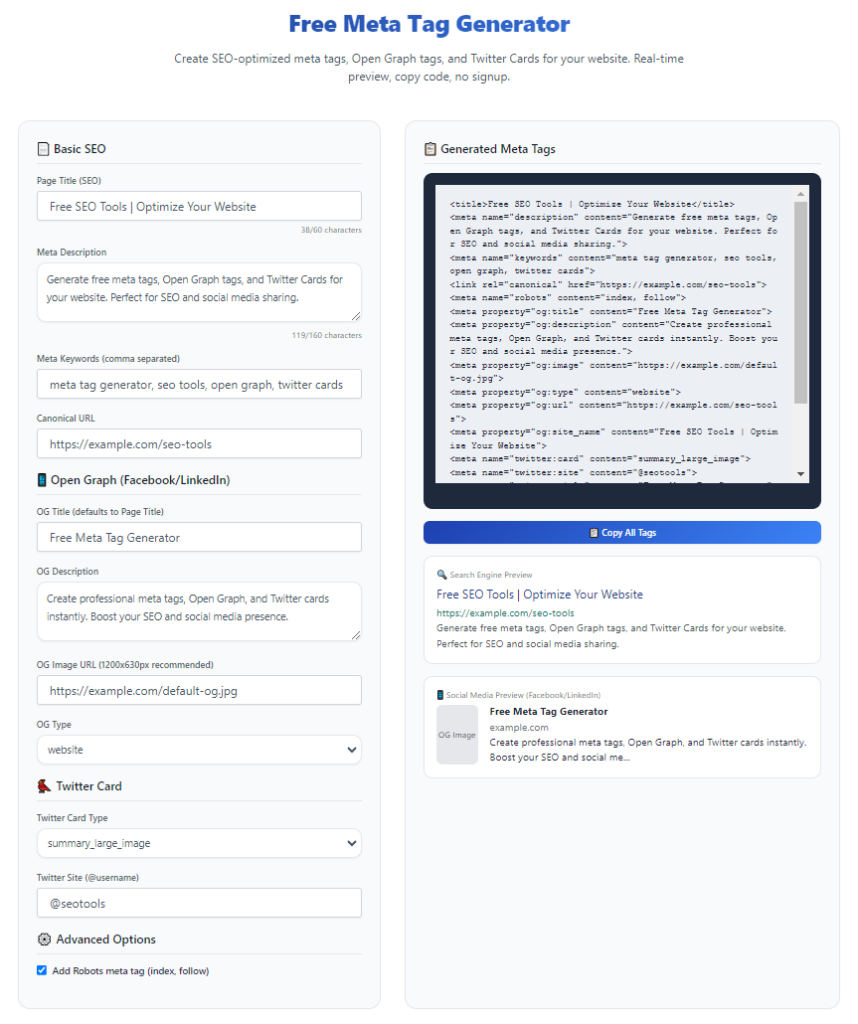
Insert page title, custom social description and featured image URL into corresponding input boxes on the tool’s form layout.
Split title and description copy if you plan to use different preview wording for Open Graph versus Twitter Card displays.
Step 4: Pick Proper Card and OG Content Types
Select your target Twitter Card variant and matching Open Graph content type based on your page’s actual content classification.
Stick with standard website or article types for regular blog content and product markup for e-commerce listing pages.
Step 5: Generate Finished HTML Meta Code
Trigger the generate button so the tool assembles all settings into fully formatted, error-free Open Graph and Twitter Card meta markup.
Scan the output code briefly to ensure all filled-in details appear correctly within the generated tag blocks.
Step 6: Copy & Embed Code Into Your Website Header
Copy all generated meta lines entirely, then paste this markup inside your site’s header template or corresponding page meta settings area.
Save your site edits and test link previews by sharing your live page URL on social platforms to verify final display effects.
Common Social Meta Tag Mistakes To Avoid
Even experienced site owners make avoidable markup mistakes that ruin social preview quality and organic sharing performance.
Rely fully on handwritten Open Graph and Twitter markup
Manual coding creates unseen syntax errors consistently. Always use the best meta tag generator for Open Graph and Twitter Card for reliable clean markup.
Using mismatched preview image dimensions
Images outside official size limits get cropped or hidden on feeds. Follow tool prompts to match required pixel specifications strictly.
Using identical text for all social preview fields blindly
Identical titles across OG and Twitter limits customization. Separate wording lets you optimize previews for each platform’s unique feed layout.
Forgetting to select correct Twitter Card format
Wrong card selection leads to small text-only previews instead of large visual layouts, hurting click attraction from social users.
Adding broken or dead image source URLs
Invalid image links result in blank preview boxes, lowering user curiosity and overall share click-through percentages.
Expert Optimization Tips For Social Meta Markup
Use these proven optimization tactics while working with the best meta tag generator for Open Graph and Twitter Card to maximize social traffic gains long term.
- Always leverage the best meta tag generator for Open Graph and Twitter Card to build bug-free social markup and skip tedious manual coding work.
- Craft unique title and description copy for Open Graph and Twitter to fit each platform’s feed reading habits separately.
- Follow recommended preview image dimensions suggested inside your generator to keep visuals fully visible in social previews.
- Pick appropriate card and OG content types matching your page content for consistent platform preview rules compliance.
- Test preview output after embedding new meta code to catch display flaws before organic shares start rolling in.
- Refresh social meta tags when you replace featured page images or update core page title and description content.
Final Thoughts
Well-structured Open Graph and Twitter Card meta tags stand as low-cost, high-return optimization for organic social traffic growth.
Manual markup drafting brings frequent coding errors and wasted hours, while the best meta tag generator for Open Graph and Twitter Card resolves all these hurdles efficiently.
Whether you manage personal blogs, commercial online stores or brand marketing landing pages, optimized social previews lift organic referral clicks steadily over time.
By following the complete setup guide listed above, you can generate fully compliant social meta markup quickly and maintain consistent, eye-catching feed previews for every published website page.
After learning the operation method, click the link below to enter the tool page for immediate use.