WordPress powers most modern content websites, from personal blogs and niche portfolios to large business and e-commerce stores. Every page, post, and product entry relies on a well-structured URL slug for proper search engine recognition.
Most WordPress users rely on auto-generated slugs from their CMS. These default slugs often include extra words, stop words, inconsistent casing, and messy formatting that hurt long-term SEO performance.
Manual slug editing in WordPress is time-consuming and prone to human error. Beginners often leave broken characters, duplicate slugs, or overly long URLs that weaken crawlability and ranking potential.
The best slug generator for WordPress eliminates these common issues. It produces perfectly formatted, WordPress-compatible slugs tailored for SEO, saving time and stabilizing search rankings.
This comprehensive tutorial explains why default WordPress slugs fail SEO standards, key benefits of the best slug generator for WordPress, essential tool features, real-world use cases, and a step-by-step workflow for flawless URL optimization.
Why Default WordPress Slugs Hurt SEO Performance
WordPress auto-generates slugs to save users time, but these automated outputs rarely meet professional SEO standards for clean site architecture.
Includes unnecessary stop words
Default slugs keep filler words like “the”, “and”, “or”, and “a”. These redundant terms bloat URLs and dilute core keyword focus for search engines.
Carries special character errors
Titles with commas, parentheses, accents, and symbols convert poorly in WordPress. Broken characters create messy, unreadable slugs.
Creates inconsistent URL lengths
Auto-generated slugs often stretch too long. Overly extended URLs lose ranking power and look spammy to search engine algorithms.
Risk of duplicate slug conflicts
WordPress appends random numbers to duplicate slugs automatically. This creates disjointed URL structures and weakens site-wide SEO consistency.
No targeted keyword optimization
Default slugs mirror full titles without strategic trimming. They fail to prioritize core target keywords needed for higher search placement.
Key Benefits of the Best Slug Generator for WordPress
A specialized best slug generator for WordPress is built exclusively for WP site architecture and SEO best practices, outperforming generic text-to-slug tools.
WordPress-native compatible formatting
Every generated slug follows strict WordPress URL rules. Outputs integrate seamlessly with WP permalinks without broken links or formatting conflicts.
Strategic stop word removal
The tool automatically cuts unnecessary filler terms. Final slugs stay tight, keyword-focused, and aligned with modern search engine preferences.
Eliminates duplicate slug issues
Users create unique custom slugs for every page. This prevents auto-numbered duplicates and maintains clean site URL architecture.
Consistent lowercase standardization
The best slug generator for WordPress enforces full lowercase formatting. Uniform URLs eliminate duplicate content penalties from mixed-case indexing.
Speeds up content publishing workflows
Bulk and instant generation cuts manual editing time. Bloggers, marketers, and developers optimize dozens of WP pages in minutes.
Improves crawlability and indexation
Clean, short slugs help search bots parse page topics faster. Better crawl efficiency leads to faster indexing and more stable rankings.
Must-Have Features of the Best Slug Generator for WordPress
Top-tier tools labeled as the best slug generator for WordPress include WordPress-specific features generic tools cannot match.
WP-compliant hyphen spacing
The tool replaces all spaces with standard hyphens, matching WordPress permalink structure perfectly. No underscores or broken spacing appears in final outputs.
Intelligent filler word trimming
Advanced filtering removes non-essential stop words while preserving core keywords. This balances brevity and topic relevance for SEO.
Special character sanitization
All symbols, punctuation, and incompatible characters get stripped automatically. Final slugs remain clean, valid, and error-free for WP databases.
Custom keyword prioritization
Users adjust slug length and focus terms easily. The tool lets users highlight primary keywords for targeted on-page SEO alignment.
Bulk slug generation support
Paste multiple post titles to generate batches of WP-ready slugs. This is ideal for site audits, content overhauls, and bulk publishing.
One-click copy integration
Finished slugs copy instantly for direct pasting into WordPress post editors, custom fields, and SEO plugin settings.
Lightweight no-bloat performance
The tool runs fast on all devices. It delivers instant results without slow load times or complicated setup steps.
Top WordPress Use Cases for Optimized Slug Generation
The best slug generator for WordPress supports every content type and optimization task on standard WordPress websites.
Blog post and article SEO tuning
Bloggers refine post slugs to target specific keywords. Optimized URLs improve topical clarity and help articles rank for focused search terms.
E-commerce product page optimization
Online store owners create clean product slugs. Short, keyword-rich URLs boost product page crawl rates and shopping search visibility.
Static website page standardization
Home, about, contact, and service pages require consistent slug formatting. The tool unifies site-wide URL structures for professional architecture.
Category and tag URL cleanup
Messy category slugs harm site taxonomy. Users generate simplified category and tag slugs to improve site navigation and SEO structure.
Content migration and site redesigns
During site migrations, consistent slug formatting prevents broken links. The tool standardizes old and new page URLs for smooth transitions.
Guest post and outreach content setup
Content creators build optimized slugs for guest posts on WP platforms. Clean URLs enhance post authority and long-term ranking stability.
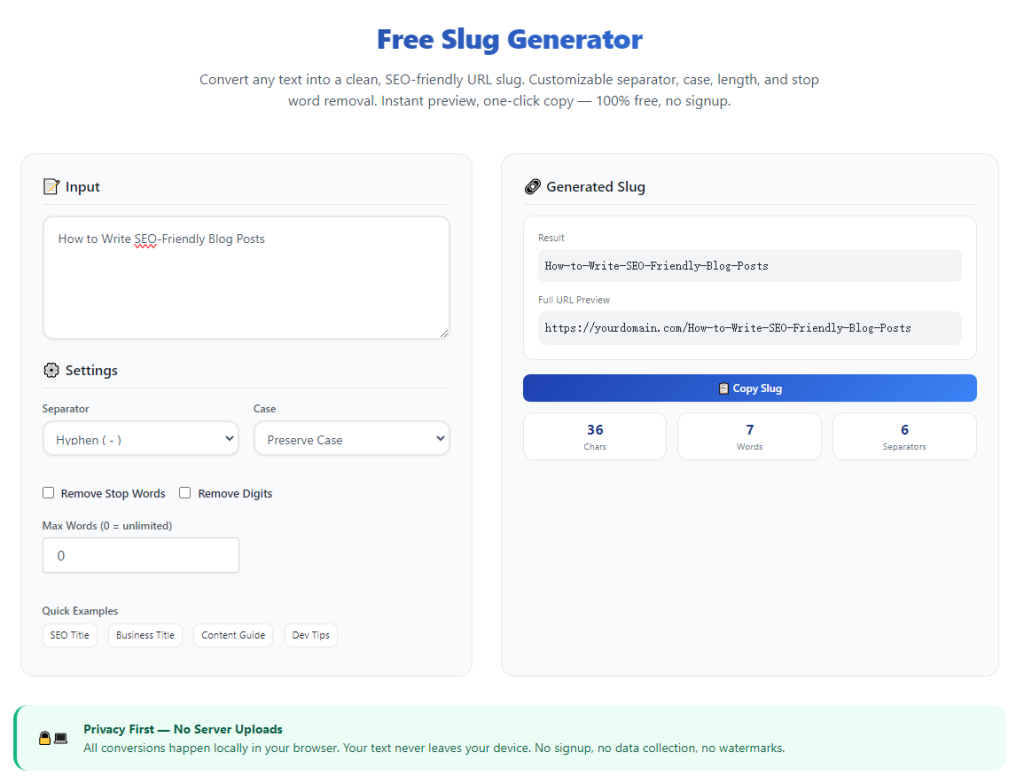
Step-by-Step Guide: Use the Best Slug Generator for WordPress
Follow this beginner-friendly workflow to create perfect, WordPress-ready slugs for every page and post.
Step 1: Prepare Your WordPress Page Titles
Gather your post titles, product names, or page headings. Keep your target core keyword visible for reference during slug customization.
Remove duplicate title drafts to ensure every new slug will be unique for your WordPress site.
Step 2: Open the WordPress-Focused Slug Tool
Launch the best slug generator for WordPress in your browser. Choose a tool built specifically for WP permalink standards instead of generic slug makers.
Confirm the tool offers stop word trimming and character sanitization for WordPress compatibility.
Step 3: Paste Your Raw Title Text
Input your full page or post title into the tool’s text field. Raw text with uppercase letters, spaces, and symbols works perfectly.
Use single entry mode for individual posts or bulk mode for multiple content pieces at once.
Step 4: Generate SEO-Optimized WP Slugs
Initiate the generation process. The tool automatically converts text to lowercase, replaces spaces with hyphens, and removes unnecessary characters.
It trims redundant stop words while preserving your core SEO keywords for maximum ranking value.
Step 5: Review and Customize Final Slugs
Check the finished slug for brevity and relevance. Confirm no special characters, double hyphens, or leftover filler words remain.
Tweak minor wording if needed to ensure full uniqueness against your existing WordPress page URLs.
Step 6: Copy and Apply to WordPress
Use the one-click copy function to save your optimized slug. Navigate to your WordPress post or page editor.
Replace the default WP slug with your new optimized version before publishing or updating the page.
Common WordPress Slug Mistakes to Avoid
Even site owners familiar with WordPress SEO make simple slug errors that weaken search performance.
Relying entirely on WordPress auto-slugs
Default WP slugs carry bloat and inconsistencies. Always use the best slug generator for WordPress to refine every URL before publishing.
Creating overly long URL slugs
Lengthy slugs dilute keyword focus. Search engines prioritize concise, purpose-driven URLs with clear topical intent.
Leaving special characters in URLs
Unfiltered symbols create broken slug structures. These errors hurt crawlability and can cause indexing failures.
Repeating slugs across pages
Duplicate slugs force WordPress to add numeric suffixes. This creates disjointed site architecture and confusing URL patterns.
Mixed case formatting errors
Random uppercase letters in slugs trigger duplicate content risks. Consistent lowercase formatting is mandatory for WP SEO stability.
Expert SEO Tips for WordPress Slug Optimization
Use these professional tactics to maximize results every time you use the best slug generator for WordPress.
- Always leverage the best slug generator for WordPress to produce clean, platform-compatible slugs aligned with official permalink standards.
- Prioritize one core target keyword per slug to keep URLs focused and search-engine friendly.
- Trim all unnecessary stop words and redundant phrases to maintain short, powerful slug structures.
- Standardize all site slugs with consistent lowercase hyphenated formatting to avoid duplicate content penalties.
- Generate unique slugs for every new post, page, and product to preserve clean WordPress site architecture.
- Use bulk generation features during content overhauls to speed up large-scale SEO cleanup projects.
Final Thoughts
URL slugs are foundational to WordPress technical SEO, yet most users overlook their long-term impact on rankings. Default auto-generated slugs create avoidable bloat, inconsistencies, and indexing issues.
A reliable best slug generator for WordPress resolves all these problems effortlessly. It delivers clean, keyword-focused, WP-compatible slugs with zero guesswork and zero manual errors.
Whether you run a personal blog, business website, or WooCommerce store, optimized slugs improve crawlability, indexation speed, and overall search authority.
By following this complete guide, you can consistently create professional WordPress slugs, standardize your site’s URL structure, and lock in stable long-term SEO rankings for all your content.
After learning the operation method, click the link below to enter the tool page for immediate use.