Working with fillable PDF forms, digital signatures, and layered graphics creates a common headache for regular users. Most online PDF flatten services stamp large watermarks across every exported file unless you buy a monthly subscription.
Many freelancers, small business admins, students, and remote workers refuse to pay recurring fees just to lock PDF content permanently. That’s why hunting for the best PDF flatten tool no watermark free becomes a top priority for anyone handling editable PDF documents daily.
Flattening a PDF merges all interactive layers—text boxes, checkboxes, signature fields, floating images—into static, uneditable page content. Once flattened, recipients cannot alter filled information, erase signatures, or edit form entries without advanced professional software.
Cheap online tools often ruin finished documents with semi-transparent brand watermarks covering critical text. Paid desktop PDF editors lock core flatten functions behind expensive premium tiers. This guide breaks down everything you need to know to pick and operate the best PDF flatten tool no watermark free, with actionable workflows, feature checklists, use cases, and avoidable errors.
What Makes Manual PDF Flattening Ineffective Without a Dedicated Free Tool
Trying to flatten PDFs using makeshift workarounds creates consistent quality and security issues that waste hours of editing work. Many users rely on browser print-to-PDF tricks or trial-only editors, which come with frustrating drawbacks.
Subjective, Inconsistent Flatten Results
Manual print-to-PDF hacks do not offer standardized flatten parameters. One file might retain hidden editable layers, while another loses image resolution entirely. Without the best PDF flatten tool no watermark free, you cannot guarantee uniform static output across dozens of form documents.
Mandatory Watermarks on All Exported Files
Nearly every random free PDF utility inserts branded watermarks on flattened outputs. Even basic flatten operations trigger watermark overlays that block contract signatures, form data, and official document text. A true best PDF flatten tool no watermark free eliminates this frustration entirely.
No Bulk Processing Support
Most manual flatten methods only handle one PDF at a time. If you manage client contracts, student forms, or employee paperwork in batches, single-file processing drastically slows your daily workflow. Top watermark-free flatten tools support bulk uploads for dozens of PDFs simultaneously.
Risk of Lost Layer Data or Image Quality
When you flatten PDFs through unoptimized browser print functions, high-resolution logos, scanned signatures, and colored charts often blur or disappear. Trusted free flatten tools preserve full visual clarity while merging interactive layers completely.
Missing Security Customization Options
Basic workaround flattening cannot add secondary protection like password locks after flattening. Premium free PDF flatten tools combine layer merging with lightweight security controls in one single operation.
Core Advantages of Choosing the Best PDF Flatten Tool No Watermark Free
Integrating a reliable free PDF flatten tool into your document workflow delivers tangible time, cost, and quality benefits for every type of user. These perks explain why thousands of creators and office workers prioritize watermark-free flatten software over limited trial editors.
Zero Permanent Watermarks on All Exported PDFs
The defining feature of the best PDF flatten tool no watermark free is clean, unmarked output files. No faded brand logos, text overlays, or banner stamps appear on any page after flattening, even with unlimited daily file processing.
100% Free Core Flatten Functionality
Top-tier watermark-free PDF flatten tools never gate basic flatten features behind paywalls, trial limits, or account sign-ups. You do not need to register an email, link payment details, or unlock premium tiers to merge PDF layers for free.
Consistent, Standardized Flattening Algorithms
Professional-grade flatten logic ensures all interactive components—dropdown menus, radio buttons, sticky notes, digital stamps—convert to static page content every single time. No hidden editable fields remain undetected after processing.
Massive Time Savings on Document Editing
Bulk upload, one-click flatten, and instant download cut down repetitive manual work drastically. Instead of flattening files one by one with clunky workarounds, you process entire folders of forms in under one minute with a free PDF flatten tool without watermarks.
Adjustable Resolution & Quality Presets
The best PDF flatten tool no watermark free includes customizable quality settings. You can select low-resolution small file sizes for email sharing or high-fidelity rendering for print-ready contracts, without sacrificing visual sharpness.
Cross-Device Compatibility
Leading free watermark-free PDF flatten tools work on Windows, Mac, Chromebooks, and mobile browsers. Many also offer lightweight offline desktop versions for users without stable internet connections.
Additional Built-In PDF Utilities
Most top flatten tools bundle complimentary editing tools alongside core flatten functions. You can compress PDFs, split pages, add password encryption, rotate sheets, or crop margins without switching to separate software.
Full Document Privacy Protection
Reputable free PDF flatten tools process files locally in your browser for online versions, or offline on your device for desktop apps. No document data uploads to external servers, eliminating risks of sensitive contract or personal information leaks.
Must-Have Features to Screen When Selecting a Free PDF Flatten Tool Without Watermarks
Not all online PDF flatten utilities deliver equal performance. When comparing options to find the best PDF flatten tool no watermark free, prioritize these blogger, admin, and freelancer-focused functional standards.
Complete Layer Flatten Coverage
The tool must fully flatten every interactive PDF element: fillable form fields, digital signature layers, floating annotations, transparent image overlays, and embedded video/audio markers. Avoid tools that only flatten text boxes while leaving signatures editable.
Unlimited File Upload Size & Daily Quotas
Low-quality free PDF flatten tools cap file size at 5MB or limit daily processing to two or three documents. The best PDF flatten tool no watermark free removes upload restrictions for standard office PDFs, supporting multi-page long-form contracts.
Bulk Batch Flatten Mode
Batch processing is non-negotiable for anyone handling regular document stacks. Look for drag-and-drop multi-file upload panels that flatten all selected PDFs in a single session, with individual download or combined ZIP export options.
Adjustable Output Quality Sliders
Separate presets for screen viewing, digital sharing, and commercial printing let users balance file size and visual clarity. The tool should retain vector text crispness while flattening raster graphics without pixelation.
Offline Desktop Software Version
Online-only tools rely on internet access, which creates delays for remote field workers or users with spotty connectivity. Premium watermark-free flatten providers offer downloadable offline executables for Windows and Mac with identical no-watermark rules.
Minimalist, Ad-Free User Interface
Cluttered pop-ups, banner ads, and forced upgrade prompts disrupt editing flow. The best PDF flatten tool no watermark free maintains a clean, distraction-free dashboard focused solely on file upload and flatten controls.
Supplementary PDF Security Tools
Integrated password protection, read-only lock settings, and redaction add-ons add extra value after flattening. After locking form layers statically, you can secure the finished PDF against unauthorized copying or printing.
No Mandatory Account Creation
Avoid tools that demand email registration or social media login before flattening files. True free watermark-free PDF flatten software lets users upload, process, and download documents instantly without collecting personal data.
Common Real-World Use Cases for a Watermark-Free Free PDF Flatten Tool
A versatile best PDF flatten tool no watermark free fits every industry, student, and personal document scenario. Below are the most frequent scenarios where flattening PDFs without watermarks becomes essential.
Freelance Client Contracts & Proposal Forms
Designers, writers, and marketing consultants send signed proposal PDFs to clients. Watermarks on flattened contracts appear unprofessional and untrustworthy. A free PDF flatten tool without watermarks delivers polished, client-ready static documents.
Small Business HR & Employee Paperwork
Onboarding forms, tax paperwork, and benefits enrollment documents require permanent flattening to prevent post-submission edits. HR teams process dozens of forms weekly, making bulk no-watermark flattening a critical daily workflow tool.
Student Academic Submission Forms
College admission worksheets, scholarship applications, and lab report fillable PDFs must stay unaltered after completion. Watermarked flattened files often get rejected by academic administration offices.
Real Estate Property Disclosure Documents
Agents share signed disclosure forms, lease agreements, and inspection reports with buyers and lenders. Flattening locks all signature and text data, while zero watermarks maintain formal industry document standards.
Legal Drafts & Non-Disclosure Agreements
Lawyers and paralegals cannot submit watermarked legal paperwork to courts or opposing parties. The best PDF flatten tool no watermark free produces clean, court-compliant static legal PDFs for filing and distribution.
Personal Tax & Financial Documentation
Tax worksheets, bank statement fillable forms, and investment disclosure sheets need flattening to protect sensitive financial entries. Watermarks covering dollar amounts create confusion during tax filing season.
Online Course & Tutorial Handouts
Educators create fillable worksheet PDFs for remote learners. Flattening prevents students from altering answer key fields, and watermark-free outputs look professional for classroom distribution.
Archived Old PDF Document Updates
Legacy fillable forms stored in company archives often require re-flattening for digital storage migration. Bulk flatten modes process hundreds of archived files without adding disruptive watermarks.
Step-by-Step Tutorial: Operate the Best PDF Flatten Tool No Watermark Free (Online Browser Version)
This simple repeatable workflow works for all top-rated free watermark-free PDF flatten tools, optimized for new and experienced users alike. Follow each step to produce clean, static PDFs without branded overlays.
Step 1: Save an Unedited Backup of Your Original PDF
Before flattening any document, duplicate and rename the editable source file. Once layers merge permanently, you cannot restore fillable fields, signatures, or annotations. Store the editable master copy in a separate folder for future revisions.
Step 2: Open the Free PDF Flatten Tool in Your Browser
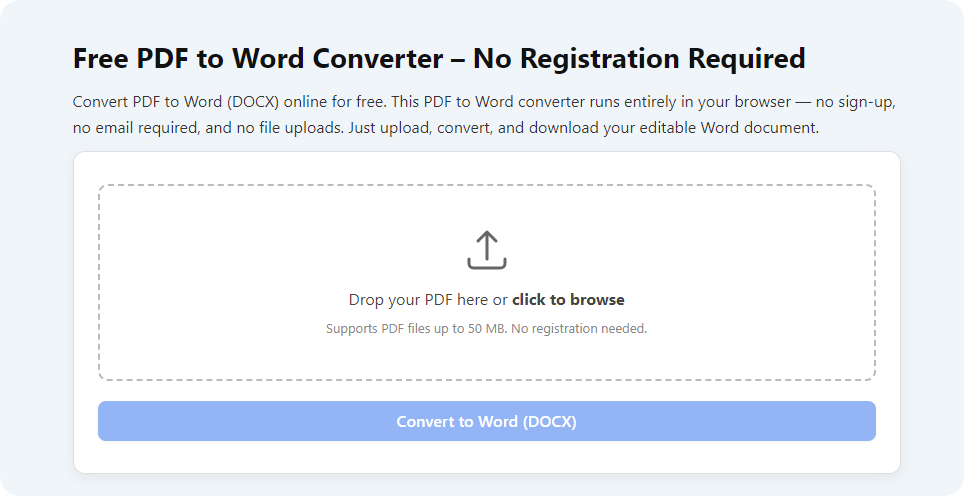
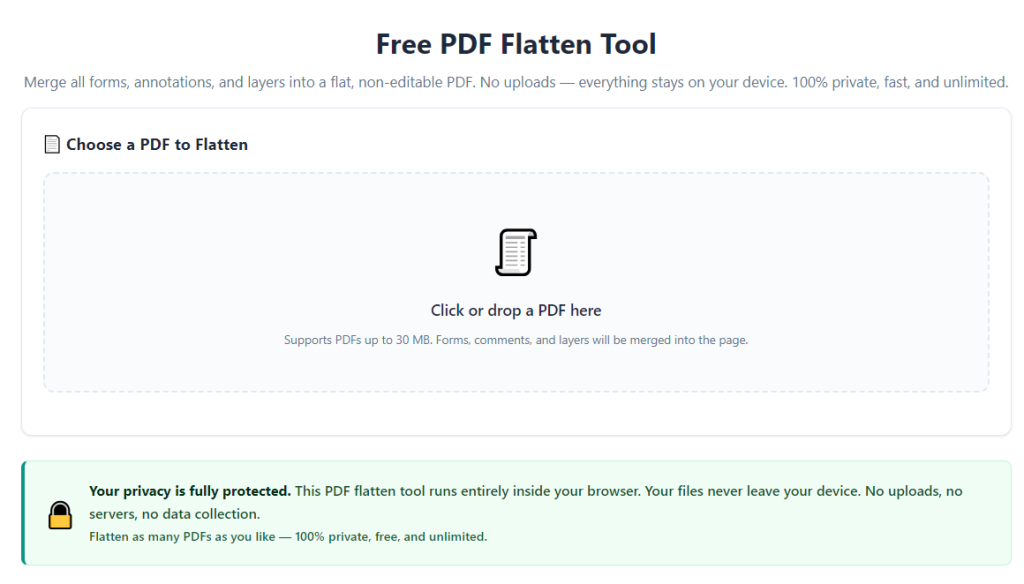
Launch the tool’s main page on Chrome, Edge, Safari, or Firefox. Locate the central file upload panel—top tier no-watermark flatten tools display a large drag-and-drop zone front and center, no hidden menus to navigate.
Step 3: Upload Single or Multiple PDF Files
Drag your target PDFs directly onto the upload box, or click “Select Files” to browse local device storage. You may upload cloud-stored documents from local folders; avoid third-party cloud link integrations if handling confidential data. Double-check all uploaded files to prevent flattening incorrect drafts.
Step 4: Adjust Flatten Output Quality Settings
Open the quality dropdown menu to pick your target resolution. Select “Standard Screen” for email sharing to reduce file size, or “High Print Quality” for physical printing and formal legal paperwork. Leave default layer flatten toggles enabled to merge all interactive elements fully.
Step 5: Activate Core Flatten Processing Function
Click the primary “Flatten PDF” button to start automated layer merging. Processing finishes within two to ten seconds depending on page count and image resolution. The tool never adds watermarks during this stage, guaranteed by no-premium core functionality rules.
Step 6: Preview the Flattened PDF for Errors
Once processing completes, use the built-in page previewer to scan every sheet. Verify all text boxes, checkmarks, and digital signatures converted to static content. Click anywhere on the page to confirm no hidden editable fields remain clickable.
Step 7: Apply Optional Secondary PDF Tools (If Needed)
If you require extra security, add a document open password, compress file size, or trim empty page margins using the free bundled utilities. All supplementary features also export without watermarks for fully finished documents.
Step 8: Download Your Clean, Watermark-Free Flattened PDF
Select individual file downloads or a combined ZIP archive for bulk processed documents. Save the flattened copy to your working folder with a clear label like “[Document Name]_Flattened_Final” to distinguish it from the editable backup file.
Step 9: Recheck Flattened File Before Sharing
Open the downloaded PDF in your default viewer for a final validation. Test form fields by clicking all previously interactive areas to confirm zero editable layers persist. Resend the file only after confirming no watermarks or layer glitches appear.
Step-by-Step Offline Desktop Version Workflow (No Internet Required)
For users needing offline access, the best PDF flatten tool no watermark free offers downloadable desktop software with identical zero-watermark rules. Follow this offline workflow for field or low-internet environments.
Step 1: Download & Install the Desktop Flatten Software
Grab the lightweight installer from the tool’s official page, run the setup file, and complete installation without mandatory account sign-ups. The desktop app does not require internet activation to unlock flatten functionality.
Step 2: Launch the Offline PDF Flatten Application
Open the desktop program; the main interface mirrors the online browser version with a dedicated file upload panel optimized for local storage access. All processing runs entirely on your device, no data sent to external servers.
Step 3: Import PDF Files From Local Folders
Use the file browser within the app to import single or batch PDFs stored on your hard drive. Drag-and-drop multi-file uploads work identically to the web tool for fast bulk processing.
Step 4: Configure Flatten Parameters Locally
Tweak resolution, page range limits, and security options using offline control sliders. The desktop tool supports advanced settings like selective page flattening for multi-section long documents.
Step 5: Run Local Flatten Processing
Click “Start Flatten” to trigger offline layer merging. Processing speed improves significantly on desktop software, especially for large multi-page PDFs with high-resolution images. No watermark overlays embed during local rendering.
Step 6: Export Flattened PDFs Directly to Local Storage
Choose a target save folder on your computer’s hard drive and export finished static PDFs. All exports remain completely watermark-free, with no hidden branding added to any page of the document.
Critical Mistakes to Avoid When Using a Free PDF Flatten Tool Without Watermarks
Even with access to the best PDF flatten tool no watermark free, common user errors compromise document quality, security, and professionalism. Watch for these frequent missteps during every flatten session.
Forgetting to Save an Editable Original Backup
The most costly error is flattening the only copy of a fillable PDF. Once layers merge, restoring editable fields demands recreating the entire document from scratch. Always duplicate the source file before running flatten operations.
Blindly Accepting Default Low-Quality Output Presets
Standard screen resolution settings shrink image clarity for print documents. Adjust quality sliders based on your end use case—print legal paperwork always requires high-fidelity flatten presets.
Uploading Confidential PDFs to Unverified Third-Party Tools
Only use trusted watermark-free flatten tools that process files locally on your device. Random unknown PDF websites may store uploaded documents on external servers, risking sensitive personal or business data exposure.
Overlooking Partial Flattening Glitches
Some tools fail to flatten sticky notes, digital stamps, or transparent image layers by default. Always preview every page post-processing to confirm all interactive assets converted to static content.
Using Online Flatten Tools Without Stable Internet
Unstable connections can interrupt processing mid-flatten, creating corrupted partial PDF files. For critical legal or financial documents, rely on the offline desktop version of the best PDF flatten tool no watermark free.
Rushing Bulk Batches Without Previewing Individual Files
When flattening dozens of PDFs in one batch, one corrupted source file can ruin the entire ZIP export. Spot-check a sample of processed documents before distributing all finished files to clients or teams.
Ignoring Post-Flatten Security Options
Flattening only locks edit layers; it does not block copying or printing automatically. Use the built-in free password protection tools to add an extra layer of document security after flattening completes.
Expert Pro Tips to Maximize Results From Your Free Watermark-Free PDF Flatten Tool
These practical strategies streamline your PDF flatten workflow and deliver consistently clean, professional static documents every time you use the best PDF flatten tool no watermark free.
- Bookmark the online tool or create a desktop shortcut for instant access whenever you finish filling out PDF forms.
- Set a standardized file naming template for flattened documents to separate final static files from editable working drafts.
- Process all weekly form batches in one scheduled session to avoid repetitive single-file flattening throughout your workday.
- Test new PDF templates through the flatten tool before mass distribution to catch layer rendering errors early.
- Share the free watermark-free flatten tool with your team to maintain uniform document formatting across all shared contracts and forms.
- Combine flattening with PDF compression for email-ready files; the dual workflow cuts down attachment load times without adding watermarks.
- Use selective page flattening for hybrid documents that only require locking specific signed sections, preserving editable content on remaining pages.
- Clear your browser cache regularly if using the online version to prevent slow upload speeds during bulk flatten batches.
- Store the offline desktop installer on an external drive for access on multiple work computers without repeated downloads.
- Cross-check flattened PDFs on both desktop and mobile viewers to confirm no hidden watermarks or layer artifacts appear on different screen sizes.
Final Thoughts
PDF flattening remains an essential step for anyone distributing fillable forms, signed contracts, and formal documents online. The frustration of watermark-covered outputs from paid trial tools or limited free utilities creates unnecessary friction for daily document workflows.
The best PDF flatten tool no watermark free eliminates every major pain point associated with locking PDF layers permanently. It delivers clean, unbranded static files, unlimited free core processing, bulk upload support, adjustable quality controls, and offline functionality for all user types—students, freelancers, small business staff, and legal professionals alike.
Manual print-to-PDF workarounds and premium paid editors cannot match the balance of cost, quality, and convenience offered by top watermark-free free PDF flatten software. By following the step-by-step online and offline tutorials, avoiding common flattening mistakes, and applying the expert optimization tips outlined above, you can produce consistent, professional flattened PDFs without subscriptions, hidden fees, or distracting watermarks on every page.
Whether you process a single student worksheet each week or hundreds of client contracts monthly, integrating a reliable free PDF flatten tool without watermarks streamlines your document pipeline and ensures every shared file looks polished, secure, and fully unalterable by third-party recipients.
After learning the operation method, click the link below to enter the tool page for immediate use.