Every professional who shares PDF documents knows the risk of accidental data exposure. Client IDs, social identifiers, financial figures, internal contact details, and private legal notes all sit unprotected inside standard PDF files.
Most people rely on simple black highlight boxes to hide private content, but this quick fix creates massive security flaws. Anyone with basic PDF editing skills can delete those colored overlays and recover every hidden word underneath.
This is where a reliable best PDF redact tool for permanent data removal becomes non-negotiable. Unlike temporary masking, proper redaction deletes target information at the source code level, with zero chance of recovery after you save the finished file.
This in-depth tutorial breaks down the dangers of makeshift PDF hiding methods, core advantages of dedicated redaction software, must-have security features, common real-world use cases, a full actionable workflow, critical mistakes to avoid, and pro tips to lock down sensitive data entirely.
Why Temporary PDF Masking Fails to Protect Confidential Information
If you’re still covering sensitive text with colored rectangles in basic PDF readers, you’re leaving your private data wide open to extraction. These quick edits only add a visual layer, they do not erase original content from the document’s backend code.
Overlays can be removed in one click
Basic black boxes, shape covers, and opaque highlights act like stickers on top of text. Any user with standard PDF editing access can select and delete those shapes instantly, revealing all confidential numbers and sentences beneath them.
Hidden text stays embedded in PDF metadata
Even if you hide text visually, the original data remains stored within the file’s hidden layers, metadata, and raw text streams. Search functions, copy-paste tools, and text extractors will still pull full unredacted information out of the file.
Scanned PDF images hold recoverable text data
For photo-based scanned PDFs, drawing shapes over typed text does nothing to block OCR layers built into the file. Optical character recognition software will read every covered word and export it into editable text documents.
No compliance with privacy regulations
Industries handling client, patient, or financial records must follow strict data protection standards. Temporary masking does not meet audit requirements for permanent data removal, which can lead to fines, legal disputes, or loss of client trust.
Manual masking wastes hours on repetitive rework
Every time you share a PDF draft, you have to re-apply all your temporary cover shapes. If you update one section of the document, your entire masking layout shifts and requires full re-editing from scratch.
Core Advantages of the Best PDF Redact Tool For Permanent Data Removal
Switching to purpose-built redaction software eliminates every weakness of basic masking tools. The top-tier best PDF redact tool for permanent data removal delivers irreversible data wiping paired with simple, fast workflows for personal and business users alike.
Full irreversible permanent data elimination
True redaction rewrites the PDF’s internal coding to completely delete selected text, images, and numbers. Once you apply and save redaction marks, the original sensitive content no longer exists anywhere in the file—there is no tool, hack, or editing trick that can restore it.
Built-in compliance for global privacy standards
Top redaction platforms are engineered to align with data protection rules for healthcare, legal, finance, and corporate teams. Every permanent data removal action creates a verifiable audit trail proving sensitive information was fully erased for official compliance checks.
Batch redaction for multi-page and multi-file workflows
Instead of editing one paragraph at a time, premium tools let you select identical sensitive phrases across dozens of PDF pages or separate documents. You can wipe matching names, account numbers, or addresses in one bulk operation without repetitive manual selection.
Dual redaction modes for text and embedded images
Confidential data doesn’t only live in typed paragraphs. Many PDFs contain scanned ID photos, signature blocks, handwritten notes, and embedded spreadsheets with private values. A robust PDF redactor permanently erases content from both text layers and image objects inside files.
Zero residual hidden metadata after export
Standard PDF editors leave behind hidden author notes, copy history, tracked changes, and embedded source text. The best PDF redact tool for permanent data removal scrubs all leftover metadata simultaneously when you finalize redacted files, closing every potential data leak point.
User-friendly interface for non-technical staff
You don’t need advanced IT training to operate professional redaction software. The core workflow uses simple drag-and-drop selection, preset redaction color themes, and one-click apply functions that new team members can master within minutes.
Preserves document formatting and readability
Permanent data removal does not break paragraph spacing, table layouts, heading structures, or page margins. The tool replaces erased content with uniform redaction blocks that keep your PDF’s original layout intact for clean, professional distribution to partners or clients.
Must-Have Features When Selecting the Best PDF Redact Tool For Permanent Data Removal
Not all PDF editing software includes legitimate permanent redaction functions. Many cheap or free lightweight tools only offer temporary masking features disguised as redaction. Prioritize these security-focused capabilities when choosing your software.
Hard-coded permanent redaction engine
Verify the tool uses full content deletion instead of overlay layers. Trusted platforms include a clear “Apply Permanent Redaction” button that creates a new saved file with no trace of original sensitive data left in the backend code.
Custom search-and-redact automation
This time-saving feature lets you input specific keywords, number patterns, email formats, or phone number templates. The tool scans every page of your PDF and automatically flags matching content for one-click permanent removal.
Audit log generation for compliance records
Every redaction action gets timestamped and logged with details of which user erased which content. You can export this audit report as a separate PDF or CSV file to submit during internal or third-party compliance audits.
Scanned PDF OCR redaction support
For image-only scanned documents, the tool must run optical character recognition first to detect hidden text inside photos, then permanently erase those OCR text layers alongside the visual image blocks.
Redaction preview panel before final save
A dedicated preview window lets you scroll through every marked section to confirm no necessary non-confidential content gets accidentally deleted. You can unselect mislabeled text before locking in permanent data removal.
Multi-format export after redaction
Once sensitive data is wiped, you can export the finalized file as standard PDF, print-ready PDF/A archive files, or flattened image-based PDFs for extra security when sharing externally.
Password lock for finished redacted documents
After completing permanent redaction, add user or owner password protection to block unauthorized editing, printing, or copying of the fully sanitized PDF file. This adds a second layer of protection post-redaction.
Common Real-World Use Cases for a PDF Redaction Tool With Permanent Data Removal
The best PDF redact tool for permanent data removal fits nearly every industry that shares digital documents containing private, restricted, or regulated information. Below are the most frequent scenarios professionals rely on this software for.
Legal firm case file distribution
Lawyers regularly send case summaries, witness statements, and court filings to opposing counsel or public records databases. They must permanently remove client identifiers, private addresses, settlement figures, and minor party information before filing documents publicly. Temporary masking carries extreme malpractice risk here.
Healthcare medical record sharing
Clinics, hospitals, and insurance providers share patient documents for billing, specialist referrals, or insurance claims. All protected health information must undergo full permanent redaction to meet privacy regulations. This includes patient full names, birth dates, diagnostic codes, and social security numbers.
Corporate internal and external reporting
Business teams distribute quarterly financial reports, employee performance documents, vendor contracts, and merger drafts to outside investors or third-party auditors. Staff redact private salary data, confidential profit margins, employee contact information, and unreleased product details permanently before sending files out.
Real estate disclosure document sanitization
Agents share property inspection reports, title records, and loan paperwork with multiple parties during sales transactions. They erase previous owner personal data, bank account routing numbers, and confidential mortgage terms to avoid exposing sensitive financial details to buyers or contractors.
Government public records release
Administrative agencies process Freedom of Information requests that require releasing PDF public records. Staff use permanent redaction to wipe private citizen identifiers, law enforcement investigative details, and restricted internal communications before making documents accessible to the public.
Education student record sharing
Schools and universities send transcript PDFs, disciplinary files, and enrollment forms to transfer institutions or parents. All minor student personal data, special education labels, and family contact details receive full permanent redaction to comply with student privacy rules.
Freelance and small business client document delivery
Designers, accountants, consultants, and writers deliver project invoices, tax worksheets, and client strategy PDFs. They permanently remove past client names, confidential pricing tiers, and personal tax IDs when sharing sample work with potential new customers.
Step-by-Step Full Workflow: Use the Best PDF Redact Tool For Permanent Data Removal
Follow this structured, secure process to complete irreversible data wiping on any PDF file using professional redaction software. Every step prioritizes data safety and avoids accidental permanent loss of necessary document content.
Step 1: Duplicate your original unredacted PDF file first
Before opening your document inside the redaction tool, create a full separate copy saved to a secure local folder. Permanent redaction cannot be reversed after saving, so you need the untouched original version for internal record-keeping or future edits. Never run redaction on your sole master file.
Step 2: Launch the PDF redaction tool and upload your duplicate file
Open your chosen best PDF redact tool for permanent data removal, then select the upload or open file function. Import the copied PDF file you prepared in Step 1. Avoid uploading confidential documents to cloud-only tools that store unprocessed drafts on remote servers.
Step 3: Run automated search to flag all sensitive target content
Navigate to the search-and-redact feature in the tool’s main toolbar. Input all patterns you need to erase: full names, social number formats, bank account strings, email addresses, phone numbers, or custom confidential keywords. Start the document scan to auto-highlight every matching section across all pages.
Step 4: Manually add redaction marks for uncaught sensitive content
Scroll through each page of the PDF to spot private information the automated search missed, such as handwritten scanned text, embedded table figures, or unique client reference codes. Use the redact selection tool to draw blocks over every piece of data requiring permanent removal.
Step 5: Open the preview panel to audit all marked redaction zones
Activate the built-in preview mode to view the document exactly as it will appear after permanent data removal. Carefully check each redaction block to confirm you have not covered critical, non-confidential text needed for document readability. Deselect any incorrectly marked sections at this stage.
Step 6: Customize redaction visual styling (optional)
Adjust the fill color, border lines, and text labels on your redaction blocks for internal standards. Many teams use solid black blocks with “REDACTED” white text inside for official shared documents. This step only changes visual presentation and does not impact permanent data deletion functionality.
Step 7: Trigger permanent redaction application
Once your full audit preview passes review, locate and click the official “Apply Permanent Redaction” button. This critical action rewrites the entire PDF file structure to fully delete all selected text, images, and metadata from the document’s source coding. This step is irreversible.
Step 8: Save the new sanitized PDF as a separate file
Do not overwrite your original duplicate file. Select a new file name and a separate secure folder to export the fully redacted PDF. This keeps your unmodified backup copy intact while isolating the sanitized version ready for external sharing.
Step 9: Run a post-redaction security validation check
Use the tool’s built-in security scan feature to verify no residual hidden text or metadata remains inside the new file. The scan will confirm all targeted data has been permanently removed and no recoverable layers exist within the finalized PDF.
Step 10: Add password protection and export for distribution
Enable document password locks to restrict editing, copying, or printing of the redacted file. Select your preferred export format (standard PDF or flattened PDF/A archive) then save the final secure copy. You can now safely share the document with third parties without data leakage risk.
Common Costly Mistakes to Avoid While Using a PDF Redaction Tool
Even with access to the best PDF redact tool for permanent data removal, these frequent user errors can lead to accidental confidential data leaks or permanent loss of essential document content. Learn to recognize and prevent each issue below.
Confusing temporary overlay masking with permanent redaction
The most dangerous mistake is drawing black shapes over text and saving the file without clicking the “Apply Permanent Redaction” function. All hidden data remains recoverable until you complete the irreversible deletion process built into the tool.
Skipping the original file backup step
Users often edit their only master PDF directly, apply permanent redaction, and later realize they need the unredacted version for internal audits or follow-up work. Since permanent data removal cannot be undone, skipping the duplicate backup creates unrecoverable document loss.
Relying solely on automated search without manual page review
Auto-scan tools miss unique handwritten notes, custom reference codes, and irregular number formatting inside scanned PDFs. If you skip full manual page auditing, unmarked sensitive data will remain exposed in the finished document.
Sharing the pre-redaction draft file by accident
Many professionals store unprocessed PDF drafts and sanitized redacted files in the same folder. Accidentally attaching the unredacted original copy to emails or shared drives exposes all private information to unauthorized recipients.
Forgetting to scrub embedded metadata and hidden layers
Some users only redact visible page text but ignore embedded spreadsheets, comment notes, tracked changes, and hidden document layers. Residual metadata can still leak confidential details even after surface-level redaction.
Over-redacting non-confidential required content
Without using the preview audit panel, users often select large full-paragraph blocks that erase necessary context, legal language, or public reference data. Over-redaction renders documents unreadable and invalid for business or legal use.
Using low-tier free PDF editors that lack true redaction engines
Basic free online PDF tools advertise “redaction” features but only supply temporary overlay shapes. These platforms do not offer permanent data removal coding, leaving all covered content fully recoverable for anyone who opens the file.
Expert Pro Tips to Maximize Security From the Best PDF Redact Tool For Permanent Data Removal
Implement these practical strategies to streamline your redaction workflow, eliminate data breach risks, and maintain consistent sanitization standards across every PDF document your team shares externally.
- Create a standardized redaction checklist for your team listing all data types requiring permanent removal, so no sensitive detail gets overlooked during editing.
- Save all fully redacted PDF files to encrypted local storage folders, never store sanitized confidential documents on unprotected public cloud drives.
- Run monthly training refreshers for new team members to clarify the difference between temporary masking and official permanent redaction functions.
- Process all scanned PDF files through the tool’s OCR module first, to detect hidden text layers before applying any permanent data removal blocks.
- Export the built-in redaction audit log alongside every shared sanitized PDF to maintain complete compliance records for internal and external audits.
- Flatten all finished redacted PDFs into static image-based archives for high-risk documents sent to unknown third parties or public record databases.
- Avoid copying unredacted text from original PDF drafts into separate emails or chat threads before completing full permanent redaction of source files.
- Batch-process multiple related PDF documents in one session using identical search-and-redact templates to keep redaction standards uniform across your entire document library.
Final Thoughts
Unprotected sensitive data inside shared PDF files creates serious legal, financial, and reputational risk for every individual and business distributing digital documents. Quick visual masking solutions offer zero long-term data protection, as hidden text can easily be recovered from basic overlay edits.
A fully featured best PDF redact tool for permanent data removal solves this core security gap with irreversible source-code level data wiping, automated bulk processing, compliance audit tracking, and metadata scrubbing all within one streamlined platform.
From legal case files and healthcare patient records to corporate financial reports and public government disclosures, dedicated redaction software is the only reliable method to fully erase confidential information before external document distribution.
By following the step-by-step secure workflow, avoiding common redaction mistakes, and applying the expert security tips outlined in this guide, you can produce fully sanitized, leak-proof PDF documents every single time. This consistent standard of permanent data removal protects your private information, satisfies global privacy compliance rules, and eliminates the threat of costly accidental data exposure long-term.
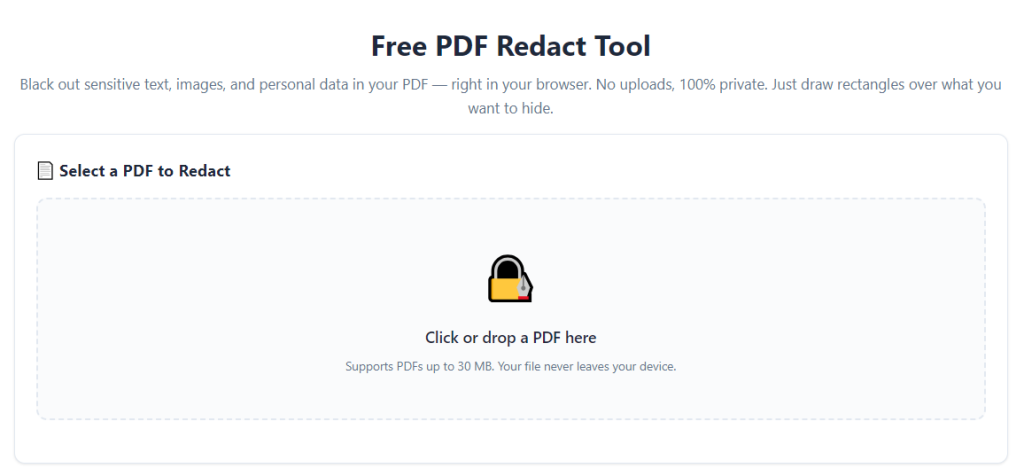
After learning the operation method, click the link below to enter the tool page for immediate use.