Text formatting quality defines how professional your documents look. Even well-written essays, reports, and blog posts lose credibility when filled with random extra spaces, duplicate gaps, and hidden whitespace characters. Most spacing errors come from copied content, imported files, or rushed manual editing sessions.
Fixing these issues by hand is incredibly inefficient. Scanning every line to delete double spaces, trailing blanks, and oversized paragraph gaps wastes hours of valuable time. It is also easy to miss hidden spacing errors that break standard formatting rules for academic and professional submissions.
Many premium editing tools lock advanced space cleaning behind paid subscriptions or mandatory account sign-ups. This makes quick formatting fixes unnecessarily complicated for casual users, students, and freelance writers. This is why finding and using the best tool to remove extra spaces online free is essential for consistent, clean text formatting.
This detailed beginner-friendly guide breaks down why extra spaces damage your content, what makes a tool the top choice for spacing cleanup, key tool features, real-world use cases, and a step-by-step workflow to master the best tool to remove extra spaces online free for flawless results every time.
How Unremoved Extra Spaces Ruin Your Content Quality
Extra spaces may seem like minor cosmetic issues, but they create tangible problems for all types of written content.
Breaks uniform document structure
Formal writing relies on consistent single spacing between words and standard paragraph breaks. Extra spaces create uneven alignment, choppy line spacing, and disjointed paragraph layouts that look unpolished and unprofessional.
Lowers overall readability
Readers naturally scan text in smooth, continuous blocks. Random blank gaps and oversized spaces disrupt visual flow, making your content harder to follow and less engaging to consume.
Triggers formatting rejection
Schools, businesses, and publishing platforms enforce strict formatting standards. Messy spacing often leads to assignment revisions, client content reworks, or automatic submission rejection.
Causes online publishing glitches
Content management systems and blog editors often misprocess hidden whitespace. These unremoved gaps create broken paragraphs, distorted text alignment, and inconsistent post layouts after publishing.
Creates inconsistent file formatting
Multiple hidden spaces add redundant invisible characters to text files. Over time, this bloats file size and creates inconsistent formatting when sharing documents across different devices and editors.
Why Manual Editing and Basic Tools Fall Short
Most users rely on manual deletion or basic word processor features to fix spacing issues. These methods cannot match the efficiency of the best tool to remove extra spaces online free.
Manual cleaning is slow and error-prone
Manually checking each line for double spaces, trailing gaps, and hidden whitespace takes massive effort. Even careful writers miss tiny invisible spaces that compromise final formatting.
Word processor fixes are limited
Basic find-and-replace features in standard editors only fix surface-level double spaces. They fail to detect tab spaces, multi-line gaps, and hidden whitespace characters common in copied web content.
Most advanced tools require payment or sign-ups
Professional text cleaning software hides full spacing correction features behind premium plans. Many also force account registration, creating unnecessary privacy risks for personal and confidential content.
Generic cleaners distort valid formatting
Low-quality free tools often over-clean text. They remove intentional line breaks and necessary spacing, ruining structured content like lists, headings, and formal paragraphs.
Key Qualities of the Best Tool to Remove Extra Spaces Online Free
Not all free online space cleaners deliver reliable results. The best tool to remove extra spaces online free includes these user-centric, professional-grade features that separate top tools from basic alternatives.
Comprehensive multi-layer space removal
Top tools eliminate every type of extra spacing, including double word spaces, leading and trailing line gaps, oversized paragraph breaks, and hidden invisible whitespace characters.
Smart formatting preservation
The tool cleans messy spacing without deleting intentional line breaks, structured paragraph divisions, and valid formatting. It only removes redundant gaps to keep your original content structure intact.
100% free full access
Premium free space removers unlock all core cleaning features with no trial limits, no paywalls, and no forced upgrades. Users get professional-level formatting for every text cleaning task.
No registration or login required
The best tools let users clean text anonymously. There is no need for email verification, account creation, or personal data input for unlimited usage.
Support for long-form text
High-quality tools process full essays, articles, reports, and large text blocks without truncation or partial cleaning errors, perfect for bulk document formatting.
Fast one-click processing
All spacing corrections complete in seconds. The streamlined interface eliminates complex settings, making professional formatting accessible for complete beginners.
Top Use Cases for the Best Tool to Remove Extra Spaces Online Free
The best tool to remove extra spaces online free fits nearly every personal, academic, and professional text editing scenario.
Academic assignment formatting
Students frequently copy research excerpts and web content for essays and papers. These copied texts are filled with messy extra spaces. The tool standardizes layout to meet strict academic formatting guidelines and avoid grade deductions.
Blog and content publishing
Content creators clean draft text before publishing. Uniform spacing ensures consistent visual layout across all articles, improving readability and overall content professionalism.
Business document polishing
Professionals format proposals, meeting notes, and official reports. Clean spacing creates neat, structured documents that build trust with clients and team members.
Resume and portfolio refinement
Job seekers fix uneven spacing in resumes and cover letters. Consistent formatting creates a polished, organized impression for hiring managers and recruiters.
Personal note and archive cleaning
Users tidy up copied study notes, web excerpts, and archived text files. Standardized spacing makes personal archives easier to read and navigate long-term.
Step-by-Step Guide: Use the Best Tool to Remove Extra Spaces Online Free
Follow this simple, foolproof workflow to achieve perfectly spaced, professional text every single time.
Step 1: Prepare Your Unformatted Text
Gather your draft content filled with inconsistent spacing. This includes copied web text, imported document content, or manually edited paragraphs with double gaps and trailing spaces.
You do not need to pre-edit any spacing errors, as the tool will handle all cleanup automatically.
Step 2: Launch the Top Free Space Removal Tool
Open the best tool to remove extra spaces online free. Confirm it offers full free access, no login requirements, and no hidden feature restrictions.
Step 3: Paste Your Full Text Content
Paste your entire unformatted text block into the tool’s input field. The tool supports both short text snippets and lengthy long-form documents with no usage limits.
Ensure full text pastes completely to guarantee uniform spacing correction across all paragraphs.
Step 4: Initiate Automatic Space Cleanup
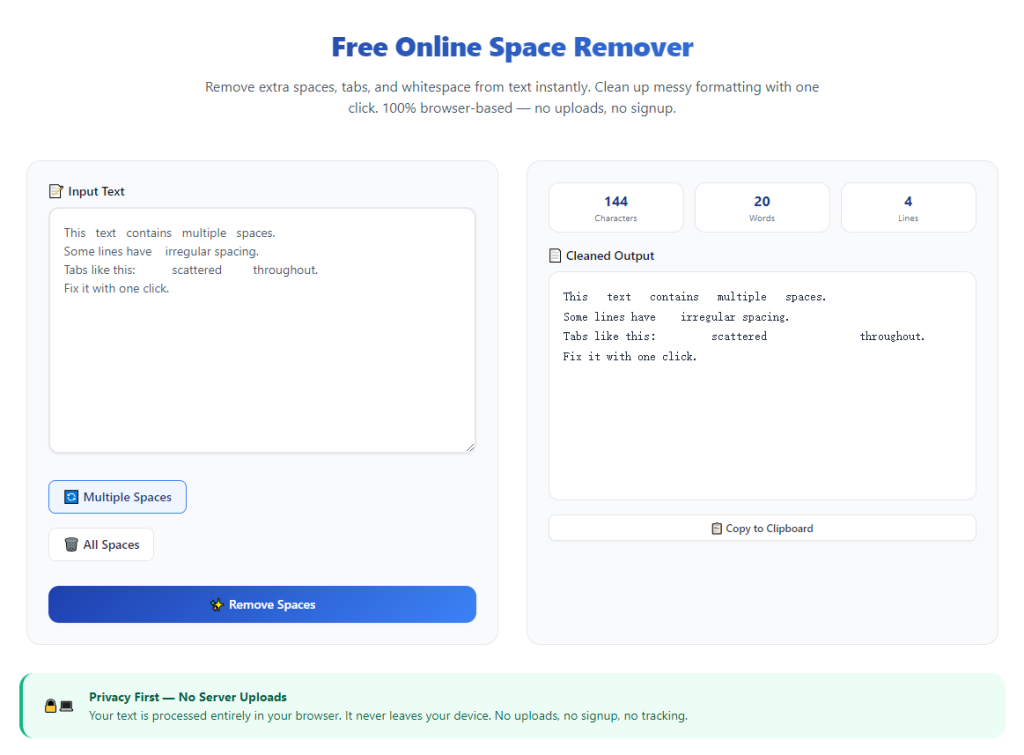
Click the clean or remove extra spaces button to start processing. The tool will instantly scan your text and eliminate all redundant double spaces, trailing gaps, hidden whitespace, and oversized paragraph breaks.
Your original wording, sentence structure, punctuation, and core content remain completely unchanged.
Step 5: Review Optimized Text Formatting
Check the cleaned text for consistent single spacing, balanced paragraph breaks, and aligned line formatting. Verify that all intentional line breaks and structured layout elements are preserved.
Confirm no valid formatting has been removed during the automatic cleaning process.
Step 6: Copy and Save Final Clean Text
Once you confirm perfect formatting, copy the polished text. Paste it back into your document editor, then save and export your finalized file for submission, publishing, or personal use.
Common Spacing Issues and Quick Fixes
Even with the best tool to remove extra spaces online free, rare minor layout adjustments may be needed for specialized content.
Over-compressed paragraph gaps
In some structured documents, automatic cleanup may shrink intentional paragraph spacing. Manually add single line breaks to restore balanced section separation.
Special character spacing shifts
Technical symbols, formulas, and unique formatting may experience minor spacing shifts. Complete a quick visual review to preserve specialized layout accuracy.
Uniform spacing too compact for formal templates
Strict academic or business templates require specific paragraph spacing. Adjust line spacing manually after tool cleanup to match official template standards.
Expert Tips for Flawless Free Online Space Removal
Use these professional tips to maximize speed, accuracy, and formatting quality with your chosen tool.
- Always clean text after final drafting to avoid reintroducing spacing errors during last-minute edits.
- Use the tool for all web-copied content, which almost always contains hidden extra whitespace and duplicate gaps.
- Clean full documents in one session to maintain consistent spacing across every paragraph and section.
- Avoid manual spacing edits before using the tool to save unnecessary time and effort.
- Prioritize no-sign-up free tools to keep personal, academic, and confidential business content private.
- Double-check formal documents post-cleanup to ensure full compliance with industry and academic formatting rules.
Final Thoughts
Extra spaces and messy whitespace are avoidable yet persistent formatting issues that undermine content professionalism. Manual cleanup is slow and unreliable, while most editing tools lock quality features behind payments or registrations.
The best tool to remove extra spaces online free solves all these problems effortlessly. It delivers fast, accurate, and comprehensive spacing correction with zero cost, zero sign-ups, and zero compromise on original text formatting.
Whether you are formatting student assignments, professional business documents, online content, or personal notes, this tool ensures your text maintains clean, uniform, and visually appealing spacing every time.
By following this complete step-by-step guide, you can eliminate messy spacing errors in seconds, streamline your editing workflow, and produce polished, professional documents for every personal and professional project.
After learning the operation method, click the link below to enter the tool page for immediate use.