PDF files are trusted across homes, schools and workplaces for their stable layout and universal compatibility. Whether you work with scanned forms, research papers, business reports or personal archives, PDFs keep text, images and formatting intact on any device. Even so, many users face a recurring problem: pages that load sideways or upside down no matter how many times they adjust the view.
Most basic PDF viewers only offer temporary rotation. You can tilt pages to read them comfortably while the file is open, but all changes disappear once you close and reopen the document. This repetitive fix wastes time and creates frustration, especially when you share or print the same file repeatedly. To solve this issue for good, you need a reliable way to adjust and lock page angles forever.
Many standard editing tools fall short here. Some require expensive subscriptions for permanent changes, while others distort original content during processing. Complicated desktop software also adds extra steps for a simple fix. This is why choosing the best tool to rotate PDF permanently makes all the difference for your daily document workflow.
This detailed guide breaks down everything you need to know about permanent PDF rotation. We will cover common pain points of temporary fixes, key features of top-rated tools, real-world use cases and a full step-by-step workflow to help you lock page orientation quickly and safely every time.
Why Temporary PDF Rotation Is Not Enough
Before you start using thebest tool to rotate PDF permanently, it is important to understand the limitations of temporary rotation and why permanent changes are necessary.
Changes reset after closing the file
Default viewers only adjust how pages display on your screen. They do not rewrite the actual file data. As soon as you close the PDF and open it again, pages revert back to their original wrong orientation. You have to repeat the rotation every single time you access the document.
Issues when sharing files with others
If you send a PDF with misaligned pages, other users will see the same sideways or inverted content. Your temporary view settings do not carry over to other devices or accounts. This creates a messy experience for colleagues, classmates and clients who receive your files.
Poor results during printing
Temporary screen rotation does not change how the file prints. Even if pages look correct on your display, they will still print at the wrong angle. You end up with cut-off content and wasted paper, forcing you to reprint multiple times.
Inefficiency for regular document use
For files you open daily or weekly, repeating rotation steps becomes a tedious routine. Small repeated tasks add up and slow down your overall productivity over time.
All of these drawbacks prove that temporary solutions are only quick band-aids. Investing in the best tool to rotate PDF permanently eliminates these recurring issues for good.
Common Flaws of Regular PDF Rotation Tools
Not every tool that claims to adjust PDF pages can deliver true permanent rotation. Many options on the market carry noticeable flaws that hurt your user experience and document quality.
Locked permanent features behind paywalls
A large number of PDF editors let you rotate pages for preview, but charge fees to save permanent changes. Casual users who only need occasional rotation are forced to pay for full memberships they will rarely use.
Format and content distortion
Low-quality tools rewrite file code poorly while rotating pages. They shift text positions, blur images, break tables or alter margins. You fix the orientation but end up with a damaged document that needs extra repair work.
Bulky software and complex menus
Full desktop PDF suites require large downloads, regular updates and steep learning curves. Hunting for permanent rotation settings among dozens of advanced features turns a simple task into a long process.
Limited page selection options
Some basic tools only let you rotate the entire document. If just a few pages are misaligned, you cannot target single pages without rotating the whole file, creating new orientation errors.
When you pick the best tool to rotate PDF permanently, you avoid all these problems. Top-tier tools focus on stable, clean and targeted permanent rotation with no hidden downsides.
Key Features of the Best Tool to Rotate PDF Permanently
A truly dependable best tool to rotate PDF permanently comes with a set of core features designed for reliability, ease of use and high-quality output. These functions separate premium tools from basic alternatives.
Genuine permanent page locking
The top feature is true permanent rotation. The tool edits the original file structure, so orientation stays locked no matter how many times you open, close, share or print the PDF. Changes never revert unexpectedly.
Precise page selection
You can rotate single pages, select multiple pages or apply changes to the entire document. This flexibility lets you fix only the misaligned sections and keep correctly oriented pages untouched.
Full format preservation
Quality permanent rotation tools adjust angles without modifying any existing content. Fonts, images, tables, links and margins remain exactly as they were, so your document suffers zero quality loss.
Simple, user-friendly interface
Clear buttons and straightforward controls mean beginners can start rotating pages right away. There are no confusing menus or hidden settings to navigate.
Multiple rotation angles
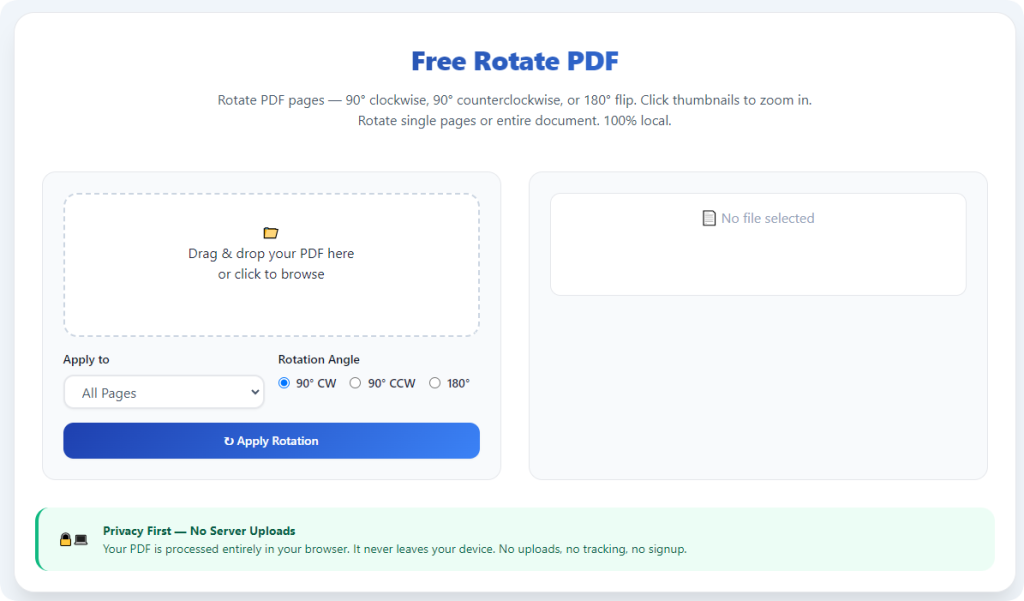
Standard 90-degree clockwise and counterclockwise options handle most sideways and upside-down pages. Reliable tools also support full 180-degree rotation for fully inverted content.
Fast processing speed
Even for large multi-page PDFs, the tool processes changes quickly. You do not have to wait long to generate and download your permanently fixed file.
Clean output with no extra markings
Trusted tools do not add watermarks, logos or text overlays to finished files. Your permanently rotated PDF stays professional and suitable for formal sharing and submission.
Top Use Cases for Permanent PDF Rotation
Using the best tool to rotate PDF permanently fits a wide range of daily scenarios for students, professionals and personal users. Here are the most common situations where permanent rotation delivers the most value.
Scanned documents and official forms
Scanned paperwork is the most frequent source of wrong page angles. Once you fix and lock the orientation, scanned contracts, applications and official records stay correct forever. This saves time every time you pull up these files for reference.
Academic papers and study materials
Downloaded lecture notes, research documents and compiled study guides often have alignment issues. Permanent rotation ensures files are easy to read during studying, note-taking and assignment submission, with no repeated adjustments.
Business reports and shared team files
When teams exchange reports, meeting minutes and project guides, permanently rotated PDFs guarantee everyone views properly aligned pages. There is no confusion or extra work for anyone who opens the shared document.
Print-ready files and booklets
If you plan to print PDFs in bulk or bind them into booklets, permanent rotation is essential. Locked orientation ensures every printout comes out neat, orderly and correctly positioned.
Long-term personal archives
For files you store and revisit for years, permanent rotation keeps your digital archive organized. You never need to fix page angles again when opening old scanned documents, notes or saved files.
Step-by-Step Guide: Use the Best Tool to Rotate PDF Permanently
Follow this simple workflow to use the best tool to rotate PDF permanently. Each step is intuitive, and you will create a fully locked, correctly oriented PDF in just minutes.
Step 1: Prepare Your Original PDF
Locate the PDF file on your device and open it to check page orientation. Note which pages need rotation. Always create a backup copy of the original file before making permanent edits.
Remove any damaged, blank or incomplete pages first to avoid errors during processing.
Step 2: Launch the Permanent PDF Rotation Tool
Open your preferred tool built to rotate PDF pages permanently. Choose a tool focused on stable, locked rotation to ensure your changes will not revert later.
Step 3: Upload Your PDF File
Upload the document using drag-and-drop or the standard file selection button. The tool will load your file quickly, regardless of total page count or standard file size.
If you have multiple files to fix, process them one at a time for precise control over each document.
Step 4: Select Pages and Adjust Orientation
Choose whether to rotate a single page, a group of pages or the entire document. Use the rotation controls to turn pages clockwise, counterclockwise or 180 degrees until all content sits correctly.
Take your time to adjust each misaligned section for the perfect view.
Step 5: Preview the Adjusted Document
Review the live preview thoroughly. Confirm all pages have the correct angle and no content is cut off or distorted. Double-check every page to avoid mistakes before saving permanent changes.
This step is critical because edits will be locked permanently after processing.
Step 6: Apply and Lock Permanent Rotation
Once you are fully satisfied with the preview, start the final processing step. The tool will rewrite the file data to lock the new page orientation permanently.
Do not close the window while the process runs to prevent file corruption.
Step 7: Download and Verify the Final File
Download the completed PDF to your device. Open and close it a few times to confirm rotation stays locked. You can now read, print, share or archive the file with full confidence.
Common Issues and Quick Solutions
Even when using a reliable tool to rotate PDF permanently, minor technical issues can appear. Use these fixes to keep your workflow smooth and error-free.
Rotation still reverts after download
This usually happens if you skip the final lock and process step. Always complete full file generation to apply permanent changes to the document code.
Content shifts or images distort
Stick to dedicated permanent rotation tools. Avoid multi-purpose editors that alter file structure unnecessarily, as they often damage original formatting.
Slow upload or processing
Large files or unstable internet can slow down tasks. Split very long PDFs into smaller parts and ensure a steady network connection before uploading.
Cannot select individual pages
Check the tool’s function settings. Some modes default to full-document rotation; switch to page selection mode to target specific misaligned pages.
Expert Tips for Perfect Permanent PDF Rotation
Use these professional tips every time you rotate PDF permanently to protect your files and get consistent high-quality results.
- Always keep the original backup file stored locally in case you need to revert changes later.
- Preview every page carefully before locking changes, since permanent edits cannot be undone easily.
- Use 90-degree rotation for standard sideways pages and 180-degree rotation for fully inverted content.
- Process large PDFs in smaller batches to prevent long wait times and potential processing failures.
- Avoid uploading highly confidential files to public tools to protect your private data.
- After downloading, test sharing and printing to confirm permanent rotation works across all use cases.
Final Thoughts
Temporary PDF rotation is only a short-term fix for misaligned pages. Repeating the same adjustments every time you open a file wastes time and creates unnecessary hassle for you and anyone you share documents with.
Choosing the best tool to rotate PDF permanently resolves orientation issues once and for all. Top tools deliver locked page angles, full format protection, simple controls and clean output, with no paywalls or complicated operations.
Whether you are fixing scanned forms, schoolwork, business documents or personal archives, permanent rotation streamlines your entire document routine. You will no longer deal with resetting page views or messy printouts.
Invest in a trusted permanent PDF rotation tool for all your alignment needs. It is a simple upgrade that boosts your daily productivity and keeps all your digital documents neat, stable and professional for years to come.
After learning the operation method, click the link below to enter the tool page for immediate use.