Transcription quality stands or falls on accuracy. Many casual speech-to-text tools generate messy, error-filled text that requires hours of manual correction. Misheard words, missing punctuation, misplaced terms, and unrecognized speech patterns ruin otherwise valuable audio content.
For professionals, students, researchers, and content creators, sloppy transcription is not just annoying. It creates misinformation, flawed meeting records, inaccurate research notes, and unpolished published content. Generic voice tools lack the advanced AI needed to process natural speech clearly and precisely.
This is why choosing the best speech to text for accurate transcription is critical for anyone relying on audio-to-text conversion. High-precision tools eliminate common transcription errors, adapt to different speech styles, and deliver clean, ready-to-use text with minimal editing required.
This in-depth professional guide breaks down why transcription accuracy matters, flaws of low-quality speech tools, key features of top accurate transcription platforms, real use cases, and a step-by-step workflow to achieve perfect, error-free transcripts every single time.
Why Transcription Accuracy Is Non-Negotiable
Many users overlook small transcription errors, but these tiny mistakes snowball into major issues for personal, academic, and professional content.
Prevents misinformation and data errors
Incorrectly transcribed terms can alter the original meaning of meetings, interviews, and research data. Accurate transcription preserves every spoken detail exactly as intended.
Saves massive post-editing time
Low-accuracy tools force users to rewrite entire paragraphs. Precise speech-to-text output cuts down revision work and speeds up content delivery significantly.
Ensures professional document quality
Business reports, legal notes, and academic research require flawless text. Accurate transcription maintains credibility and formal content standards.
Preserves speaker tone and context
Top accurate tools capture context, pauses, and sentence flow. They deliver transcripts that reflect the original conversation instead of disjointed, incorrect text fragments.
Common Errors From Low-Quality Speech to Text Tools
Generic transcription tools lack advanced linguistic algorithms, leading to recurring errors that compromise text quality.
Word substitution mistakes
Similar-sounding words often get swapped incorrectly. These subtle errors change sentence meaning and create confusing transcript content.
Missing punctuation and sentence breaks
Basic tools generate block text with no proper punctuation. Unstructured transcripts become difficult to read and analyze.
Failure to recognize accents and tones
Standard tools struggle with mild accents, fast speech, and natural conversational tones, resulting in incomplete or jumbled text.
Ignoring industry-specific terminology
Generic software mishears professional jargon, technical terms, and niche vocabulary, which ruins specialized transcription projects.
Random text duplication and gaps
Low-grade tools often repeat words or leave missing phrases. These inconsistencies make transcripts unreliable for official use.
Key Features of the Best Speech to Text for Accurate Transcription
The best speech to text for accurate transcription includes specialized precision features that separate professional tools from basic free alternatives.
Advanced AI contextual recognition
Premium transcription algorithms analyze full sentence context instead of single words. This eliminates word substitution errors and improves overall text coherence.
Natural punctuation automation
The tool intelligently inserts commas, periods, and paragraph breaks based on speech pauses. Output text comes structured and readable.
Accent and dialect adaptability
High-precision models recognize various speech speeds, mild accents, and conversational styles without sacrificing accuracy.
Industry vocabulary support
Top tools correctly identify technical, academic, and business terminology, ensuring specialized transcripts stay precise and error-free.
Noise reduction technology
Built-in audio filtering minimizes background interference. It delivers clean transcription even in moderately noisy environments.
Real-time error correction
The system adjusts text output dynamically as speech continues, fixing minor recognition issues instantly during live transcription.
Top Use Cases for High-Accuracy Transcription Tools
The best speech to text for accurate transcription serves high-stakes scenarios where precision is non-negotiable.
Business meeting transcription
Company discussions, client calls, and strategy sessions require perfect records. Accurate transcription captures action items, decisions, and key dialogue flawlessly.
Academic lecture and research transcription
Students and researchers convert lectures and field interviews into precise notes. Error-free text ensures accurate study material and research data.
Legal and official documentation
Formal statements and recorded proceedings demand zero errors. High-precision transcription maintains official document integrity.
Content script creation
Podcasts, videos, and voice drafts rely on accurate text conversion. Clean transcripts simplify editing, captioning, and content publishing.
Medical and technical note conversion
Specialized terminology is captured correctly, ensuring professional notes remain precise and usable for future reference.
Step-by-Step Guide: Use the Best Speech to Text for Accurate Transcription
Follow this professional workflow to consistently generate flawless, high-precision transcripts with minimal editing.
Step 1: Optimize Your Audio Environment
Start by minimizing background noise. Choose a quiet space and ensure your microphone has clear input volume. Clean audio is the foundation of accurate transcription.
Avoid echo and distant speaking distances to prevent muffled voice input.
Step 2: Choose a High-Precision Transcription Tool
Select thebest speech to text for accurate transcription designed for precision output. Prioritize tools with contextual AI and noise reduction features over basic generic platforms.
Step 3: Configure Tool Settings
Set the correct language and enable punctuation automation features. If available, activate industry terminology mode for specialized content.
Adjust microphone sensitivity to match your speaking volume for balanced input quality.
Step 4: Begin Live or Pre-Recorded Transcription
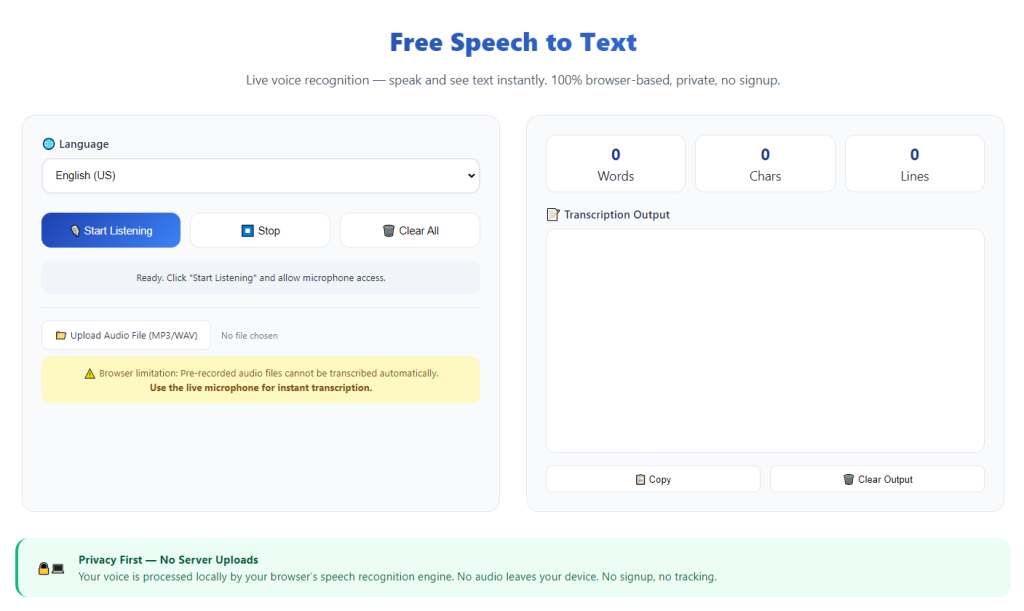
Start your live voice recording session or upload your pre-recorded audio file. Speak naturally at a steady pace with clear articulation.
Brief pauses between sentences help the tool generate accurate punctuation and clean paragraph breaks.
Step 5: Review Precision Output
Once transcription completes, scan the full text. High-accuracy tools will require only minor tweaks. Focus on verifying technical terms and proper nouns.
Check sentence structure and punctuation to confirm full readability and accuracy.
Step 6: Finalize and Export Transcript
After quick revisions, copy and save your polished transcript. Store the final text for documentation, publishing, research, or professional records.
Common Accuracy Mistakes to Avoid
Even premium tools deliver subpar results if users make these avoidable errors during transcription.
Speaking too quickly or unclearly
Rushed speech confuses AI context recognition. Consistent, clear speaking ensures maximum transcription precision.
Ignoring background noise
Ambient sound distorts voice input and creates random errors. Always prioritize quiet recording environments.
Using generic low-precision tools
Basic tools lack contextual AI, guaranteeing frequent errors. Precision-focused platforms are always worth choosing for important transcription tasks.
Skipping final light editing
Minor proper noun errors are common. A fast review eliminates tiny mistakes and perfects transcript quality.
Expert Tips to Maximize Transcription Accuracy
Use these professional tips to get studio-level precision from your transcription tool every time.
- Always rely on the best speech to text for accurate transcription for professional and academic projects to avoid critical errors.
- Speak in short, clear phrases to help AI recognize context and apply correct punctuation automatically.
- Remove background noise before transcription to boost overall text precision drastically.
- Verify specialized terminology post-transcription to preserve technical content accuracy.
- Use live transcription mode for real-time notes to capture speech flow and natural context.
- Avoid overcrowding audio with multiple overlapping voices to keep transcript output clean and ordered.
Final Thoughts
Transcription accuracy defines the usability of every voice-to-text project. Low-quality speech tools create endless errors, waste editing time, and risk misinformation in important documents.
The best speech to text for accurate transcription solves these problems with advanced contextual AI, noise reduction, automatic punctuation, and industry terminology support. It transforms raw voice audio into clean, precise, professional-grade text with minimal manual correction.
Whether you are transcribing business meetings, academic lectures, research interviews, or creative scripts, a precision-focused transcription tool elevates your workflow and guarantees reliable results.
By following this complete guide, you can consistently produce highly accurate transcripts, cut down editing time, and maintain professional standards for all your audio-to-text conversion tasks.
After learning the operation method, click the link below to enter the tool page for immediate use.