Formatting titles and headlines correctly is one of the most critical details for academic work, online content, business documents and creative writing. Title case follows strict capitalization rules that set major words apart from short articles, prepositions and conjunctions. Even skilled writers struggle to apply these rules consistently across dozens of headlines, post titles and report headers.
Manually adjusting each word’s capitalization takes a great deal of time. When you work on long articles, marketing copy or research papers, fixing title case word by word leads to fatigue and careless mistakes. Inconsistent title formatting makes content look unprofessional, and many formal platforms will reject work that fails to meet standard capitalization standards.
Generic text converters often deliver flawed title case results. They over-capitalize small words, ignore style rules or create uneven formatting that requires extra editing. This is why finding and using the best text case converter for title case becomes essential for anyone who regularly creates titled content.
This in-depth guide breaks down everything you need to know. We explain what makes a tool stand out for title case work, the flaws of average converters, key features to look for, real use cases, and a complete step-by-step workflow to get perfect results from the best text case converter for title case every single day.
Why Proper Title Case Formatting Matters
Before you start using a dedicated converter, it is important to understand why title case cannot be overlooked in your writing projects. Many users treat headline capitalization as a minor detail, but it directly impacts readability and credibility.
Follows universal style standards
Most industries and educational institutions adopt widely recognized title case rules. Whether you follow common editorial guidelines for web content or formal rules for academic papers, uniform capitalization keeps your work compliant. Using the best text case converter for title case ensures you align with these standards automatically.
Boosts visual readability
Well-formatted titles guide readers’ eyes across the page. Proper title case creates clear visual hierarchy for blog headlines, presentation slides, document headers and section labels. Messy mixed casing makes headlines hard to scan and reduces overall content quality.
Builds professional credibility
Clients, teachers and audiences judge content based on small formatting details. A title with random uppercase and lowercase letters signals carelessness. Clean, rule-based title case shows attention to detail and elevates the overall impression of your work.
Saves time on repeated revisions
If you format titles manually, you will likely go back multiple times to fix errors. A reliable title case tool cuts out repeated revisions and lets you focus fully on writing instead of basic formatting tasks.
Common Problems With Regular Text Converters for Title Case
Not all text case tools handle title case properly. Most basic converters are built for simple uppercase and lowercase changes, and they fail when it comes to nuanced headline formatting. These issues explain why you need to seek out the best text case converter for title case instead of using random free tools.
Over-capitalizes short function words
The biggest issue with average converters is over-capitalization. Many tools capitalize every single word in a title, including short articles like a, an and the, plus short prepositions and conjunctions. This breaks standard title case rules and creates awkward-looking headlines.
Lacks style rule customization
Different projects require slight variations in title case rules. Some platforms allow capitalizing longer prepositions, while others keep all short connecting words lowercase. Basic tools offer no settings to adjust these rules, leaving you stuck with one rigid format.
Creates inconsistent results across long texts
When you convert multiple titles or large blocks of headline content, low-quality tools produce uneven formatting. Some lines follow rules correctly, while others show random casing errors. This forces you to manually correct every headline one by one.
No bulk conversion support
Many standard text converters only process small snippets at a time. If you have a list of blog titles, chapter headers or marketing headlines, you cannot format them all in one go. This slows down your workflow significantly.
Carries hidden formatting glitches
Copied text often includes extra spaces, special symbols or hidden code. Regular converters do not clean these elements during title case conversion, resulting in messy titles with misplaced capital letters and broken spacing.
Key Features of the Best Text Case Converter for Title Case
A truly reliable best text case converter for title case is designed specifically to solve the issues above. It combines accuracy, flexibility and ease of use to meet the needs of casual writers, students, content creators and business professionals. Below are the must-have features you should always look for.
Rule-compliant default title case
The top tools use industry-standard title case logic by default. They automatically capitalize nouns, verbs, adjectives, adverbs and pronouns, while keeping short articles, prepositions and conjunctions lowercase. This delivers correct results with no extra adjustments needed.
Customizable title case settings
Great converters let you tweak capitalization rules to match specific style guides. You can choose to capitalize all prepositions, keep conjunctions lowercase or apply special rules for academic writing. This flexibility makes the tool suitable for every type of project.
Bulk title conversion capability
You can paste an entire list of headlines, titles and headers in one single input. The tool formats every line accurately at once, which is perfect for content calendars, book chapters, presentation slides and document outlines.
Additional case modes for full workflow support
While your main focus is title case, the best converters also include sentence case, full uppercase and full lowercase. This means you do not need to switch between multiple tools for different formatting tasks within the same document.
Automatic cleanup for extra spaces and symbols
When you copy text from different sources, extra spaces and stray characters often tag along. Premium title case converters remove unnecessary spacing and irrelevant symbols during conversion, leaving only clean, ready-to-use titles.
No word limits or usage restrictions
Trusted tools allow unlimited text and unlimited conversions. You can format hundreds of titles every day without hitting paywalls, trial limits or forced upgrades. Core title case functionality stays completely accessible for regular users.
Simple, ad-free interface
Cluttered pages with pop-ups and ads slow down your work. The best text case converter for title case features a clean layout with only essential buttons and input fields. Navigation is intuitive even for users with no technical experience.
Cross-device accessibility
These tools run fully online, so you can format titles on desktops, laptops, tablets and mobile devices. There is no software to download, install or update, and you can access the tool anywhere with a basic internet connection.
Top Use Cases for the Best Text Case Converter for Title Case
Title case formatting is required across dozens of daily tasks. Understanding where to use the best text case converter for title case helps you integrate the tool into every part of your writing and editing workflow.
Blog and online content creation
Content writers and bloggers rely heavily on proper title case for post headlines, subheadings and meta titles. Uniform formatting improves page structure and creates a consistent brand style across all published content. Bulk conversion makes managing large content lists fast and simple.
Academic papers and school assignments
Essays, research papers, thesis documents and class presentations all use title case for chapter titles, section headers and figure labels. Following academic style rules is mandatory for grading, and a dedicated title case converter ensures full compliance.
Business reports and official documents
Corporate reports, proposals, memos and client presentations use formal title case for all main headings. Professional formatting reinforces brand image and ensures internal and external documents follow company style guidelines.
Marketing and social media content
Marketing teams format ad headlines, campaign titles and social media headers. Clean title case makes promotional text look polished and easy to read, whether used for print materials or online posts.
Books, e-books and creative manuscripts
Authors format chapter titles, section headings and artwork labels for books and digital publications. Consistent title case creates a smooth reading experience and meets publishing industry standards.
Resumes, portfolios and professional profiles
Job seekers use title case for resume section headers, portfolio titles and project labels. Neat, rule-based formatting makes professional documents stand out and appear organized to hiring managers.
Note-taking and personal file organization
Even for personal use, title case helps organize saved articles, document archives and note collections. Clear headline formatting lets you scan and locate files much faster than randomly styled text.
Step-by-Step Guide: Use the Best Text Case Converter for Title Case
Follow this simple, structured process to get flawless title case results every time. This workflow works for single headlines, long lists of titles and full document headers.
Step 1: Gather and prepare your title text
Collect all headlines, titles and headers you need to format. Remove obvious typos, broken words or incomplete phrases first. If you are working with a long list, keep each title on its own line for clean bulk conversion.
Raw text copied from other websites or files may carry extra spaces. Do a quick visual check to remove large gaps between words before moving forward. This small step prevents minor formatting issues later.
Step 2: Open your preferred title case converter
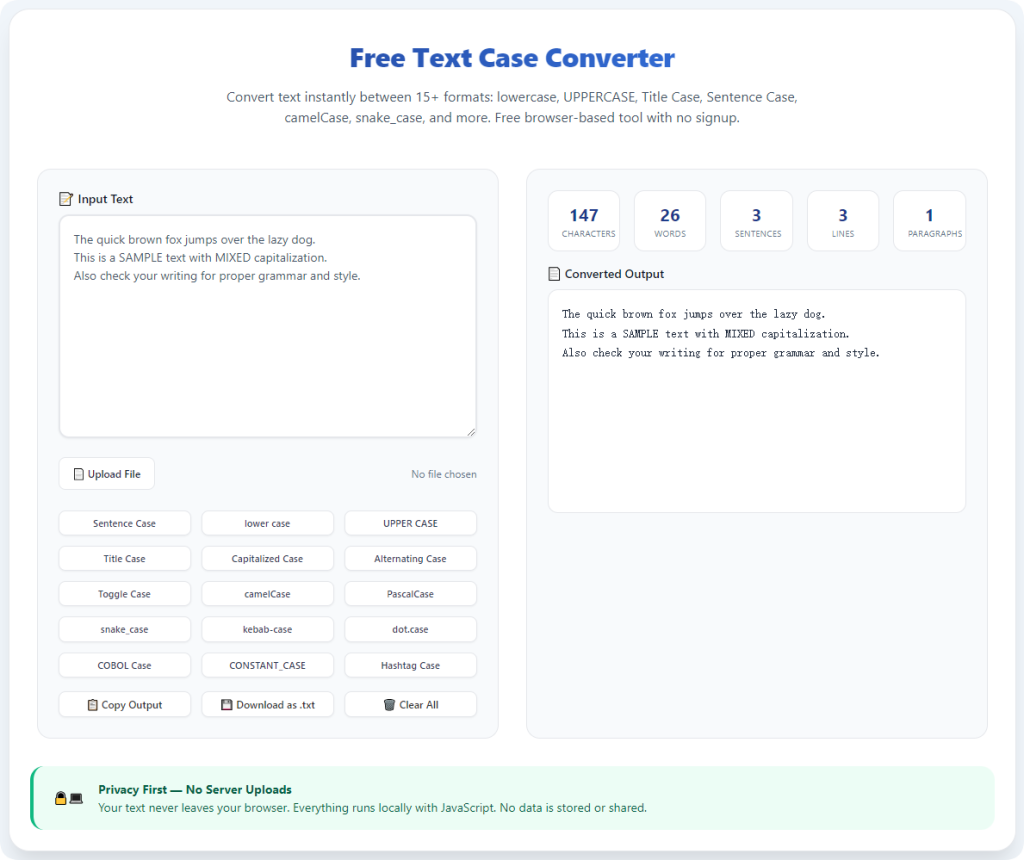
Launch the best text case converter for title case you have selected. Confirm that the main interface clearly labels the title case option and includes any custom rule settings you may need for your project.
Stay away from basic generic converters that do not specialize in headline formatting. Tools built for general text changes will not deliver the accurate title case results you require.
Step 3: Paste all text into the input area
Paste your prepared titles directly into the main text box. You can add a single short headline or a long list of dozens of titles all at once. Reliable tools handle large volumes of text without truncation or slowdowns.
Double-check to make sure every title has pasted completely. Missing lines or partial text will create gaps in your finished formatted content.
Step 4: Select title case mode and adjust rules (if needed)
Locate and select the Title Case option from the conversion menu. If your project follows a specific style guide, open the advanced settings to tweak capitalization rules.
For example, you can choose to capitalize all prepositions longer than four letters, or keep all conjunctions lowercase. Match these settings to your school, company or publishing requirements.
Step 5: Run the conversion process
Click the convert button to start formatting. The tool will process every line instantly, applying standard or customized title case rules across all your text. You will see fully reformatted titles appear in the output section within seconds.
Do not close the page or refresh the window mid-conversion, even for very long lists of titles. The process only takes a moment for most standard text lengths.
Step 6: Review formatted titles for accuracy
Go through the output to check overall capitalization. Verify that major words are capitalized and short function words remain lowercase as expected.
Pay extra attention to proper nouns, brand names, unique product titles and technical terms. Automated tools follow general rules, so rare custom terms may need a quick manual adjustment.
Step 7: Copy and save your finished titles
Once you confirm all formatting is correct, copy the fully converted text. Paste the titles into your document, content editor, presentation or file storage. Save your work to lock in the clean title case formatting permanently.
If you need to reuse the same list later, keep a copy of the formatted text for quick access in future projects.
Common Title Case Conversion Issues & Quick Solutions
Even when using the best text case converter for title case, minor issues can occasionally appear. Use these simple fixes to resolve problems and keep your formatting perfect.
Short words are incorrectly capitalized
If articles, prepositions or conjunctions show uppercase letters, open the tool’s style settings. Disable the option to capitalize all words, and revert to standard title case rules. This will immediately correct over-capitalization.
Proper nouns lose capitalization
Some converters treat unique names, locations and brands as regular words. Simply re-capitalize these specific terms manually after conversion. This is a quick fix for all specialized vocabulary.
Uneven line spacing after bulk conversion
Extra spaces between titles usually come from the original copied text. Use the tool’s built-in space cleanup feature, or remove extra line breaks manually before or after conversion.
Formatting does not match your style guide
Every organization has slight variations in title case rules. Explore the advanced settings of your converter to toggle different capitalization options until the output aligns with your required style.
Slow processing for extremely long title lists
If you are converting hundreds of titles at once, split the list into two or three smaller groups. Process each group separately to keep the tool running fast and stable.
Expert Tips for Better Title Case Conversion
Use these professional tips whenever you work with the best text case converter for title case to boost efficiency and maintain consistent high-quality formatting across all your work.
- Always finish writing your content first before formatting titles. Re-editing text after applying title case will force you to re-convert the headlines again.
- Set your preferred style rules once and save the settings if the tool allows. This ensures every future conversion follows the exact same guidelines.
- Use bulk conversion for all content lists, including blog calendars, presentation slides and document outlines, to save maximum time.
- Combine title case conversion with the tool’s other case modes for full-document formatting. Format headers in title case and body text in sentence case without switching tools.
- Do a quick final scan of all titles before submission or publication. A short review catches tiny errors that automated tools might miss.
- Avoid mixing manual case changes with converted text. Editing individual words after conversion often reintroduces inconsistent capitalization.
- Keep your go-to title case converter bookmarked for daily access. Quick access turns formatting into a seamless part of your regular workflow.
Final Thoughts
Title case is a small but powerful part of professional, academic and creative writing. Manual formatting is slow, tedious and full of human error, while low-quality text converters produce messy, rule-breaking headlines. Choosing the best text case converter for title case eliminates all these frustrations in one simple step.
A dedicated title case tool delivers accurate, rule-compliant capitalization, supports bulk work, offers customizable settings and works across all devices. It fits seamlessly into the workflows of students, content creators, business teams and independent writers alike. Every headline, header and title you create will look polished, consistent and fully aligned with standard formatting rules.
By following the step-by-step guide and expert tips in this article, you can master title case conversion completely. You will spend less time on repetitive formatting and dedicate more energy to the actual content of your work. For anyone who regularly writes titles and headlines, a reliable title case converter is an indispensable tool that elevates quality and productivity every single day.
After learning the operation method, click the link below to enter the tool page for immediate use.